99
General setup information
Additional Information
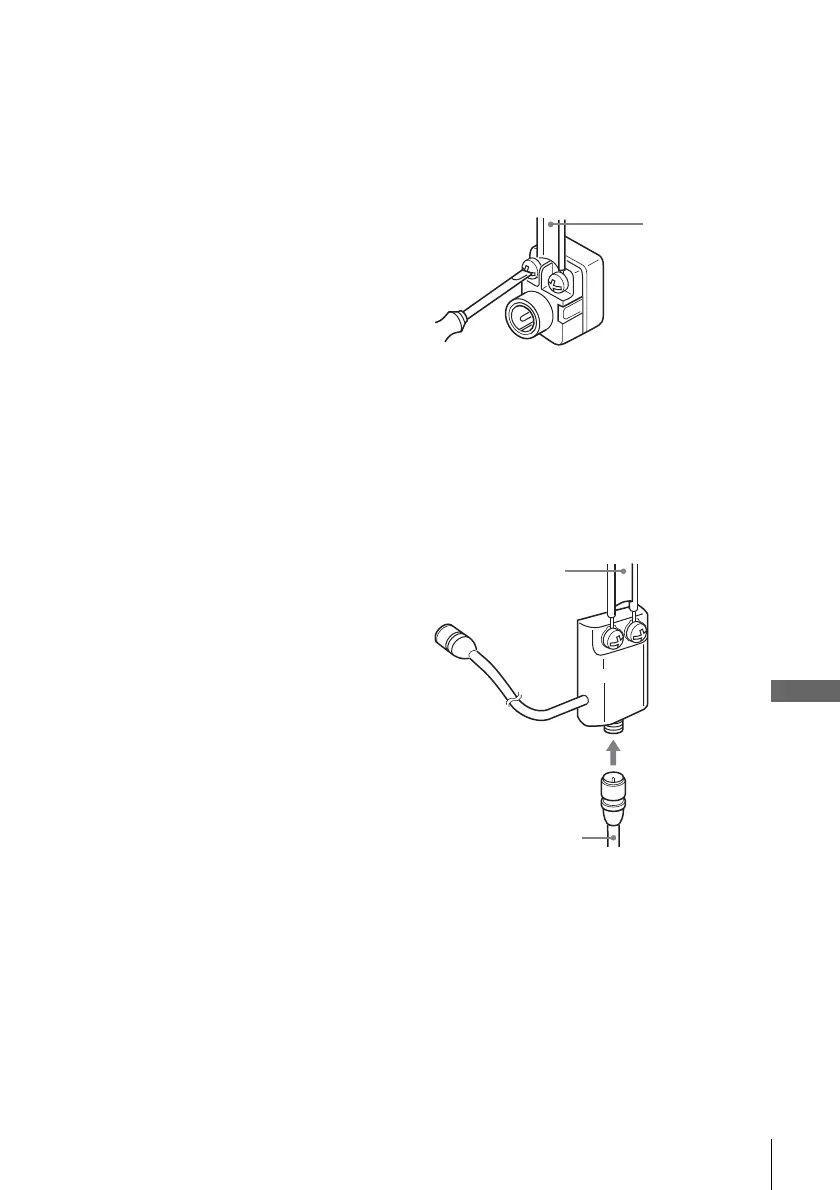
Attaching the external antenna connector
Attaching a VHF/UHF band mixer
5
Turn on your TV and set it to the channel you selected in step 1 (3CH or 4CH).
The channel you selected in step 4 appears on the TV screen. If the channels
change when you press CH +/–, you have made the correct setting.
Whenever you use the DVD-VCR, set the TV to the channel selected in step 1.
When using a 300-ohm twin lead cable for a
VHF/UHF antenna, use an antenna connector
(not supplied) to connect the antenna to the
DVD-VCR.
1
Loosen the screws on the antenna connector.
2
Wind the twin leads around the screws on the antenna connector.
3
Retighten the screws.
When using both a 75-ohm coaxial cable and
a 300-ohm twin lead cable for a VHF/UHF
antenna, use a VHF/UHF band separator/
mixer (not supplied) to connect the antenna
to the DVD-VCR.
1
Loosen the screws on the mixer.
2
Wind the twin leads around the screws on the mixer.
3
Retighten the screws.
4
Connect the 75-ohm coaxial cable to the mixer.
300-ohm twin
lead cable
Antenna
connector
(not supplied)
300-ohm twin
lead cable
VHF/UHF
band
separator/
mixer (not
supplied)
75-ohm coaxial
cable














 To Next Page