EasyManua.ls Logo

Sony SLV-X37 - Getting Started; Connecting Peripheral Equipment

Sony SLV-X37
31 pages
Print Icon
To Next Page IconTo Next Page
To Previous Page IconTo Previous Page
Loading...
Chapter
2-
Getting
Started
Connecting
Peripheral
Equipment
Checking
Your
TV
Connections
Whenever
you
view
video
pictures
as
well
as
TV
programs
on
your
TV
screen,
connect
the
VCR
and
your
TV
properly.
The
connection
between
the
VCR
and
TV
varies
depending
upon
the
type
of
your
TV
receiver
and
antenna.
First
check
the
type
of
your
TV,
and
use
the
appropriate
instructions
in
this
section.
Connecting
the
VCR
to
a
TV
Before
making
connections
do
the
following
¢
Turn
off
the
power
to
the
VCR
and
the
TV.
*
Do
not
connect
the
AC
power
cords
until
all
of
the
connections
are
completed.
¢
Make
sure
that
all
connections
are
firm.
Loose
connections
may
cause
picture
distortion.
¢
If
your
TV
does
not
match
the
following
examples,
consult
your
nearest
Sony
dealer
or
qualified
technician.
How
you
connect
your
VCR
to
your
TV
depends
on
the
type
of
TV
you
have.
Before
doing
step
3
to
5,
check
to
see
if
your
TV
has:
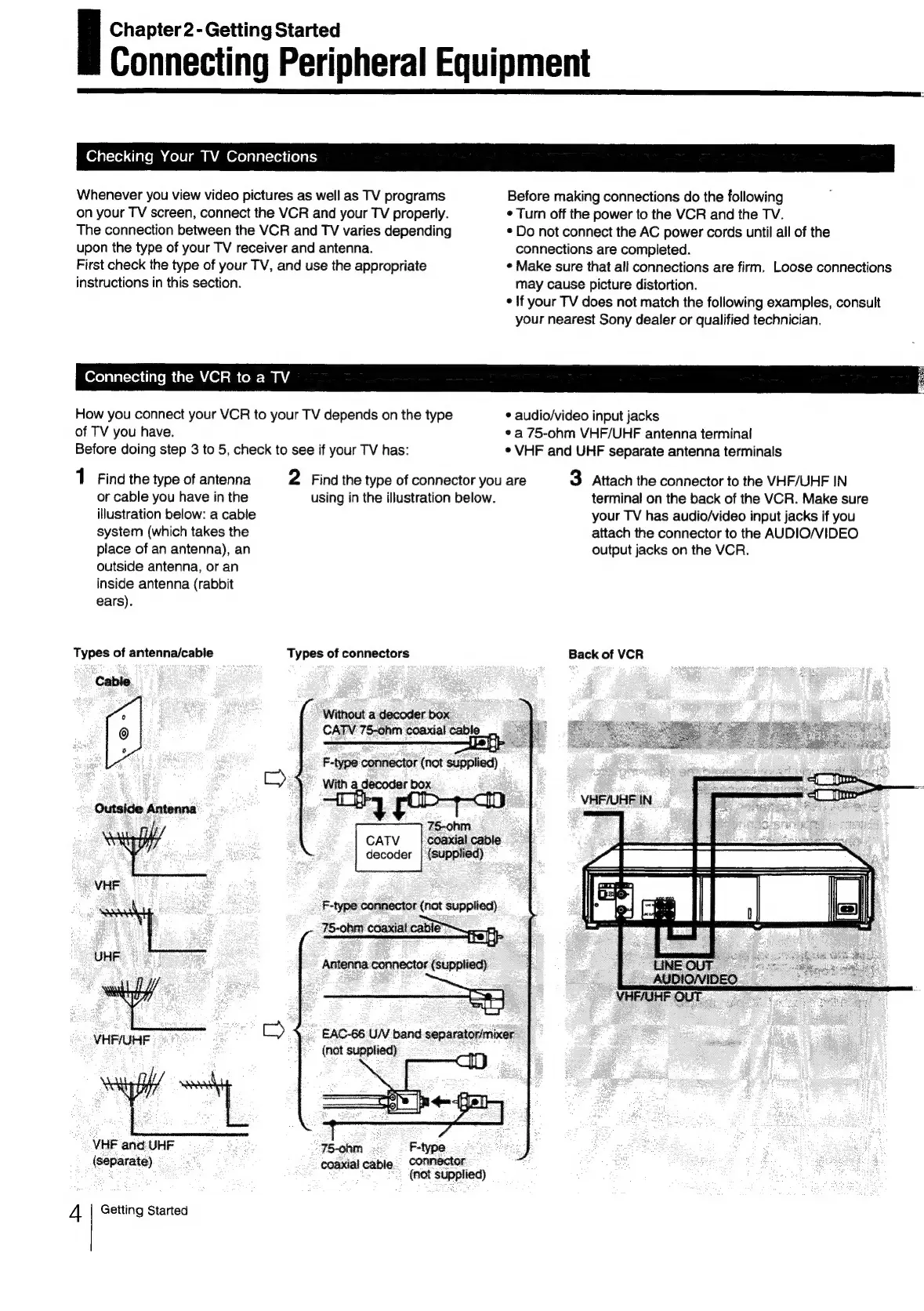
1
Find
the
type
of
antenna
or
cable
you
have
in
the
illustration
below:
a
cable
system
(which
takes
the
place
of
an
antenna),
an
outside
antenna,
or
an
inside
antenna
(rabbit
ears).
using
in
the
illustration
below.
Types
of
antenna/cabie
Types
of
connectors
Cable.
7
0
Without
a
decoder
box
©
CATV
75-ohm
coaxial
cable
o
F-type
connector
(not
supplied)
C4
with
a
décodar
box
Outside
Antenna
75-ohm
CATV
|
Coaxial
cable
decoder
|
(supplied)
VHF
F-type
connector
(not
supplied)
75-ohm
coaxial
cable
UHF
:
Antenna
connector
(supplied)
gd
i)
EAC-66
U/V
band
separator/mixer
-
VHF/UHF
pie
{not
supplied)
VHF
and
UHF
75-ohm
F-type.
(separate)
coaxial
cable.
connector
(at
supped
Getting
Started
4
2
Find
the
type
of
connector
you
are
¢
audio/video
input
jacks
*
a
75-ohm
VHF/UHF
antenna
terminal
*
VHF
and
UHF
separate
antenna
terminals
3
Attach
the
connector
to
the
VHF/UHF
IN
terminal
on
the
back
of
the
VCR.
Make
sure
your
TV
has
audio/video
input
jacks
if
you
attach
the
connector
to
the
AUDIO/VIDEO
output
jacks
on
the
VCR.
Back
of
VCR

Related product manuals