EasyManua.ls Logo

Sony SLV-X37 - Basic Operations; Setting the Time and Date Clock

Sony SLV-X37
31 pages
Print Icon
To Next Page IconTo Next Page
To Previous Page IconTo Previous Page
Loading...
Z
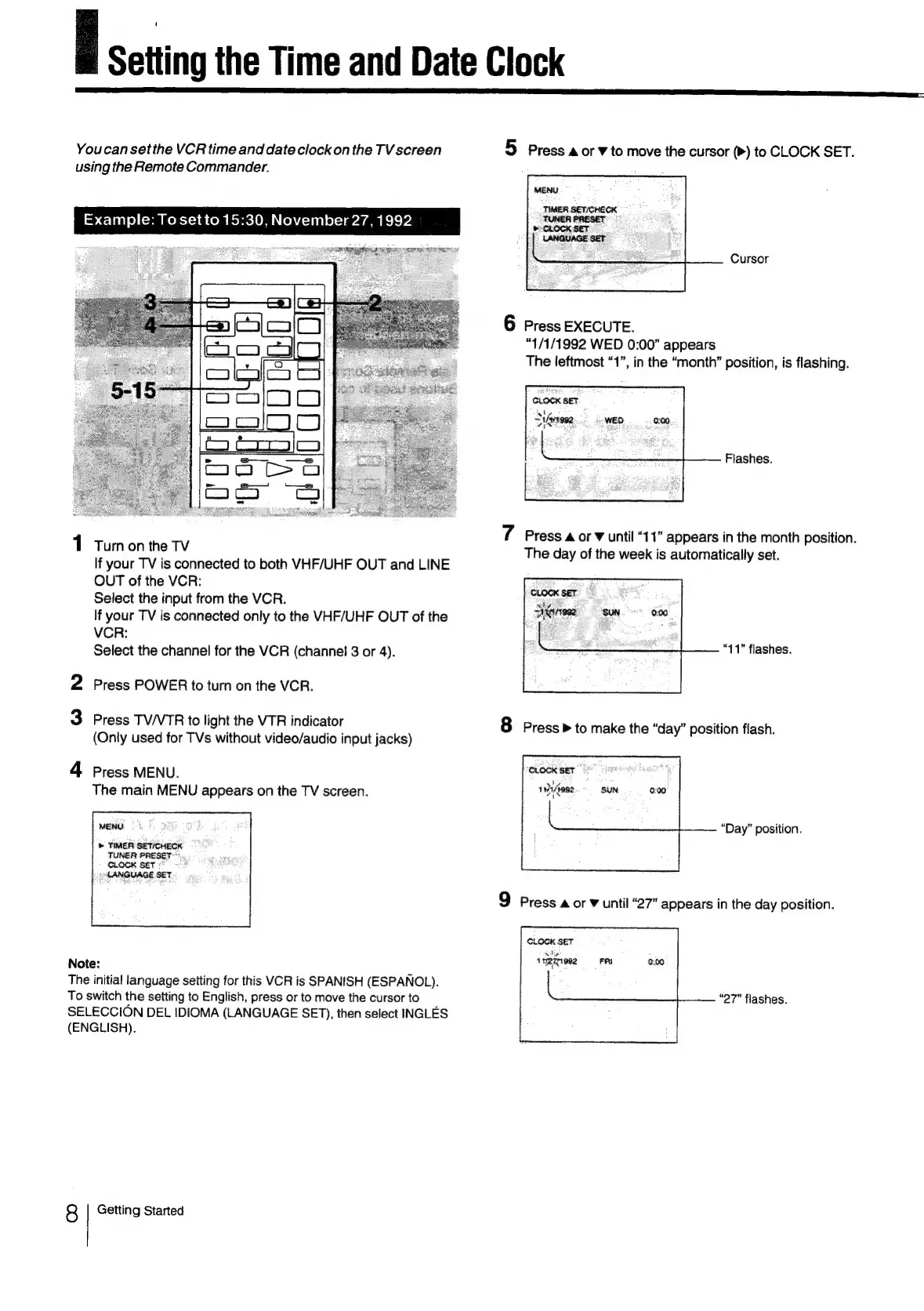
Setting
the
Time
and
Date
Clock
Youcan
set
the
VCR
time
and
date
clock
on
the
TV
screen
5
Press
a
or
v
to
move
the
cursor
(>)
to
CLOCK
SET.
using
the
Remote
Commander.
MENU
TIMER.
SET/CHECK
TUNER
PRESET
&
CLOCK
SET
LANGUAGE
SET
Example:
Tosetto
15:30,
November
27,
1992
Cursor
6
Press
EXECUTE.
“1/1/1992
WED
0:00”
appears
The
leftmost
“1”,
in
the
“month”
position,
is
flashing.
Flashes.
1
7
Press
a
or
v
until
“11”
appears
in
the
month
position.
Tum
on
the
TV
The
day
of
the
week
is
automatically
set.
If
your
TV
is
connected
to
both
VHF/UHF
OUT
and
LINE
OUT
of
the
VCR:
Select
the
input
from
the
VCR.
If
your
TV
is
connected
only
to
the
VHF/UHF
OUT
of
the
VCR:
Select
the
channel
for
the
VCR
(channel
3
or
4).
“11”
flashes.
2
Press
POWER
to
turn
on
the
VCR.
3
Press
TV/VTR
to
light
the
VTR
indicator
8
Press»
to
make
the
“day”
position
flash.
(Only
used
for
TVs
without
video/audio
input
jacks)
4
Press
MENU.
The
main
MENU
appears
on
the
TV
screen.
MENU
“Day”
position.
»
TIMER
SETICHECK
9
Press
a
or
¥
until
“27”
appears
in
the
day
position.
CLOCK
SET
1
mRii982
FR
0:00
Note:
The
initia!
language
setting
for
this
VCR
is
SPANISH
(ESPANOL).
To
switch
the
setting
to
English,
press
or
to
move
the
cursor
to
SELECCION
DEL
IDIOMA
(LANGUAGE
SET),
then
select
INGLES
(ENGLISH).
“27”
flashes.
8
Getting
Started