EasyManua.ls Logo

Sony SLV-X37 - Tuning the VCR to Your TV

Sony SLV-X37
31 pages
Print Icon
To Next Page IconTo Next Page
To Previous Page IconTo Previous Page
Loading...
Connecting
Peripheral
Equipment
Tuning
the
VCR
to
Your
TV
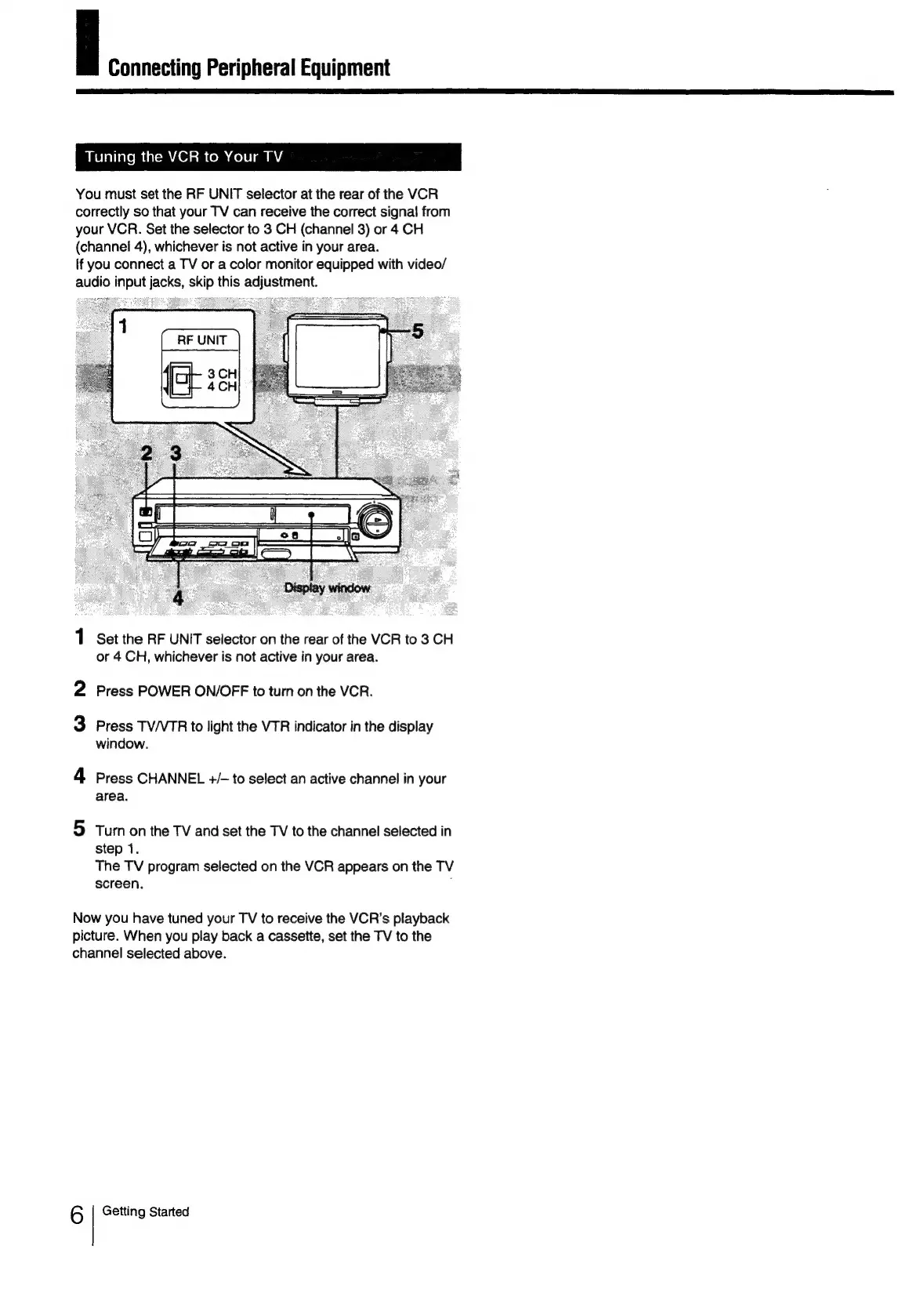
You
must
set
the
RF
UNIT
selector
at
the
rear
of
the
VCR
correctly
so
that
your
TV
can
receive
the
correct
signal
from
your
VCR.
Set
the
selector
to
3
CH
(channel
3)
or
4
CH
(channel
4),
whichever
is
not
active
in
your
area.
If
you
connect
a
TV
or
a
color
monitor
equipped
with
video/
audio
input
jacks,
skip
this
adjustment.
1
Set
the
RF
UNIT
selector
on
the
rear
of
the
VCR
to
3
CH
or
4
CH,
whichever
is
not
active
in
your
area.
2
Press
POWER
ON/OFF
to
turn
on
the
VCR.
3
Press
TV/VTR
to
light
the
VTR
indicator
in
the
display
window.
4
Press
CHANNEL
+/-
to
select
an
active
channel
in
your
area.
5
Turn
on
the
TV
and
set
the
TV
to
the
channel
selected
in
step
1.
The
TV
program
selected
on
the
VCR
appears
on
the
TV
screen.
;
Now
you
have
tuned
your
TV
to
receive
the
VCR’s
playback
picture.
When
you
play
back
a
cassette,
set
the
TV
to
the
channel
selected
above.
6
Getting
Started