Chapter 2: Sonoma Editor
Chapter 2: Sonoma Editor 17
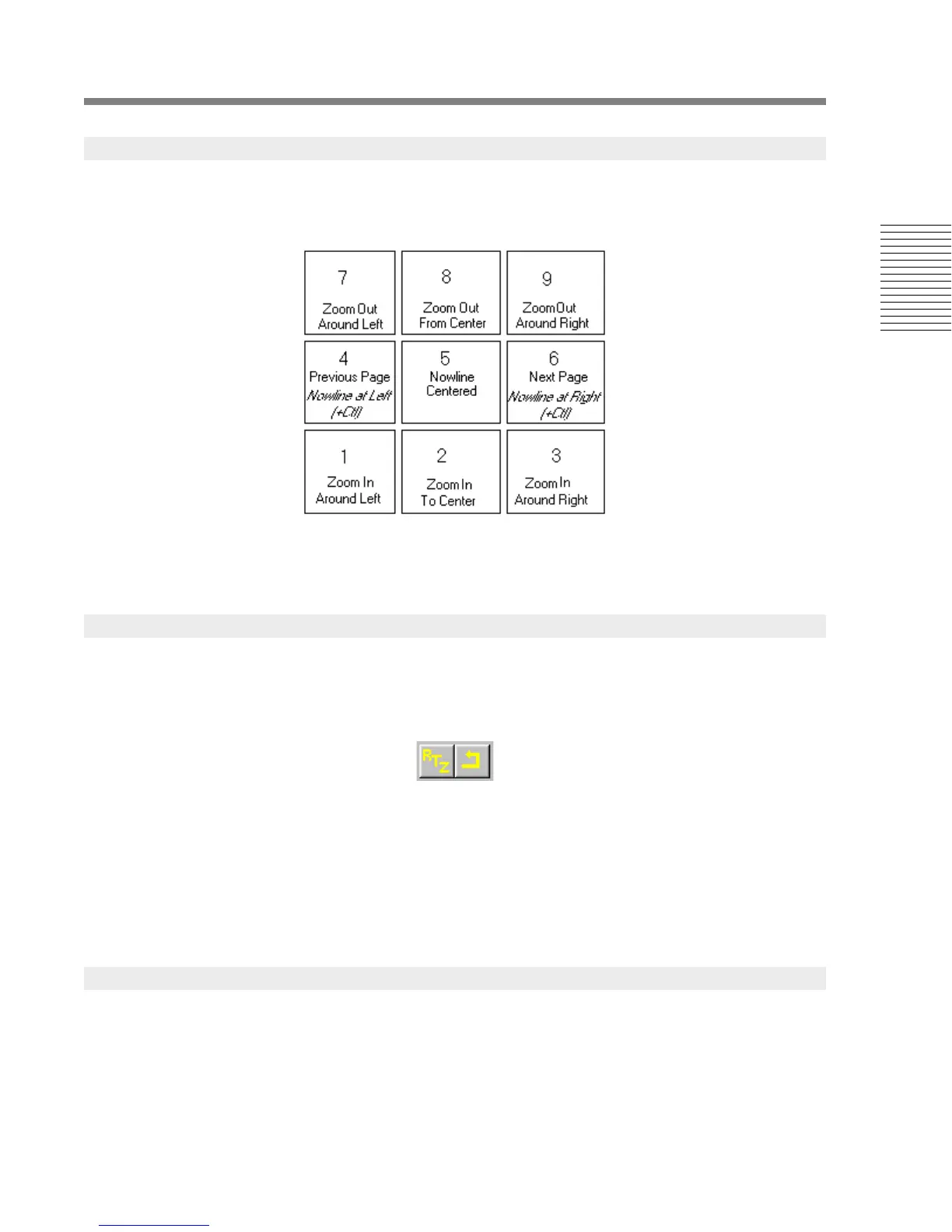
The numeric keypad can be used to access the anchored zoom commands and the paging commands.
You must be sure that the NumLock-key is on to use the keypad for these commands.
Alt+NumPad 1, Alt+NumPad 2, Alt+NumPad 3, and Alt+NumPad 4 zooms the EDL to the four
zoom presets set in the edit preferences.
Two commands in the transport menu also scroll the EDL and move the Nowline at the same time.
Return To Zero, Rewind
The Return To Zero command (RTZ) places the Nowline at the start of the EDL. The rewind
command places the Nowline at the position it occupied when the last play command was issued.
Both these commands scroll the EDL so the visible range includes the Nowline.
You can use the Home-key for RTZ and Shift+Home for rewind. (The Home-key is usually found
in a cluster of six keys that also include Page Up, Page Down, Insert, Delete, and End. The numeric
keypad Home-key will not work for this shortcut.)
The left and right EDL bounds are displayed in the lower strip of the EDL. You can select either
bound and type or paste a new timecode into them. The EDL will rezoom to the new boundaries.
2.4.2 Navigating with the Keypad
2.4.3 Navigating with the Transport Menu
2.4.4 Navigating with the EDL Bounds




 To Next Page