68 Chapter 2: Sonoma Editor
Chapter 2: Sonoma Editor
.
Open EDLs Maximized
When you open an EDL it can be maximized to fill the Sonoma window, or sized smaller so
that you can have multiple EDL windows open and visible at the same time. The window
preference checkbox controls this behavior.
Linear Edit Tiling
When you perform the source/destination tiling command this selection determines which
EDL will be placed above and which below.
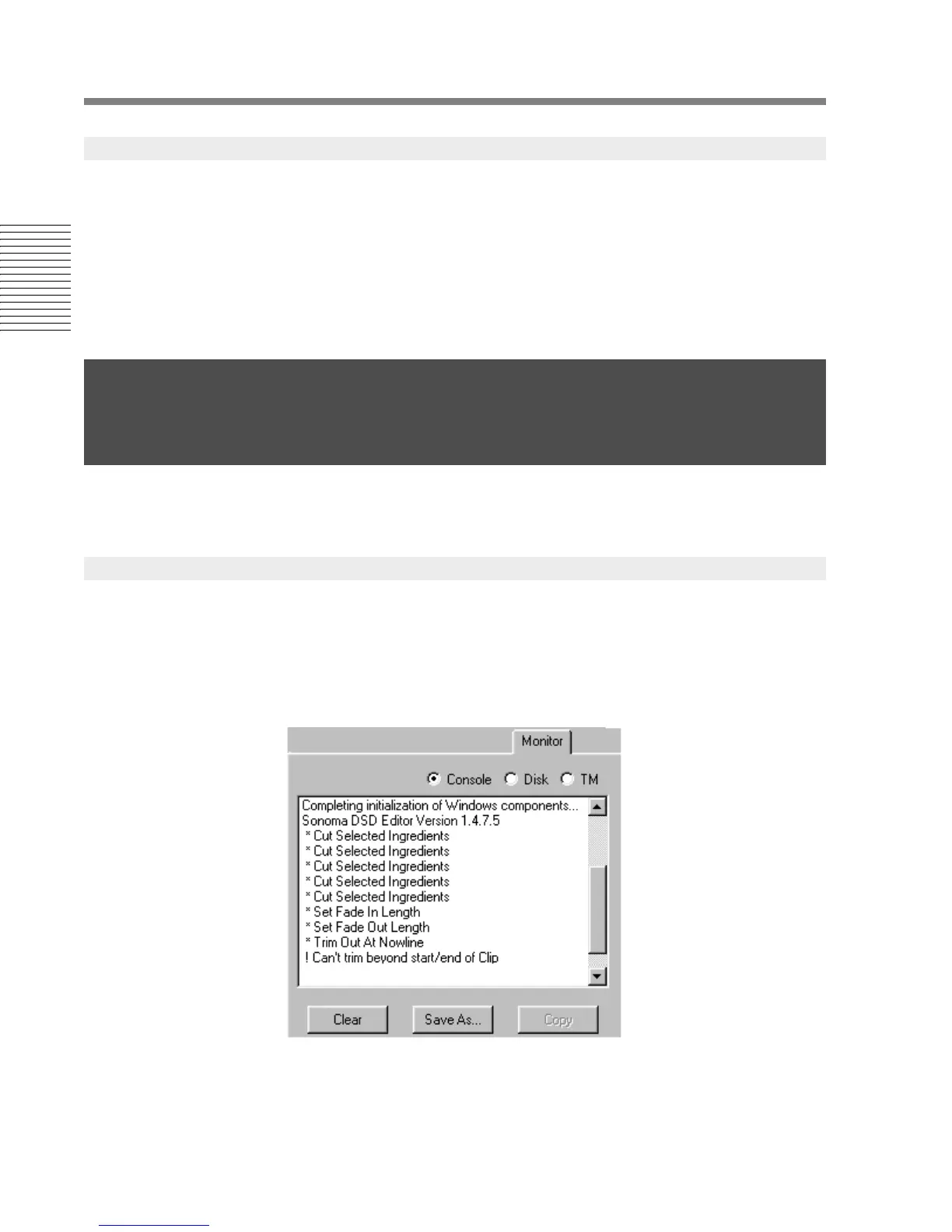
The monitor control panel contains three separate displays that show the system status. A set of radio
buttons lets you select the console window, the disk monitor, or the trimedia (TM) monitor.
The console window contains a scrolling text pane that displays a trace of the commands you have
performed and any error messages that Sonoma issues. The console window will display an error
message when the program beeps. The message will also appear at the bottom of the EDL in the
status bar. You can use the three buttons at the bottom of the console window to clear its contents,
save the contents of the console window to a text file, or copy the selected text to the clipboard for
pasting into another application.
2.19.8 Window Preferences
2.20 The Monitor Control Panel
2.20.1 The Console Window




 To Next Page