EasyManua.ls Logo

Sony STR-D1090 - Adjusting Surround Effect Parameters; Customizing Sound Field Parameters; Storing and Retaining Custom Settings

Sony STR-D1090
51 pages
Print Icon
To Next Page IconTo Next Page
To Previous Page IconTo Previous Page
Loading...
.
PXe\LeCoalalemas(-melUlanelelalem
ai(-tel
Before
adjusting
parameters,
play
back
the
program
source.
You
can
adjust
parameters
while
listening
to
the
actual
sound.
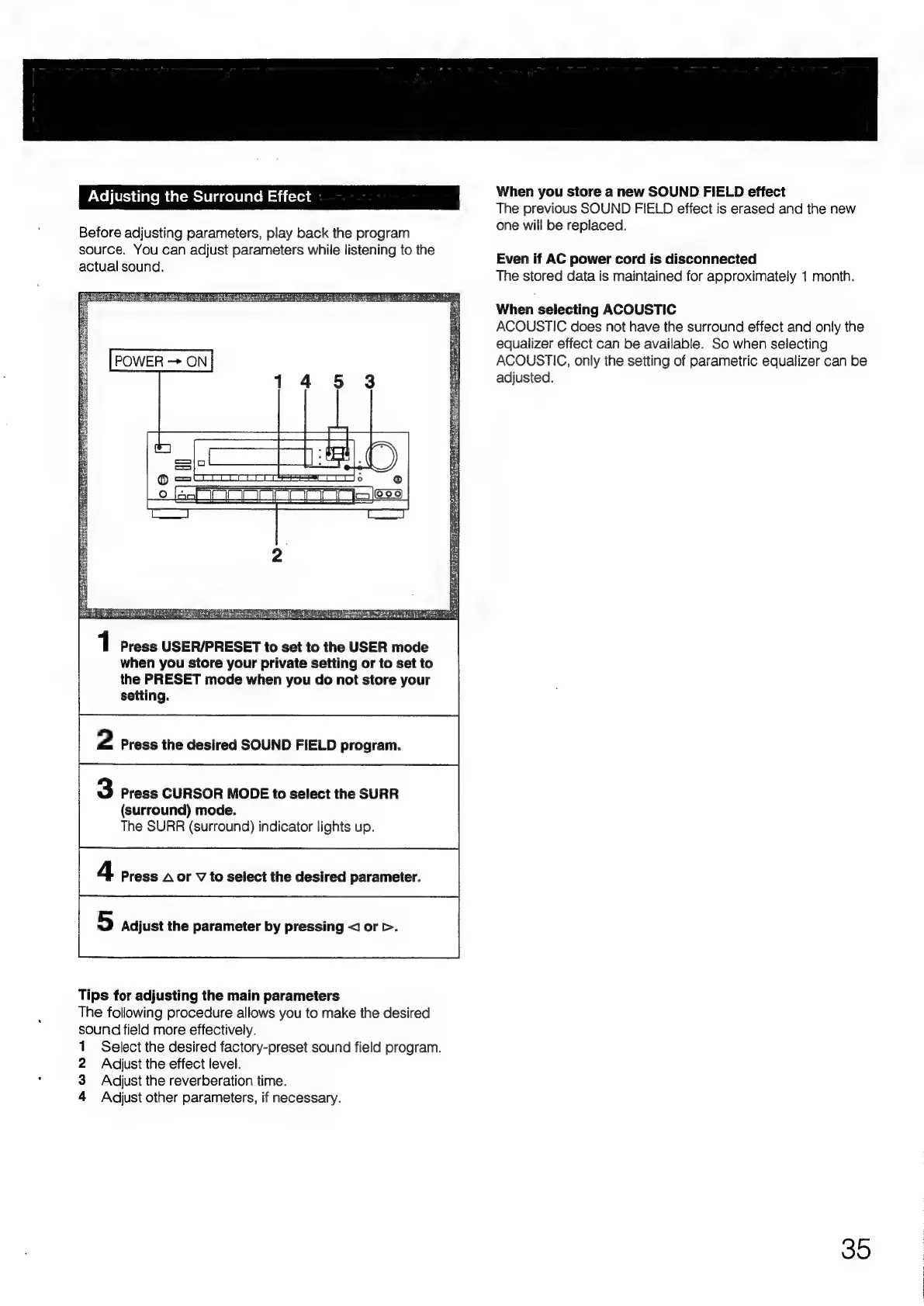
POWER
ON
cE
Serie
ee
1
Press
USER/PRESET
to
set
to
the
USER
mode
when
you
store
your
private
setting
or
to
set
to
the
PRESET
mode
when
you
do
not
store
your
setting.
2
Press
the
desired
SOUND
FIELD
program.
3
Press
CURSOR
MODE
to
select
the
SURR
(surround)
mode.
The
SURR
(surround)
indicator
lights
up.
4
Press
A
or
VY
to
select
the
desired
parameter.
5
Adjust
the
parameter
by
pressing
<
or
>.
Tips
for
adjusting
the
main
parameters
The
following
procedure
allows
you
to
make
the
desired
sound
field
more
effectively.
1
Select
the
desired
factory-preset
sound
field
program.
2
Adjust
the
effect
level.
3
Adjust
the
reverberation
time.
4
Ad{just
other
parameters,
if
necessary.
When
you
store
a
new
SOUND
FIELD
effect
The
previous
SOUND
FIELD
effect
is
erased
and
the
new
one
will
be
replaced.
Even
if
AC
power
cord
is
disconnected
The
stored
data
is
maintained
for
approximately
1
month.
When
selecting
ACOUSTIC
ACOUSTIC
does
not
have
the
surround
effect
and
only
the
equalizer
effect
can
be
available.
So
when
selecting
ACOUSTIC,
only
the
setting
of
parametric
equalizer
can
be
adjusted.
35

Table of Contents

Related product manuals