EasyManua.ls Logo

Sony STR-D1090 - Sound Field Simulation Parameters Explained; Room Size Simulation; Wall Material Simulation

Sony STR-D1090
51 pages
Print Icon
To Next Page IconTo Next Page
To Previous Page IconTo Previous Page
Loading...
@
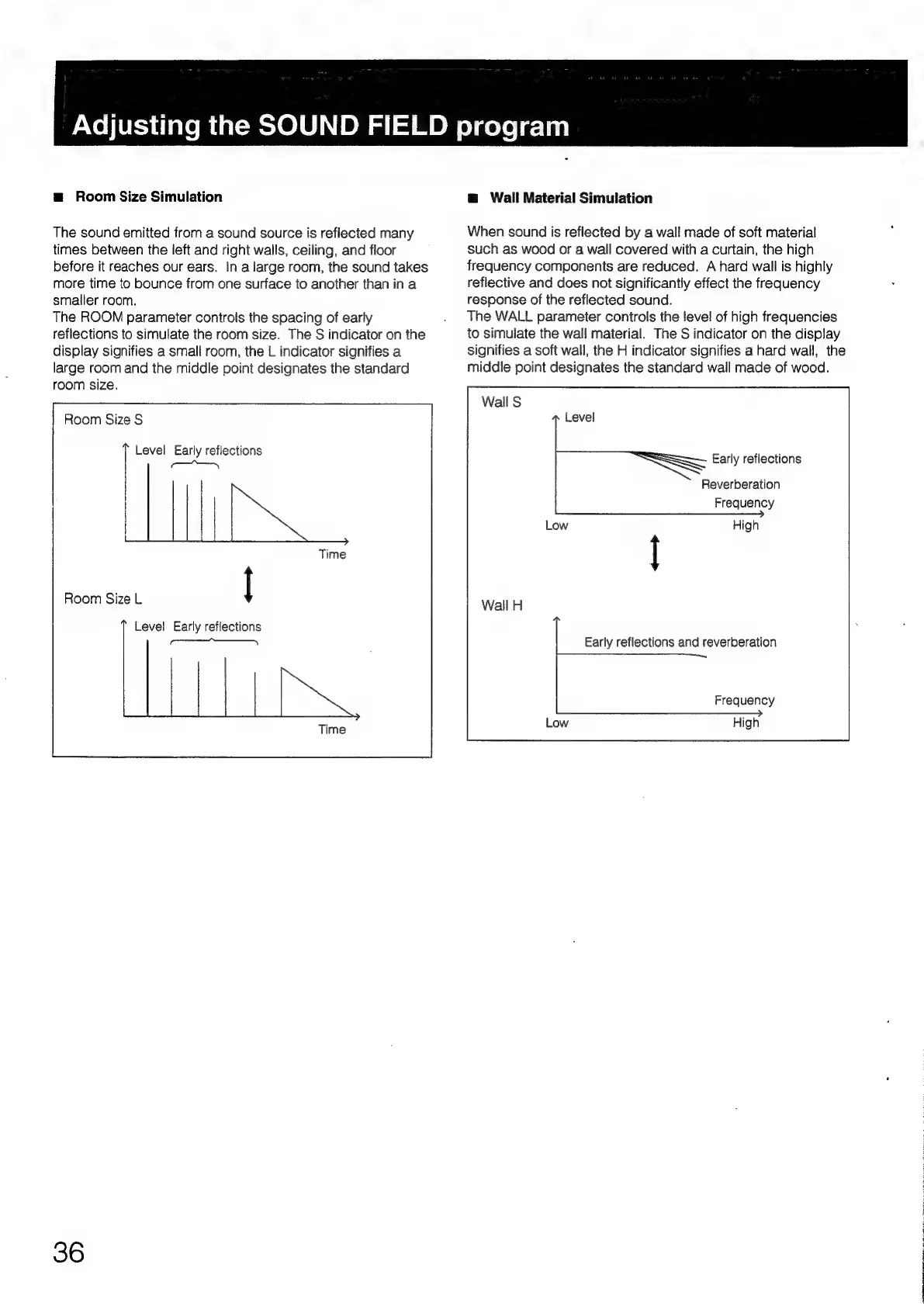
Room
Size
Simulation
The
sound
emitted
from
a
sound
source
is
reflected
many
times
between
the
left
and
right
walls,
ceiling,
and
floor
before
it
reaches
our
ears.
In
a
large
room,
the
sound
takes
more
time
to
bounce
from
one
surface
to
another
than
in
a
smaller
room.
The
ROOM
parameter
controls
the
spacing
of
early
reflections
to
simulate
the
room
size.
The
S
indicator
on
the
display
signifies
a
small
room,
the
L
indicator
signifies
a
large
room
and
the
middle
point
designates
the
standard
room
size.
Room
Size
S
Level
Early
reflections
SS
Room
Size
L
|
Level
Early
reflections
<<<
36
Adjusting
the
SOUND
FIELD
program
@
Wall
Material
Simulation
When
sound
is
reflected
by
a
wall
made
of
soft
material
such
as
wood
or
a
wall
covered
with
a
curtain,
the
high
frequency
components
are
reduced.
A
hard
wall
is
highly
reflective
and
does
not
significantiy
effect
the
frequency
response
of
the
reflected
sound.
The
WALL
parameter
controls
the
level
of
high
frequencies
to
simulate
the
wall
material.
The
S
indicator
on
the
display
signifies
a
soft
wall,
the
H
indicator
signifies
a
hard
wall,
the
middle
point
designates
the
standard
wall
made
of
wood.
Early
reflections
Reverberation
Frequency
Early
reflections
and
reverberation
Frequency

Table of Contents

Related product manuals