EasyManua.ls Logo

Sony STR-DB930 - Other Operations

Sony STR-DB930
58 pages
Print Icon
To Next Page IconTo Next Page
To Previous Page IconTo Previous Page
Loading...
Other
Operations
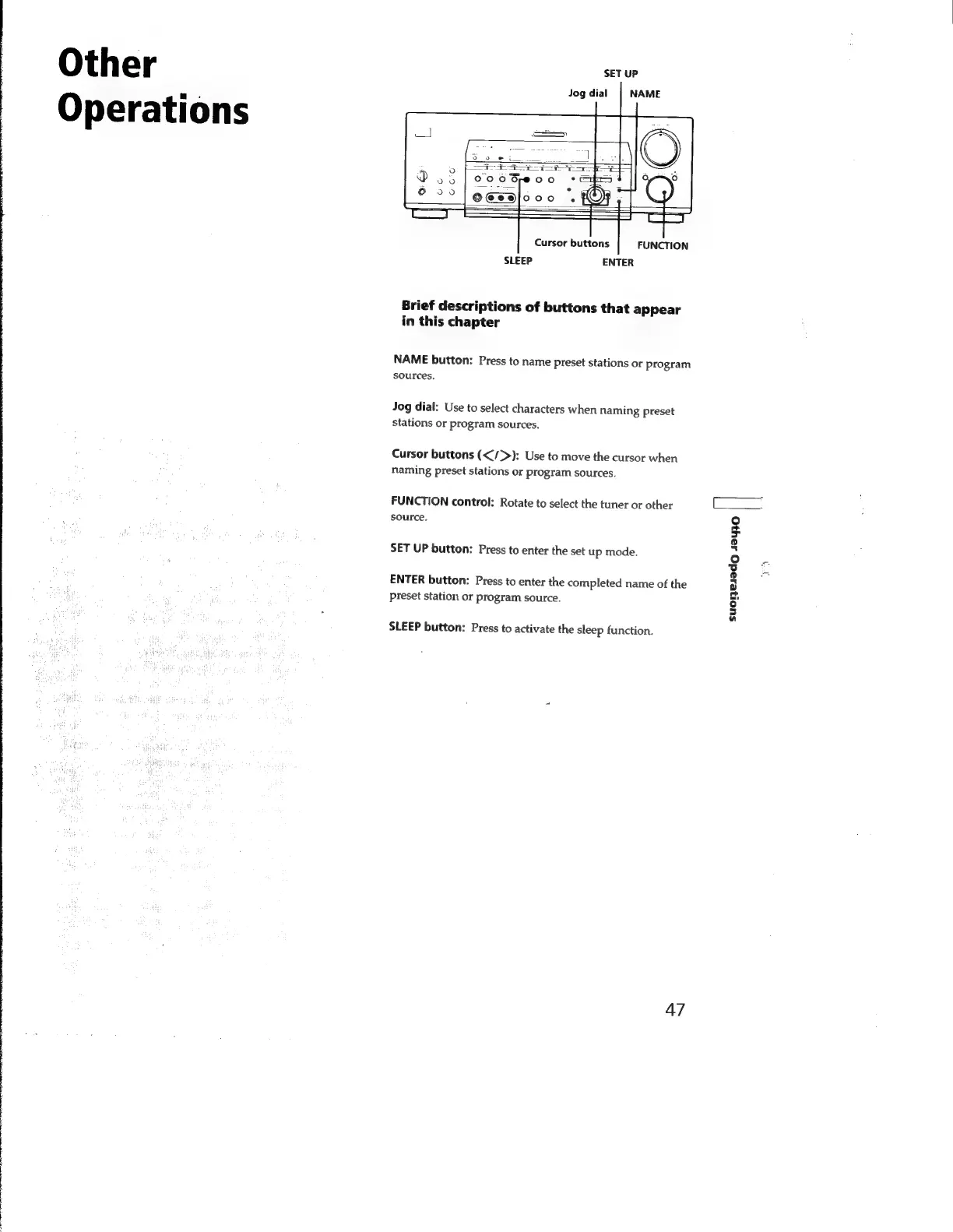
SET
UP
Jog
dial
NAME
Cursor
buttons
FUNCTION
SLEEP
ENTER
Brief
descriptions
of
buttons
that
appear
in
this
chapter
NAME
button:
Press
to
name
preset
stations
or
program
sources.
Jog
dial:
Use
to
select
characters
when
naming
preset
stations
or
program
sources.
Cursor
buttons
(</>):
Use
to
move
the
cursor
when
naming
preset
stations
or
program
sources.
FUNCTION
control:
Rotate
to
select
the
tuner
or
other
source.
SET
UP
button:
Press
to
enter
the
set
up
mode.
ENTER
button:
Press
to
enter
the
completed
name
of
the
preset
station
or
program
source.
SLEEP
button:
Press
to
activate
the
sleep
function.
47
[
5ицоцеләао
19910

Related product manuals