35
GB
Getting Started
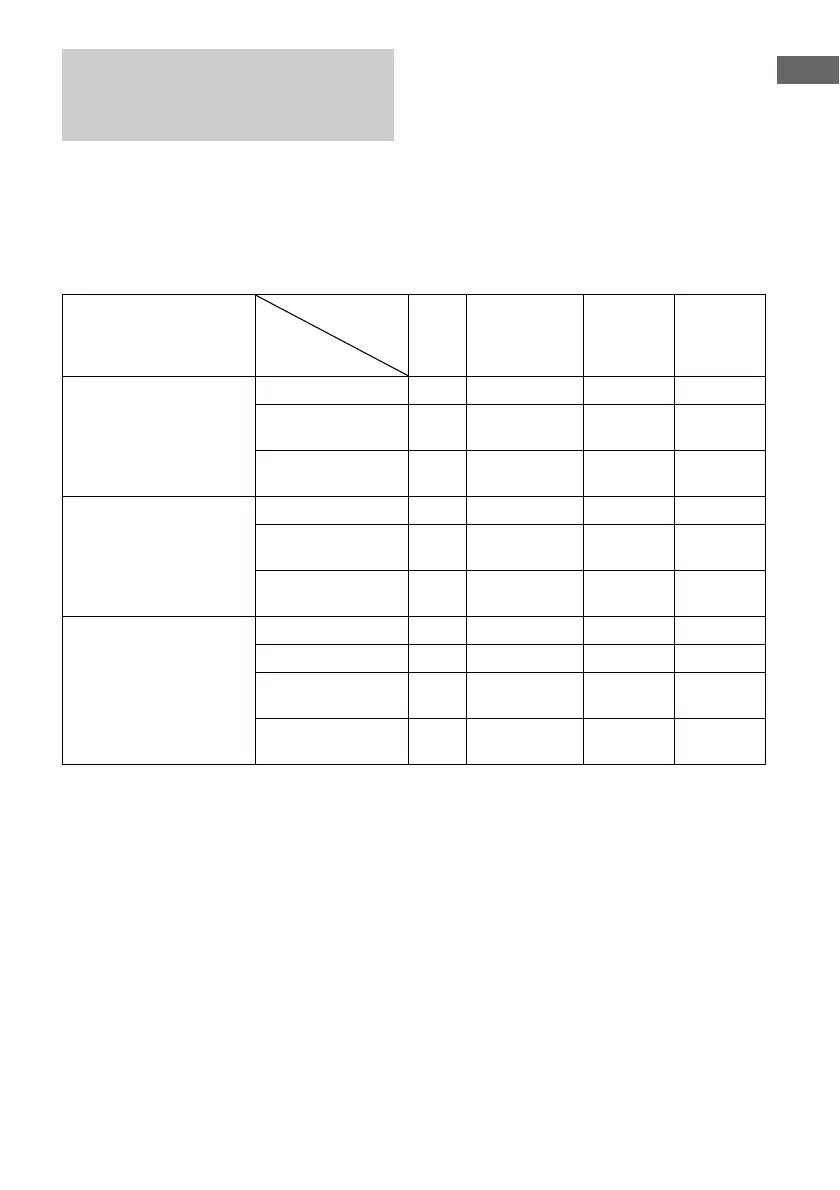
You can set the video signal conversion
function on/off.
The relationships between the video input and
output signals set by “VIDEO CONVERT”
and “PROGRESSIVE OUT” in the Video
Settings menu are shown in the chart below.
a : Video signals are converted and output through the video converter.
f : The same type of signals as those of the input signals will be output. Video signals are not converted.
X : Video signals are not output.
In the video input/output
conversion table classified by
the menu settings
Menu setting HDMI
OUT
COMPONENT
VIDEO
MONITOR
OUT
SVIDEO
MONITOR
OUT
VIDEO
MONITOR
OUT
VIDEO CONVERT: ON /
PROGRESSIVE OUT: OFF
Video/S video aa (480i) aa
Component video
(480i)
af a a
Component video
(Other than 480i)
af XX
VIDEO CONVERT: ON /
PROGRESSIVE OUT: ON
Video/S video aa (480p) aa
Component video
(480i)
aa (480p) aa
Component video
(Other than 480i)
a XXX
VIDEO CONVERT: OFF /
PROGRESSIVE OUT:
Dimmed in the display
Video XX X f
Svideo XX f X
Component video
(480i)
X f XX
Component video
(Other than 480i)
X f XX
Input signal
MONITOR
OUT jacks


 To Next Page