89
GB
Other Operations
Displaying menus of the
receiver on the TV screen
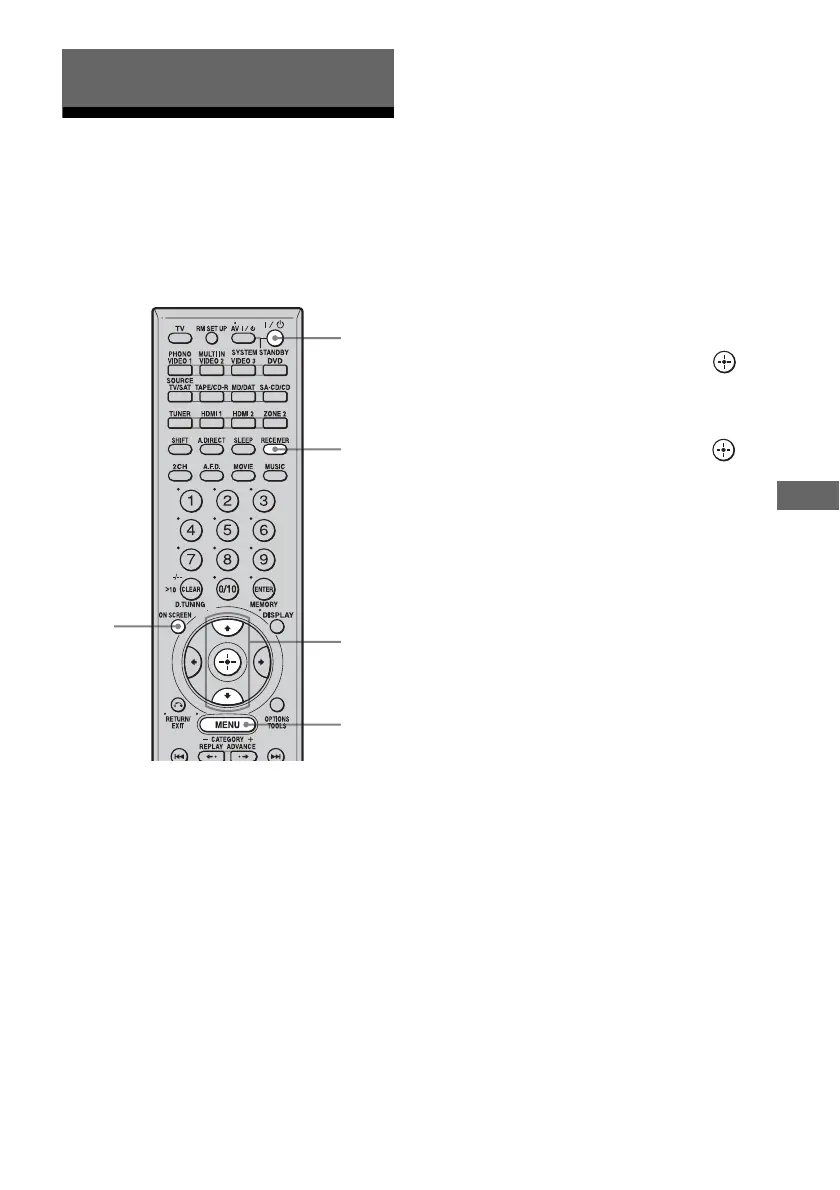
Press ON SCREEN, then display a menu on
the TV screen connected to this receiver. You
can set up menus easily.
1 Turn on the receiver and the TV.
2 Press ON SCREEN.
Switch the input of the TV so that a
setting menu is displayed on the TV
screen connected to this receiver.
3 Press RECEIVER.
Receiver operation is enabled.
4 Press MENU.
The following menus are displayed on the
TV screen.
1-Level Settings
2-Equalizer Settings
3-Surround Settings
4-Tuner Settings
5-Audio Settings
6-Video Settings
7-Speaker Settings
8-System Settings
9-Auto Calibration
5 Press V/v repeatedly to select
the menu item, then press to
enter the menu.
6 Press V/v repeatedly to select
the parameter, then press to
enter the parameter.
Depending on the parameter, the selected
parameter can be entered by completing
step 7.
7 Press ON SCREEN.
The menu setting display disappears.
Other Operations
2,7
5,6
4
1
3



 To Next Page