99
GB
Other Operations
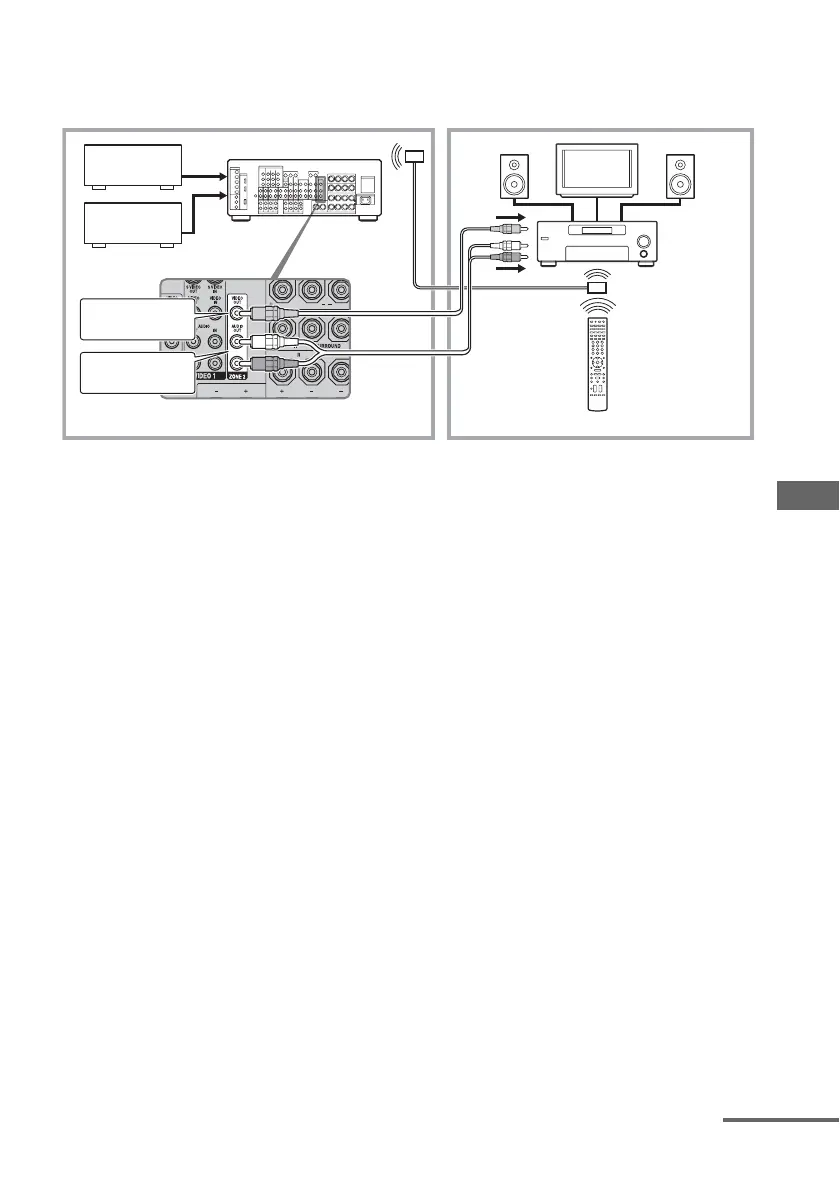
2 Outputs sound from speakers in zone 2 using the receiver and another
amplifier.
Notes
• Connect video signals to the component of zone 2
using the VIDEO jack.
• Connect audio signals to the component of
zone 2
using the AUDIO L/R jack.
Tips
• Only signals from components connected to the
analog input jacks are output through the ZONE 2
jack. No signal is output from components
connected to only the digital input jacks.
• When “SOURCE” is selected, the signals input to
the MULTI CHANNEL INPUT jacks are not
output from the ZONE 2 jack even when the
MULTI IN is selected in the main zone. The 2
channel analog audio signals of the current input
are output.
Main zone Zone 2
ZONE 2 VIDEO OUT
TV
monitor
A
ZONE 2 AUDIO OUT
B
C
EE
D
STR-DG1000
C
A Audio component
B Video component
C IR repeater (not supplied)
D Sony’s Amplifier/Receiver
E Speaker
RM-AAL003
continued


 To Next Page