Name
Function
Name Function
[:>a)b)
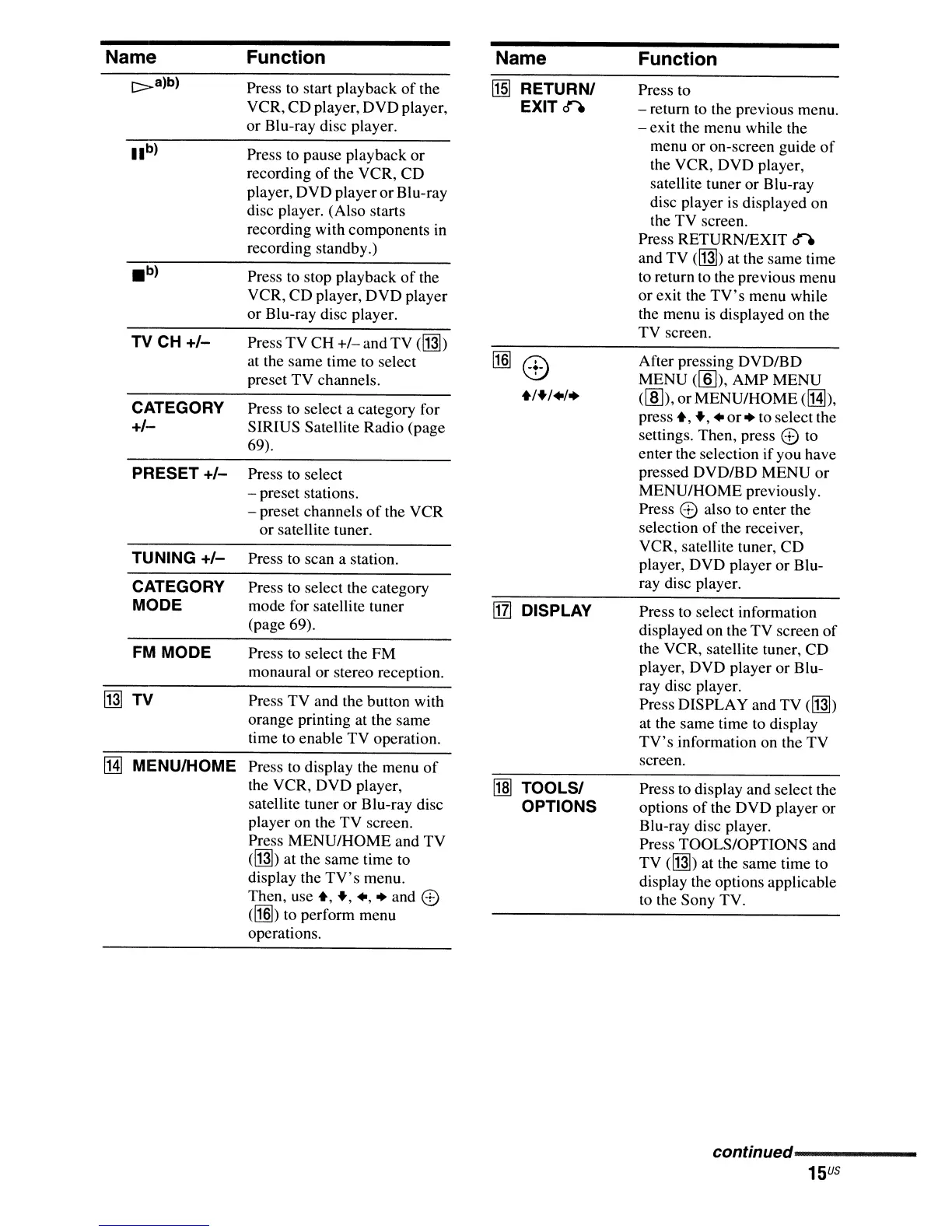
Press to start playback
of
the
~
RETURN/ Press to
VCR, CD player, DVD player,
EXITn
- return to the previous menu.
or Blu-ray disc player.
- exit the menu while the
lib)
Press
to
pause playback or
menu or on-screen guide
of
the VCR, DVD player,
recording of the VCR, CD
satellite tuner or Blu-ray
player, DVD playerorBlu-ray
disc player is displayed on
disc player. (Also starts
the TV screen.
recording with components
in
Press RETURNIEXIT n
recording standby.)
and TV
(~)
at the same time
.b)
Press to stop playback
of
the
to
return to the previous menu
VCR, CD player, DVD player
or exit the
TV's
menu while
or Blu-ray disc player.
the menu
is
displayed on the
Press TV CH
+/-
andTV
(~)
TV screen.
TV CH
+/-
at the same time to select
[1§]
0)
After pressing DVD/BD
preset TV channels.
MENU
([§]),
AMP MENU
+/+/+/.
(lID), orMENU/HOME
(!Hl),
CATEGORY
Press
to
select a category for
press
+, +, +
or.
to select the
+/-
SIRIUS Satellite Radio (page
settings. Then, press
CD
to
69).
enter the selection ifyou have
PRESET
+/-
Press to select
pressed DVD/BD MENU or
- preset stations.
MENU/HOME previously.
- preset channels
of
the VCR
Press
CD
also to enter the
or satellite tuner.
selection
of
the receiver,
VCR, satellite tuner, CD
TUNING
+/-
Press to scan a station.
player, DVD player or Blu-
CATEGORY Press to select the category
ray disc player.
MODE mode for satellite tuner
[j]
DISPLAY
Press to select information
(page 69).
displayed on the TV screen of
FM
MODE Press to select the FM
the VCR, satellite tuner, CD
monaural or stereo reception.
player, DVD player or Blu-
ray disc player.
~
TV
Press TV and the button with
Press DISPLAY and TV
(~)
orange printing at the same
at the same time to display
time to enable TV operation.
TV's
information on the TV
!Hl
MENU/HOME
Press to display the menu
of
screen.
the VCR, DVD player,
r1m
TOOLS/
Press
to
display and select the
satellite tuner or Blu-ray disc
OPTIONS options
of
the DVD player or
player on the TV screen.
Blu-ray disc player.
Press MENU/HOME and TV
Press TOOLS/OPTIONS and
(~)
at the same time to
TV
(~)
at the same time to
display the
TV's
menu.
display the options applicable
Then, use
+, +,
+,.
and
CD
to
the Sony TV.
([1§])
to perform menu
operations.
continued------
15
US



 To Next Page