Connecting
the
SIRIUS
Satellite
Radio
Preparing
to
listen
to
the
SIRIUS
Satellite
Radio
VIDEO!
V~
BD
DVD'
8
..
~·8
8
SAT
TV
SA-eDICD
TUNER
8 8 8
--+-tI~
TUNER
o
"C
(1)
..,
l»
::!:
o
j
en
-
TUNING
+/-
2CH
A.f.D.
MOVIE
MUSIC
OC)OO
THEATER.
·.CD
·CD
·rn:
C)
. .
OVo/BO
~m
°rn·m
(=:5'
.
,Auro
CAL
~cD.ci5.m
DOG
.
.c
O,SKIP
AMP
MEMORY
AJIJP
I8IU
0I10:·e.··
..
c
•
_-tt-- MENU
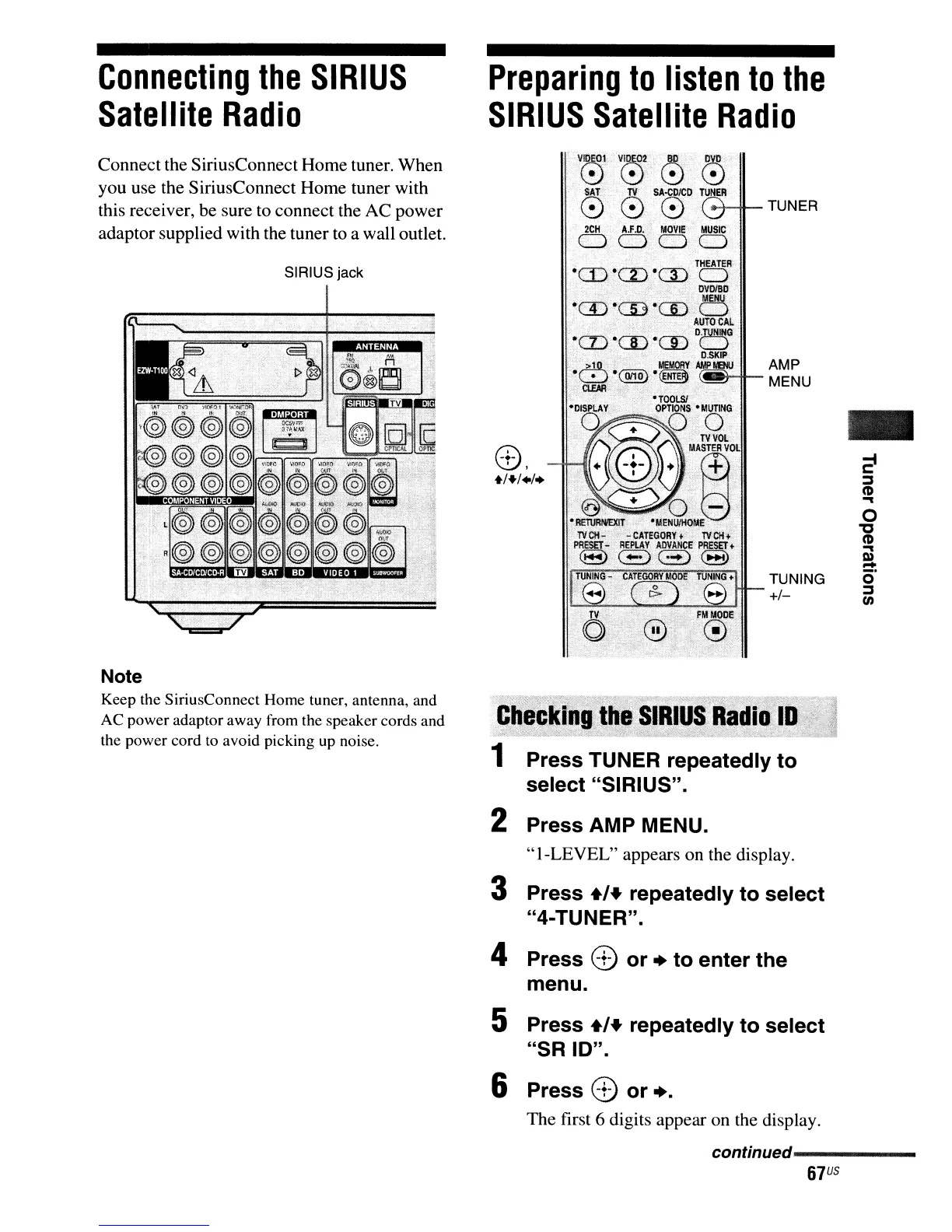
SIRIUS jack
Connect the SiriusConnect Home tuner. When
you use the SiriusConnect Home tuner with
this receiver, be sure to connect the AC power
adaptor supplied with the tuner to a wall outlet.
Note
Keep the SiriusConnect Home tuner, antenna, and
AC power adaptor away from the speaker cords and
the power cord
to
avoid picking
up
noise.
Press TUNER repeatedly to
select "SIRIUS".
2 Press AMP MENU.
"I-LEVEL"
appears on the display.
3 Press +,+ repeatedly to select
"4-TUNER".
4 Press
CD
or • to enter the
menu.
5 Press +'+ repeatedly to select
"SR 10".
6 Press
CD
or
•.
The first 6 digits appear on the display.
conunued-----------
67
US



 To Next Page