Description
and
location
of
parts
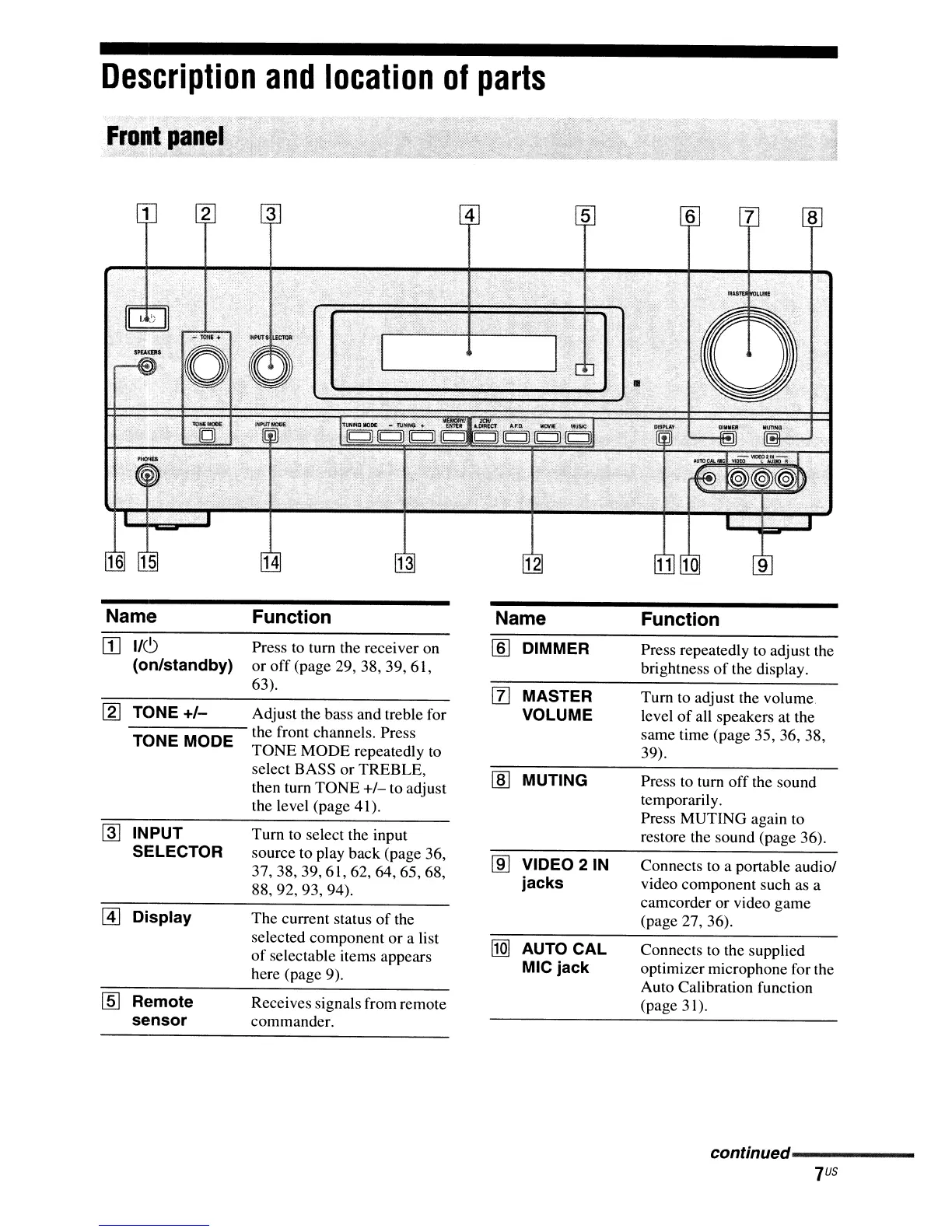
Name Function Name Function
[I]
1/6
Press to tum the receiver on
[ID
DIMMER Press repeatedly to adjust the
(on/standby)
or
off
(page 29, 38, 39, 61,
brightness
of
the display.
63).
[I]
MASTER
Tum
to adjust the volume.
[g]
TONE
+/-
Adjust the bass and treble for VOLUME level
of
all speakers at the
TONE MODE
the front channels. Press same time (page 35, 36, 38,
TONE MODE repeatedly to 39).
select BASS or TREBLE,
lID
MUTING
Press
to
tum
off
the sound
then tum TONE
+/-
to adjust
the level (page 41).
temporarily.
Press MUTING again to
~
INPUT
Turn
to
select the input restore the sound (page 36).
SELECTOR
source to play back (page 36,
m]
VIDEO 21N Connects
to
a portable audio/
37,38,39,61,62,64,65,68,
88,92,93,94).
jacks video component such as a
camcorder or video game
@]
Display The current status
of
the (page 27, 36).
selected component or a list
l1m
AUTO CAL Connects
to
the supplied
of
selectable items appears
here (page 9).
MIC jack optimizer microphone for the
Auto Calibration function
[§]
Remote
Receives signals from remote
(page 31).
sensor
commander.
conffnued------------



 To Next Page