Preparing
for
the
"BRAVIA"
Sync
To use the "BRAVIA" Sync, tum the Control
for HOMI function on for both the receiver
and the connected component. The receiver is
compatible with the "Control for HOMI-Easy
Setting" function.
When your TV is compatible
with the "Control for HDMI-Easy
Setting" function
When you connect a Sony TV with the
"Control for HOMI-Easy Setting" function,
the Control for HOMI function
of
the receiver
can be turned on simultaneously by turning the
Control for HOMI function
of
the TV on.
1
Make
sure
that
the receiver, TV, and
playback
components
are connected
using an HOMI cable (not supplied).
(The respective
components
must
be
compatible with the Control for HOMI
function.)
2 Turn on the receiver,
TV
and playback
components.
3 Turn
the
Control for HOMI function of
the
TV
on.
The Control for HOMI function
of
the
receiver and all the connected components
are simultaneously turned on. Ouring
setup, "CONTROL", "SCAN FOR" and
"HOMI" appear sequentially
in
thedisplay,
and once setting is completed,
"COMPLETE" will appear. Wait until the
setup is complete.
For details on setting the TV, refer to the
operating instructions supplied with the TV.
76
US
When your TV is not compatible
with the "Control for HDMI-Easy
Setting" function
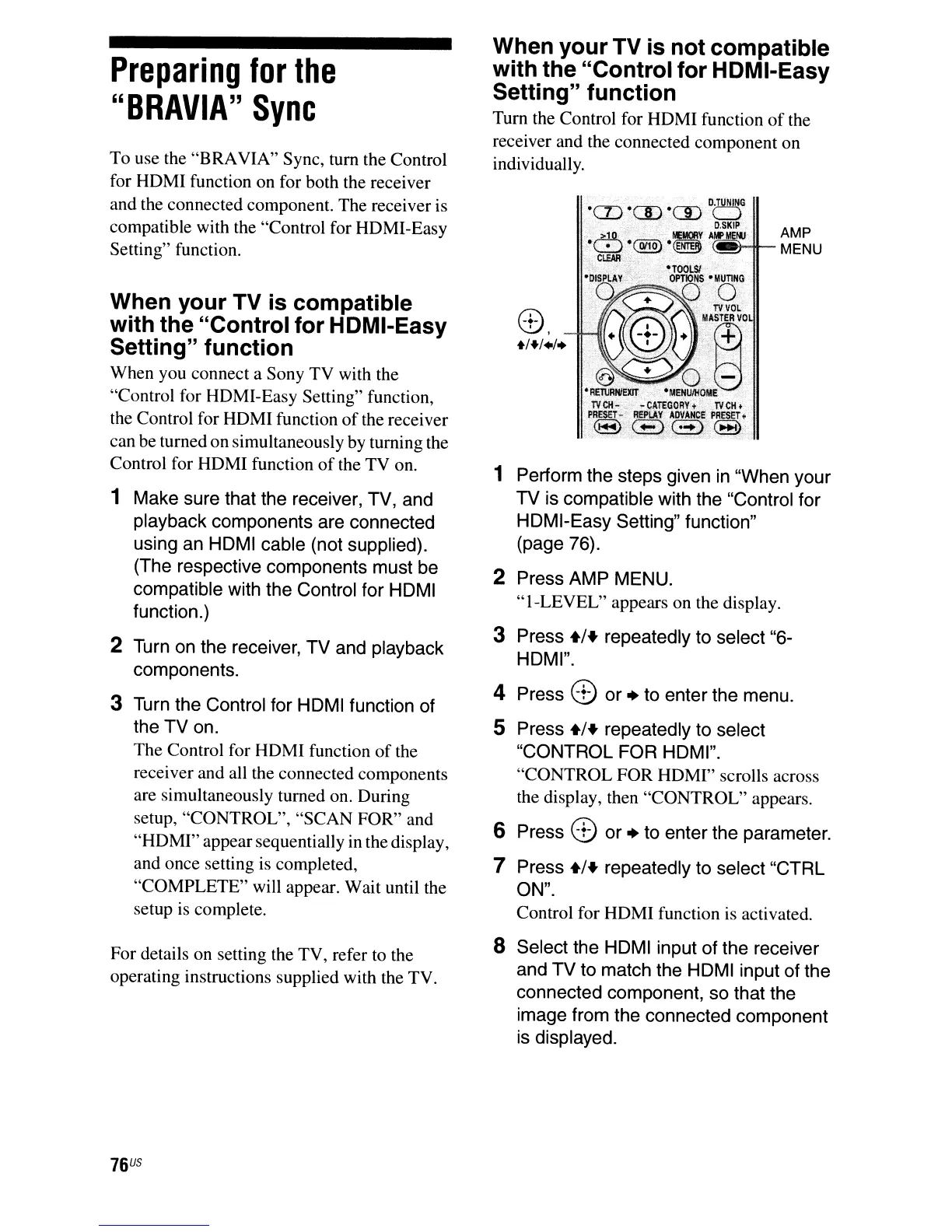
Tum the Control for HOMI function
of
the
receiver and the connected component on
individually.
AMP
(_t-it--
MENU
8,
+/+/./.
1 Perform
the
steps given in "When
your
TV
is compatible with the "Control
for
HOMI-Easy Setting" function"
(page 76).
2 Press
AMP
MENU.
"I-LEVEL"
appears on the display.
3 Press
+1+
repeatedly to select "6-
HOMI".
4 Press 8
or
+ to
enter
the
menu.
S Press
+1+
repeatedly to select
"CONTROL
FOR
HOMI".
"CONTROL FOR HOMI" scrolls across
the display, then "CONTROL" appears.
6 Press 8
or
+ to
enter
the
parameter.
7 Press
+1+
repeatedly to select
"CTRL
ON".
Control for HOMI function
is
activated.
8 Select the HOMI input of the receiver
and
TV
to
match the HOMI input of the
connected component,
so
that the
image
from the connected
component
is displayed.



 To Next Page