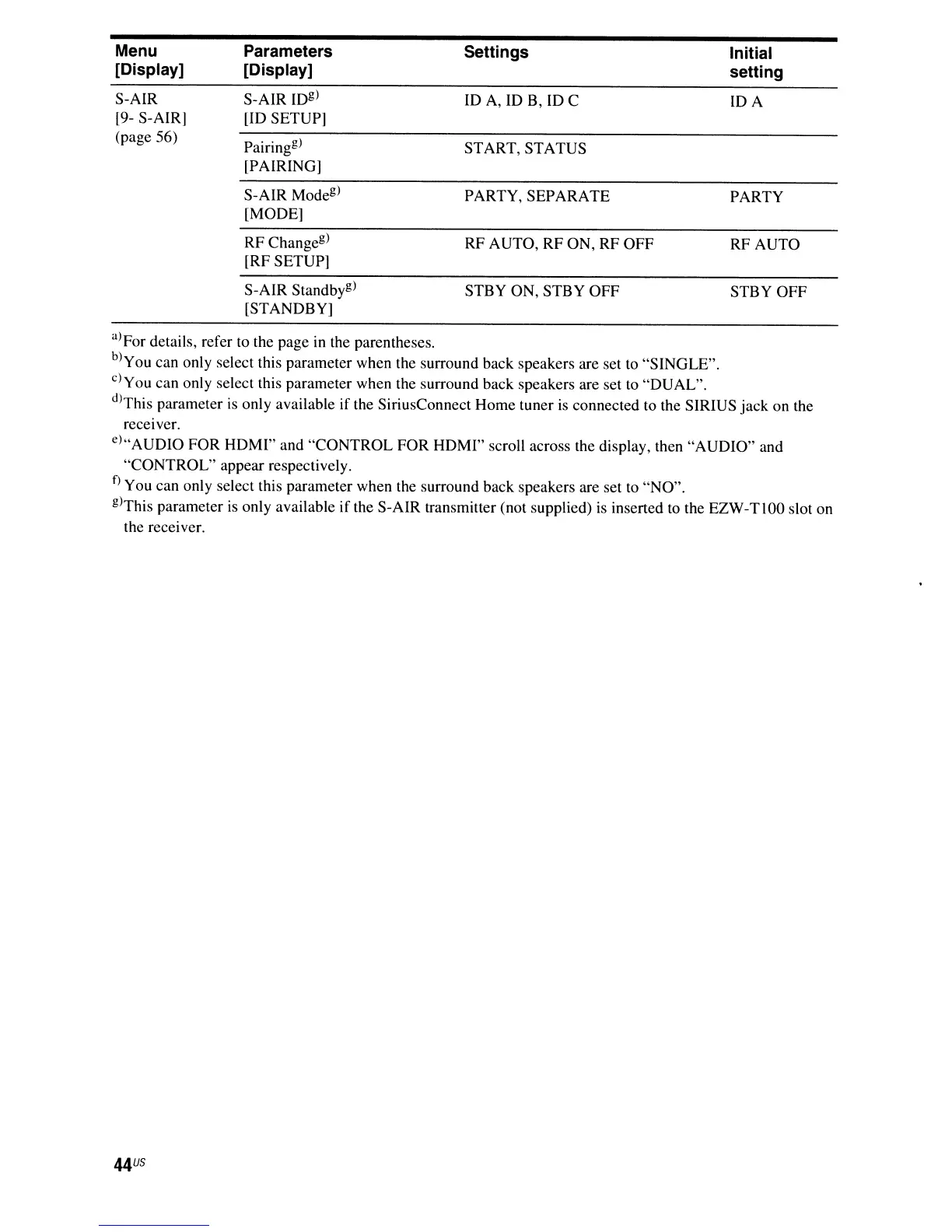
Menu
[Display]
S-AIR
[9- S-AIR]
(page 56)
Parameters
[Display]
S-AIR
IDg)
[ID SETUP]
Pairing
g
)
[PAIRING]
S-AIR Mode
g
)
[MODE]
RF Change
g
)
[RF SETUP]
S-AIR Standbyg)
[STANDBY]
Settings
ID A, ID B, ID C
START, STATUS
PARTY, SEPARATE
RF AUTO, RF ON, RF OFF
STBY ON, STBY OFF
Initial
setting
IDA
PARTY
RF AUTO
STBY
OFF
a)For details, refer to the page in the parentheses.
b)
You can only select this parameter when the surround back speakers are set to "SINGLE".
c)You can only select this parameter when the surround back speakers are set to "DUAL".
d)This parameter
is
only available if the SiriusConnect Home tuner is connected to the SIRIUS
jack
on the
receiver.
e)"AUDIO FOR HDMI" and "CONTROL FOR HDMI" scroll across the display, then "AUDIO" and
"CONTROL" appear respectively.
f)
You can only select this parameter when the surround back speakers are set to "NO".
g)This parameter
is
only available
if
the S-AIR transmitter (not supplied)
is
inserted to the EZW-T I
00
slot on
the receiver.
44
US



 To Next Page