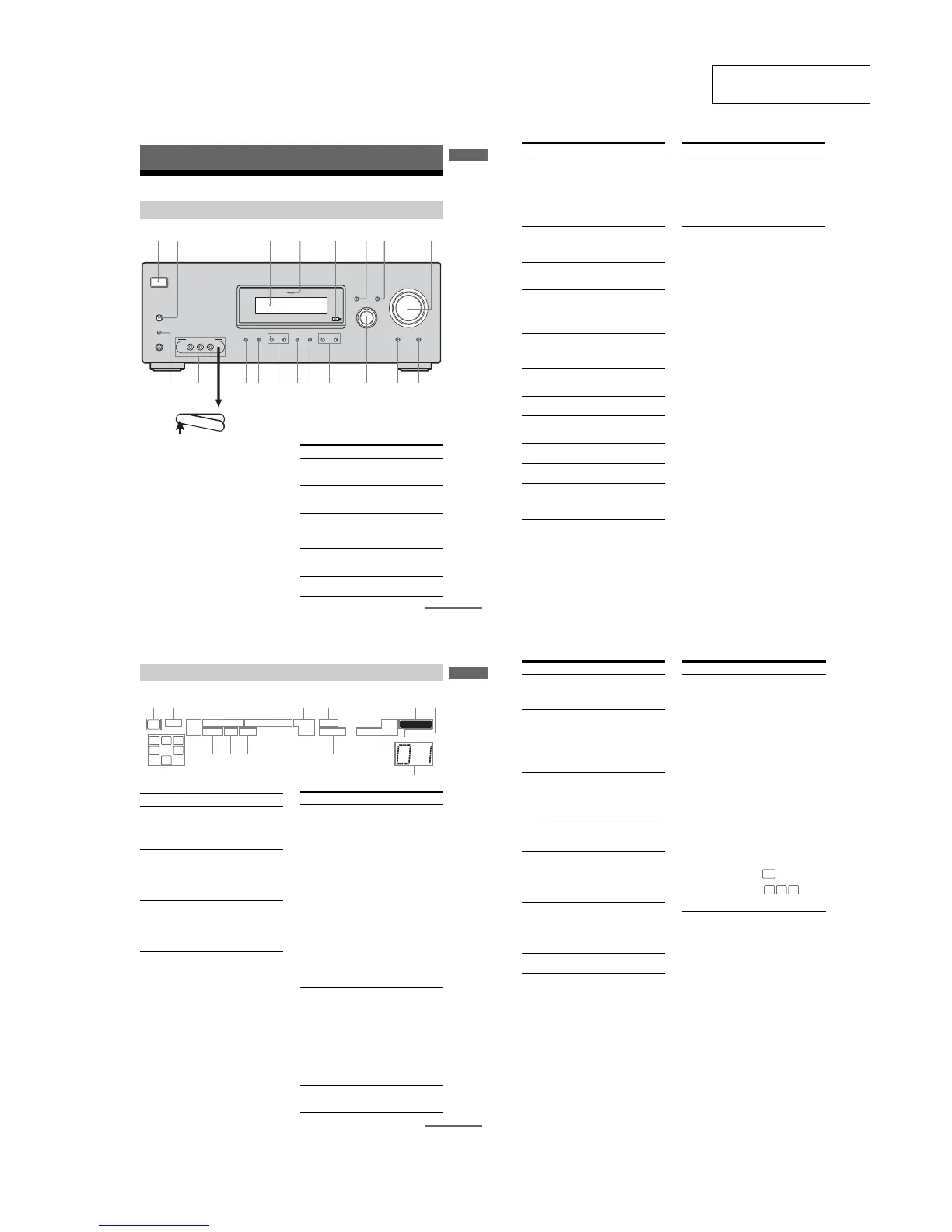
9q;w; qaqsqkql qdqfqgqhqj
P
U
SH
Name Function
A ?/1 Press to turn the receiver
on or off (page 25, 32, 33,
53, 55, 73).
B SPEAKERS
(OFF/A/B/A+B)
Press to select OFF, A, B,
A+B of the front speakers
(page 26).
C Display The current status of the
selected component or a
list of selectable items
appears here (page 7).
D MULTI CHANNEL
DECODING lamp
Lights up when multi
channel audio is decoded
(page 33).
E Remote sensor Receives signals from
remote commander.
continued
6
GB
Name Function
F DISPLAY Press to select information
displayed on the display
(page 59, 62).
G INPUT MODE Press to select the input
mode when the same
components are connected
to both digital and analog
jacks (page 60).
H MASTER
VOLUME
Turn to adjust the volume
level of all speakers at the
same time (page 30, 31,
32, 33).
I DIRECT Press to listen to high
quality analog sound
(page 52).
J MULTI CH IN Press to select the audio
directly from the
components connected to
the MULTI CH IN jacks
(page 31).
K INPUT
SELECTOR
Turn to select the input
source to playback (page
31, 32, 33, 52, 54, 57, 58,
60, 62, 63, 64).
L MOVIE,
MUSIC
Press to select sound fields
(MOVIE, MUSIC) (page
49).
M A.F.D. Press to select A.F.D.
mode (page 47).
N 2CH Press to select 2CH
STEREO mode (page 52,
53).
O TUNING +/– Press to scan a station
(page 54, 57).
P TUNING MODE Press to select the tuning
mode (page 54, 57, 73).
Q MEMORY/ENTER Press to store a station or
enter the selection when
selecting the settings
(page 25, 56).
Name Function
R VIDEO 3 IN/
PORTABLE AV IN
jacks
To con nect a camcorder or
video game (page 23, 31).
S AUTO CAL MIC
jack
Connects to the supplied
ECM-AC2 optimizer
microphone for the Auto
Calibration function (page
27).
T PHONES jack Connects to a headphone
(page 68).
7
GB
Getting Started
About the indicators on the display
MEMORY
L C R
SL
S
SR
SB
SW
LFE
SP A
SP B
RDS
STEREO MONO
A.DIRECT
D.RANGE
NEO:6
SLEEP OPT COAX 96/24
DIGITAL EX
;
DTS-ES
;
PRO LOGIC IIx
qs qa
qg
qh
qdqf
2143567 89
q;
Name Function
A SW Lights up when sub woofer
selection is set to “YES” (page
37) and the audio signal is
output from the SUB WOOFER
jack.
B LFE Lights up when the disc being
played back contains an LFE
(Low Frequency Effect)
channel and the LFE channel
signal is actually being
reproduced.
C SP A/SP B Lights up according to the
speaker system used. However,
these indicators do not light up
if the speaker output is turned
off or if a headphone is
connected.
D ;DIGITAL
(EX)
Lights up when Dolby Digital
signals are input. “;
DIGITAL EX” lights up when
Dolby Digital Surround EX
signals are decoded.
Note
When playing a Dolby Digital
format disc, be sure that you
have made digital connections
and that INPUT MODE is not
set to “ANALOG” (page 60).
E ;PRO
LOGIC (II)/
(IIx)
Lights up when the receiver
applies Pro Logic processing to
2 channel signals in order to
output the center and surround
channel signals. “; PRO
LOGIC II” lights up when the
Pro Logic II Movie/Music/
Game decoder is activated.
“; PRO LOGIC IIx” lights up
when the Pro Logic IIx Movie/
Music/Game decoder is
activated. However, these
indicators do not light up if both
the center and surround
speakers are set to “NO” (page
37) and you select a sound field
using the A.F.D. button.
Note
Dolby Pro Logic IIx decoding
does not function for DTS
format signals or for signals
with a sampling frequency of
more than 48 kHz.
F DTS (-ES)/
(96/24)
Lights up when DTS signals are
input. “DTS-ES” lights up
when DTS-ES signals are input.
“DTS 96/24” lights up when the
receiver is decoding DTS 96
kHz/24 bit signals.
Note
When playing a DTS format
disc, be sure that you have made
digital connections and that
INPUT MODE is not set to
“ANALOG” (page 60).
G NEO:6 Lights up when DTS Neo:6
Cinema/Music decoder is
activated (page 48).
Name Function
continued
8
GB
H MEMORY Lights up when a memory
function, such as Preset
Memory (page 57), etc., is
activated.
I A.DIRECT Lights up when ANALOG
DIRECT is selected (page 52).
J Preset
station
indicators
Lights up when using the
receiver to tune in radio stations
you have preset. For details on
presetting radio stations, see
page 56.
K Tuner
indicators
Lights up when using the
receiver to tune in radio stations
(page 53), etc.
Note
“RDS” appears for models of
area code CEL, CEK only.
L D.RANGE Lights up when dynamic range
compression is activated (page
35).
M COAX Lights up when INPUT MODE
is set to “AUTO” and the source
signal is a digital signal being
input through the COAXIAL
jack, or when INPUT MODE is
set to “COAX IN” (page 60).
N OPT Lights up when INPUT MODE
is set to “AUTO” and the source
signal is a digital signal being
input through the OPTICAL
jack, or when INPUT MODE is
set to “OPT IN” (page 60).
O SLEEP Lights up when the sleep timer
is activated (page 63).
Name Function
P Playback
channel
indicators
L
R
C
SL
SR
S
SB
The letters (L, C, R, etc.)
indicate the channels being
played back. The boxes around
the letters vary to show how the
receiver downmixes the source
sound (based on the speaker
settings).
Front Left
Front Right
Center (monaural)
Surround Left
Surround Right
Surround (monaural or the
surround components obtained
by Pro Logic processing)
Surround back (the surround
back components obtained by
6.1 channel decoding)
Example:
Recording format (Front/
Surround): 3/2.1
Output channel: When surround
speaker is set to “NO” (page 37)
Sound Field: A.F.D. AUTO
Name Function
L C R
SL SR
SW
STR-DG500:










 To Next Page