8
GB
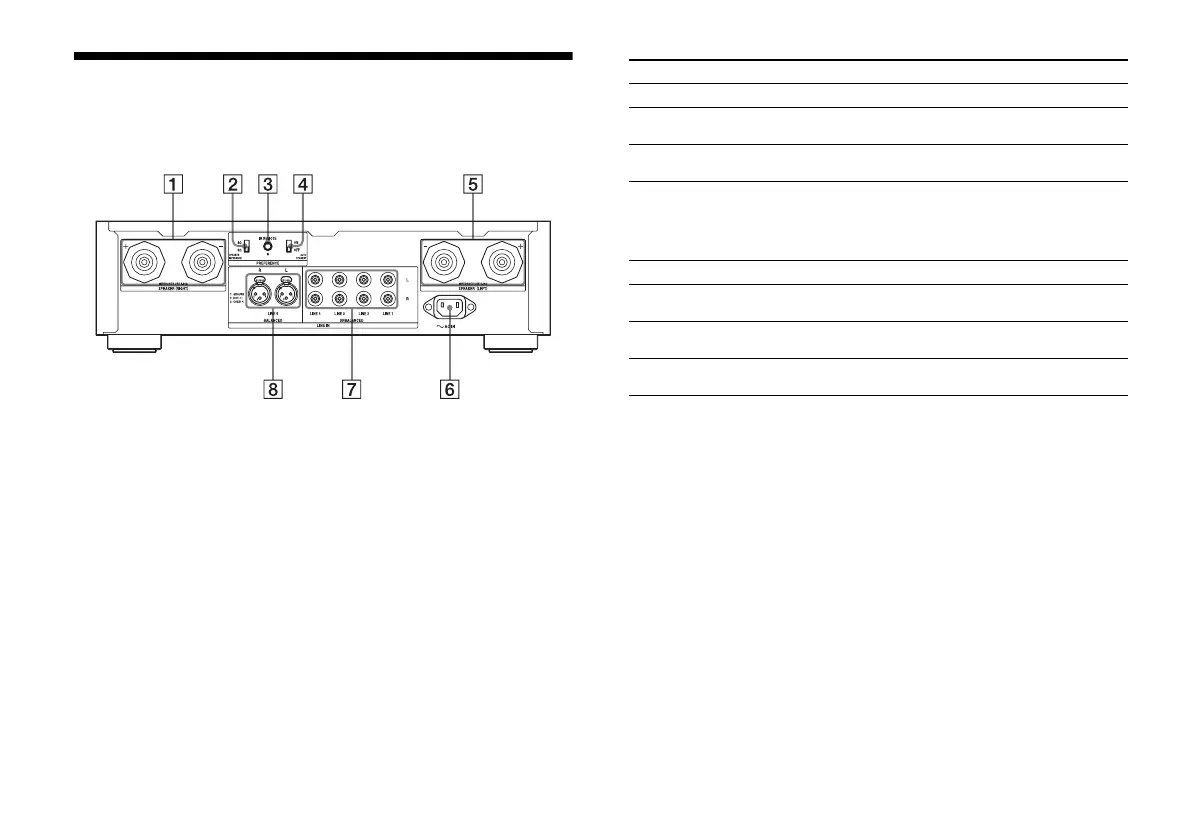
Rear panel
Parts Functions
SPEAKER (RIGHT) terminals Connect a right speaker (page 10).
SPEAKER IMPEDANCE switch
(4 Ω/8 Ω)
Set the switch to the impedance of the
speaker connected (page 10).
IR REMOTE jack Connects an IR repeater (not supplied)
(page 13).
AUTO STANDBY switch (ON/
OFF)
When it is set to ON, the amplifier
switches to standby mode
automatically when no sound has been
output for about 10 to 15 minutes
(page 17).
SPEAKER (LEFT) terminals Connect a left speaker (page 10).
AC IN terminal Connects the supplied AC power cord
(mains lead) (page 14).
UNBALANCED LINE 1/2/3/4
L/R jacks
Connect analog audio equipment with
audio cables (page 12).
BALANCED LINE 5 L/R jacks Connect analog audio equipment with
XLR (balanced) cables (page 12).


 To Next Page