EasyManua.ls Logo

Sony TC-366 - Page 17

Sony TC-366
53 pages
Print Icon
To Next Page IconTo Next Page
To Previous Page IconTo Previous Page
Loading...
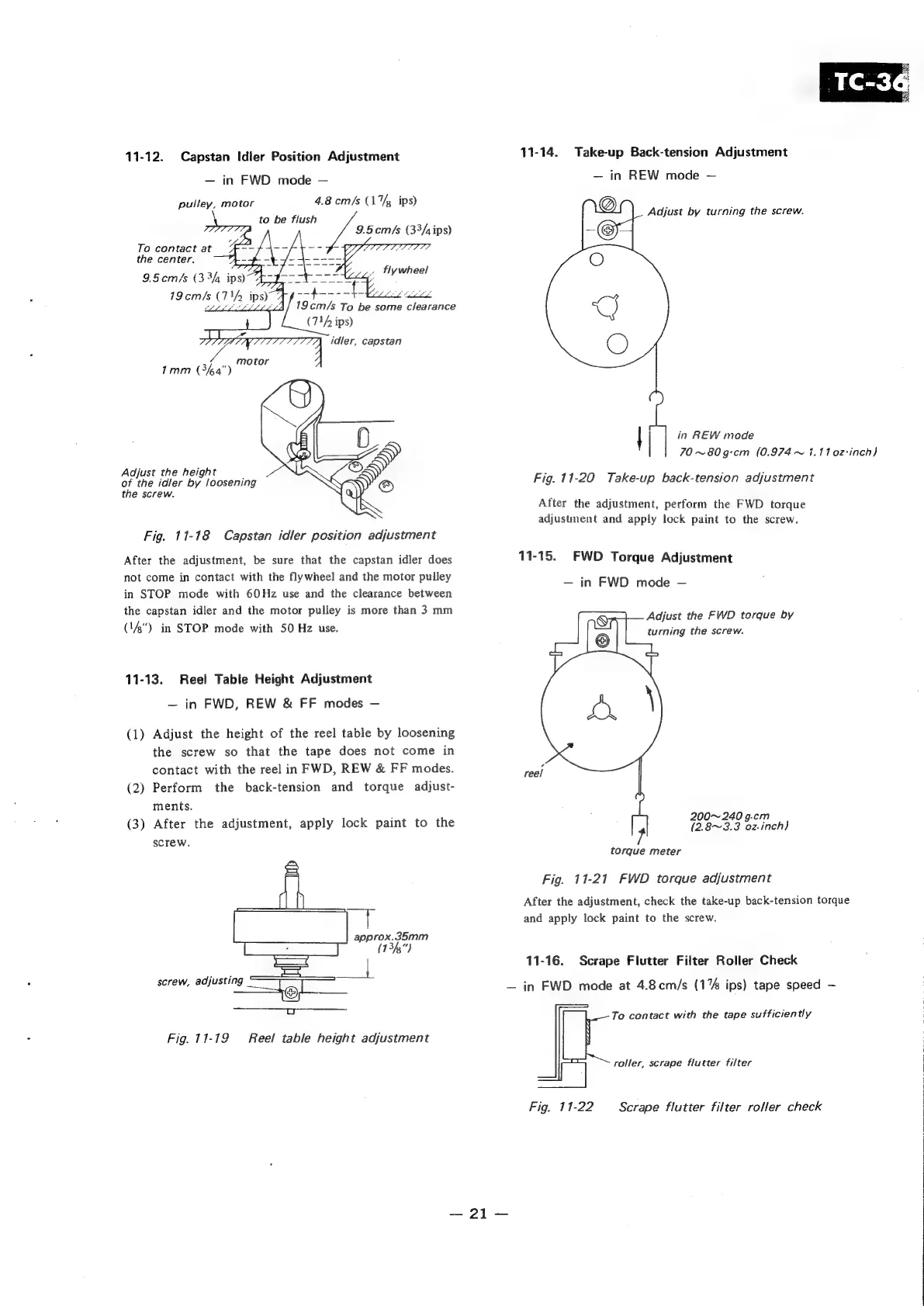
11-12.
Capstan
Idler
Position
Adjustment
in
FWD
mode
4.8
cm/s
(17,
ips)
to
be
flush
9.5cem/s
(33/,ips)
:
arse
eee
19cm/s
To
be
some
clearance
(7/
ips)
7
idler,
capstan
pulley,
motor
To
contact
at
the
center.
motor
7mm
(3%4")
Adjust
the
height
,
of
the
idler
by
loosening
the
screw.
Fig.
11-18
Capstan
idler
position
adjustment
After
the
adjustment,
be
sure
that
the
capstan
idler
does
not
come
in
contact
with
the
flywheel
and
the
motor
pulley
in
STOP
mode
with
60Hz
use
and
the
clearance
between
the
capstan
idler
and
the
motor
pulley
is
more
than
3
mm
(14")
in
STOP
mode
with
50
Hz
use.
11-13.
Reel
Table
Height
Adjustment
in
FWD,
REW
&
FF
modes
(1)
Adjust
the
height
of
the
reel
table
by
loosening
the
screw
so
that
the
tape
does
not
come
in
contact
with
the
reel
in
FWD,
REW
&
FF
modes.
(2)
Perform
the
back-tension
and
torque
adjust-
ments.
(3)
After
the
adjustment,
apply
lock
paint
to
the
screw.
approx.35mm
(134)
-—
ee
screw,
adjusting
Fig.
11-19
Reel
table
height
adjustment
21
11-14.
Take-up
Back-tension
Adjustment
in
REW
mode
@
Adjust
by
turning
the
screw.
©
O
5G)
O
1
|
in
REW
mode
|
70
~80g-cm
(0.974
~
4.11
02-inch)
Fig.
11-20
Take-up
back-tension
adjustment
After
the
adjustment,
perform
the
FWD
torque
adjustment
and
apply
lock
paint
to
the
screw.
11-15.
FWD
Torque
Adjustment
in
FWD
mode
Adjust
the
FWD
torque
by
turning
the
screw.
reel
200~
240
g.cm
(2.8~3.3
oz-inch)
7
torque
meter
Fig.
11-21
FWD
torque
adjustment
After
the
adjustment,
check
the
take-up
back-tension
torque
and
apply
lock
paint
to
the
screw.
11-16.
Scrape
Flutter
Filter
Roller
Check
in
FWD
mode
at
4.8cm/s
(1%
ips)
tape
speed
To
contact
with
the
tape
sufficiently
roller,
scrape
flutter
filter
|
Fig.
11-22
Scrape
flutter
filter
roller
check

Other manuals for Sony TC-366

Related product manuals