EasyManua.ls Logo

Sony TCD-D3 - Recording Procedures; Digital and Analog Input Connections

Sony TCD-D3
35 pages
Print Icon
To Next Page IconTo Next Page
To Previous Page IconTo Previous Page
Loading...
To
Record
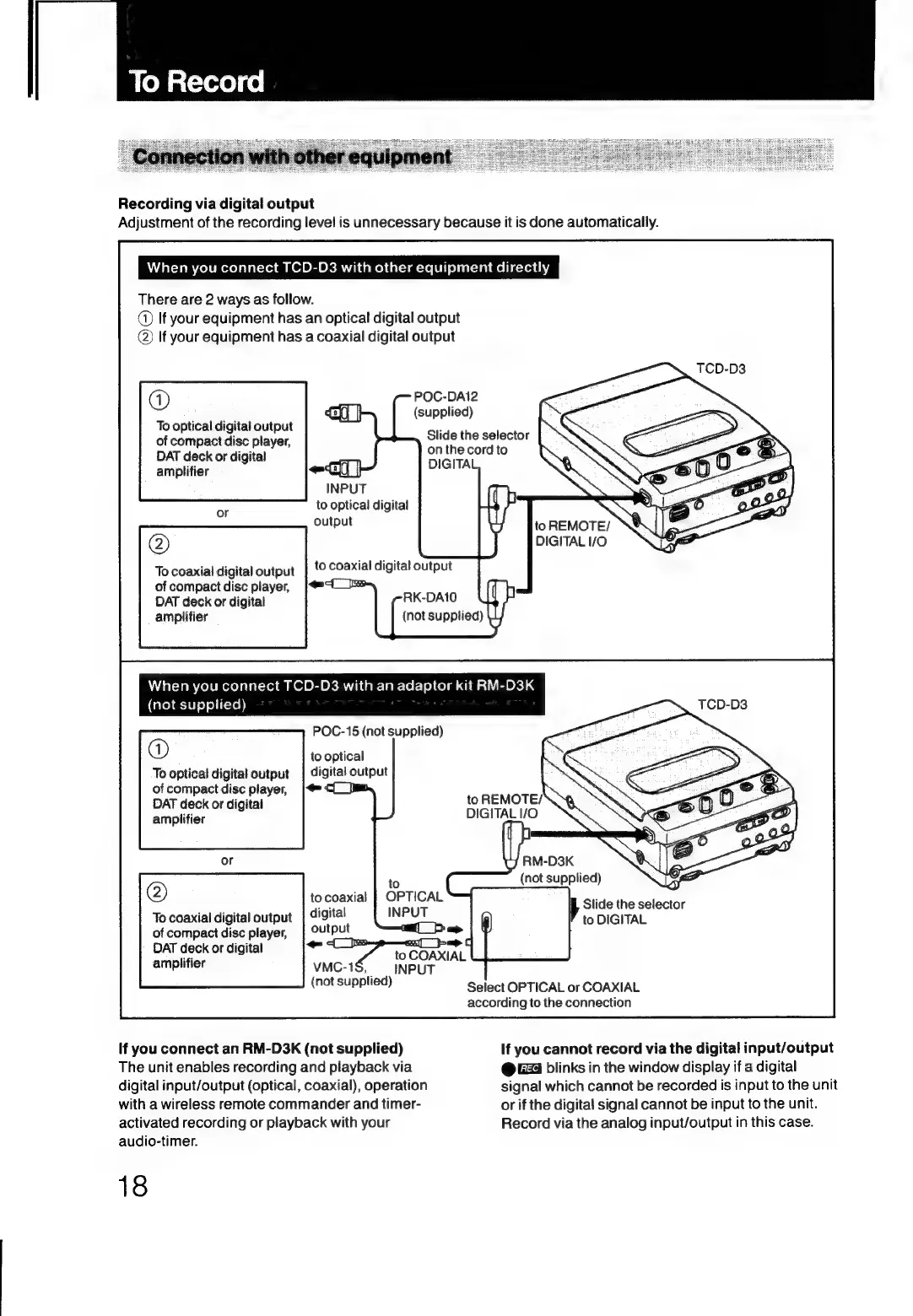
Recording
via
digital
output
Adjustment
of
the
recording
level
is
unnecessary
because
it
is
done
automatically.
When
you
connect
TCD-D3
with
other
equipment
directly
There
are
2
ways
as
follow.
@)
If
your
equipment
has
an
optical
digital
output
@)
If
your
equipment
has
a
coaxial
digital
output
@
To
optical
digital
output
of
compact
disc
player,
DAT
deck
or
digital
amplifier
onthe
@)
To
coaxial
digital
output
of
compact
disc
player,
DAT
deck
or
digital
amplifier
When
you
connect
TCD-D3
with
an
adaptor
ki
Care)
@-10)
9)
o)1(-19))
@)
To
optical
digital
output
of
compact
disc
player,
DAT
deck
or
digital
amplifier
POC-15
(not
supplied)
to
optical
digital
output
@
To
coaxial
digital
output
to
coaxial
digital
output
->
=
to
COAXIAL
vMC-1$,
INPUT
(not
supplied)
of
compact
disc
player,
DAT
deck
or
digital
amplifier
If
you
connect
an
RM-D3K
(not
supplied)
The
unit
enables
recording
and
playback
via
digital
input/output
(optical,
coaxial),
operation
with
a
wireless
remote
commander
and
timer-
activated
recording
or
playback
with
your
audio-timer.
18
POC-DA12
(supplied)
Slide
the
selector
cord
to
to
REMOTE/
DIGITAL
I/O
t
RM-D3K
to
REMOTE/
DIGITAL
I/O
RM-D3K
(not
supplied)
Slide
the
selector
to
DIGITAL
Select
OPTICAL
or
COAXIAL
according
to
the
connection
If
you
cannot
record
via
the
digital
input/output
@
G4
blinks
in
the
window
display
if
a
digital
signal
which
cannot
be
recorded
is
input
to
the
unit
or
if
the
digital
signal
cannot
be
input
to
the
unit.
Record
via
the
analog
input/output
in
this
case.

Related product manuals