EasyManua.ls Logo

Sony TCD-D3 - Page 19

Sony TCD-D3
35 pages
Print Icon
To Next Page IconTo Next Page
To Previous Page IconTo Previous Page
Loading...
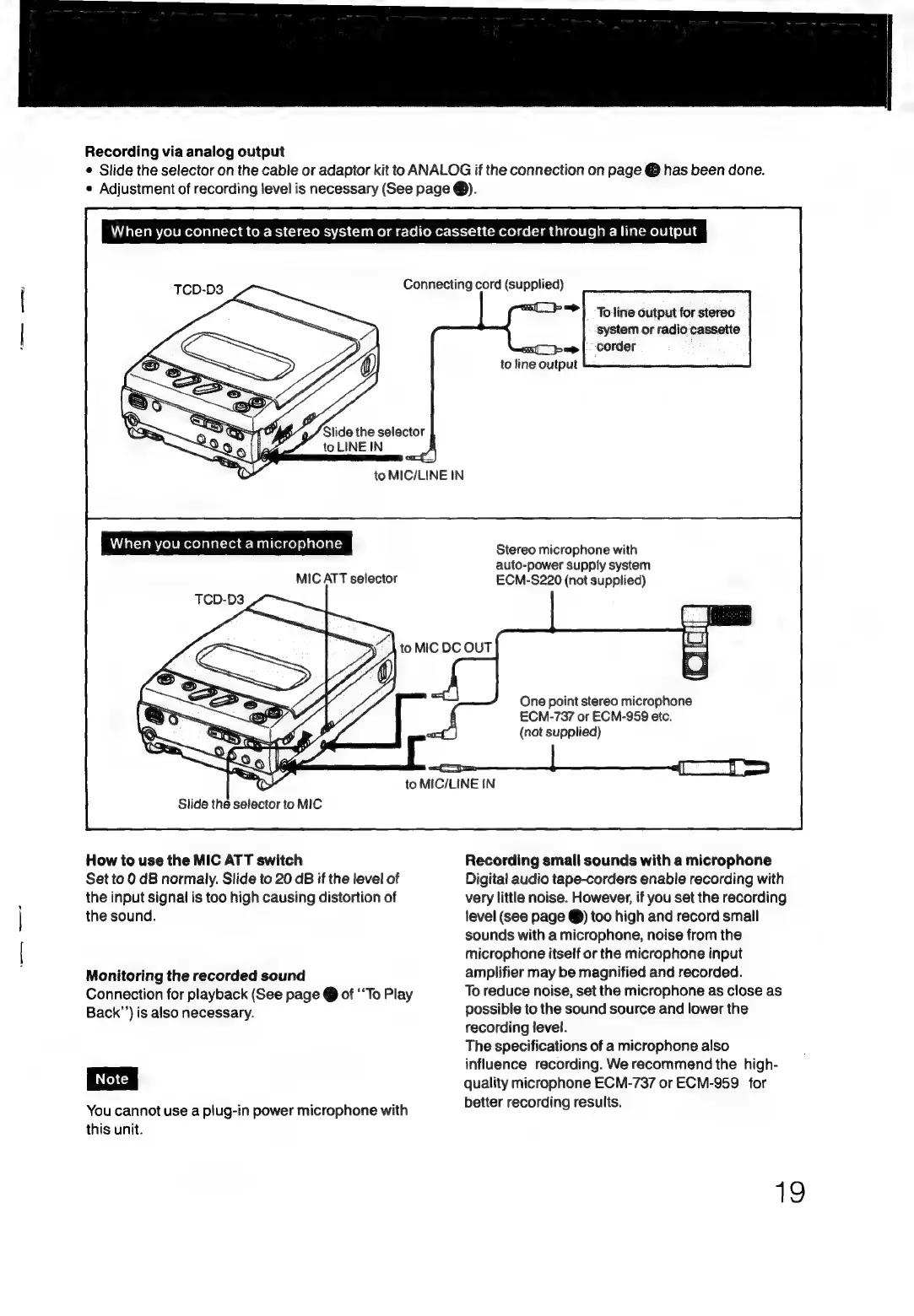
Recording
via
analog
output
¢
Slide
the
selector
on
the
cable
or
adaptor
kit
to
ANALOG
if
the
connection
on
page
@
has
been
done.
¢
Adjustment
of
recording
level
is
necessary
(See
page
®).
AT
aTcraMm
cole
moxelalal-xei@
Com-Bc}
(-1e-1R=\'7-)
lime)
mele
(omer:
(-t-1-1
4
cmerolcel-Tm
dalcell
(else
Milaccmoeli
olen
Connecting
cord
(supplied)
Slide
the
selector
to
LINE
IN
to
MIC/LINE
IN
When
you
connect
a
microphone
MIC
ATT
selector
“>|
‘Toline
output
for
stereo
system
or
radio
cassette
to
line
output
Stereo
microphone
with
auto-power
supply
system
ECM-S220
(not
supplied)
to
MIC
DC
OUT
One
point
stereo
microphone
ECM-737
or
ECM-959
etc.
(not
supplied)
to
MIC/LINE
IN
Slide
the
selector
to
MIC
How
to
use
the
MIC
ATT
switch
Set
to
0
dB
normaly.
Slide
to
20
dB
if
the
level
of
the
input
signal
is
too
high
causing
distortion
of
the
sound.
Monitoring
the
recorded
sound
Connection
for
playback
(See
page
@
of
‘‘To
Play
Back’’)
is
also
necessary.
You
cannot
use
a
plug-in
power
microphone
with
this
unit.
Recording
small
sounds
with
a
microphone
Digital
audio
tape-corders
enable
recording
with
very
little
noise.
However,
if
you
set
the
recording
level
(see
page
@)
too
high
and
record
small
sounds
with
a
microphone,
noise
from
the
microphone
itself
or
the
microphone
input
amplifier
may
be
magnified
and
recorded.
To
reduce
noise,
set
the
microphone
as
close
as
possible
to
the
sound
source
and
lower
the
recording
level.
The
specifications
of
a
microphone
also
influence
recording.
We
recommend
the
high-
quality
microphone
ECM-737
or
ECM-959
for
better
recording
results.
19

Related product manuals