EasyManua.ls Logo

Sony TCD-D3 - Tape Handling for Recording

Sony TCD-D3
35 pages
Print Icon
To Next Page IconTo Next Page
To Previous Page IconTo Previous Page
Loading...
To
Record
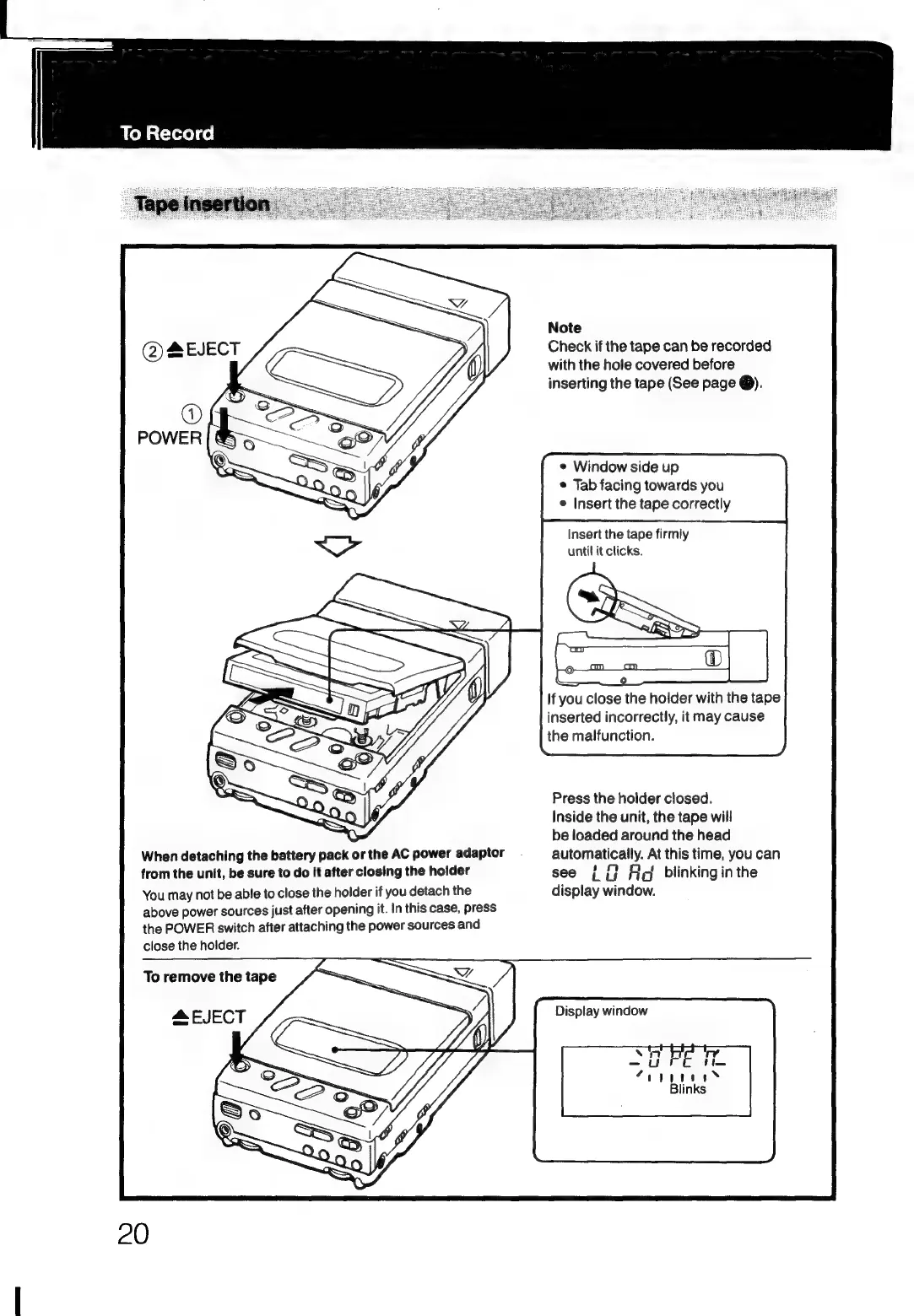
When
detaching
the
battery
pack
or
the
AC
power
adaptor
from
the
unit,
be
sure
to
do
it
after
closing
the
holder
You
may
not
be
able
to
close
the
holder
if
you
detach
the
above
power
sources
just
after
opening
it.
In
this
case,
press
the
POWER
switch
after
attaching
the
power
sources
and
close
the
holder.
To
remove
the
tape
Note
Check
if
the
tape
can
be
recorded
with
the
hole
covered
before
inserting
the
tape
(See
page
@).
©
Window
side
up
e
Tab
facing
towards
you
e
Insert
the
tape
correctly
Insert
the
tape
firmly
until
it
clicks.
If
you
close
the
holder
with
the
tape
inserted
incorrectly,
it
may
cause
the
malfunction.
Press
the
holder
closed.
Inside
the
unit,
the
tape
will
be
loaded
around
the
head
automatically.
At
this
time,
you
can
see
{
{}
A
blinkinginthe
display
window.
Display
window

Related product manuals