EasyManua.ls Logo

Sony TCD-D3 - Playback Operations

Sony TCD-D3
35 pages
Print Icon
To Next Page IconTo Next Page
To Previous Page IconTo Previous Page
Loading...
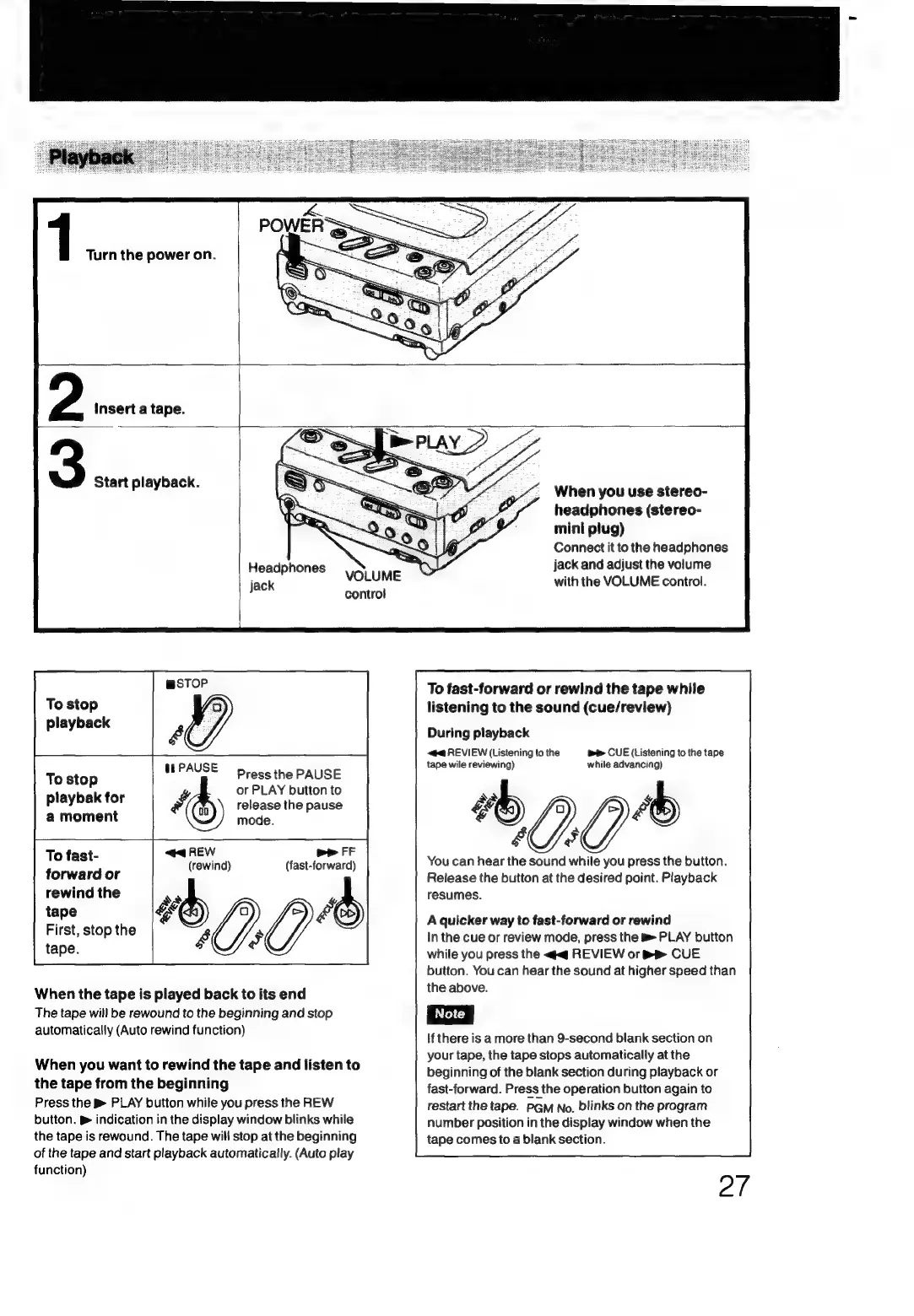
1
Turn
the
power
on.
7,
Insert
a
tape.
Start
playback.
Headphones
Jack
contro!
To
stop
playback
4
eae
Press
the
PAUSE
To
sto
P
or
PLAY
button
to
playbak
for
Py,
(th)
release
the
pause
a
moment
mode.
To
fast-
<@<4
REW
bP
FF
(rewind)
(fast-forward)
forward
or
rewind
the
ss
E—-
OO*
irst,
stop
the
Fy
tape.
&
a
When
the
tape
is
played
back
to
its
end
The
tape
will
be
rewound
to
the
beginning
and
stop
automatically
(Auto
rewind
function)
When
you
want
to
rewind
the
tape
and
listen
to
the
tape
from
the
beginning
Press
the
PLAY
button
while
you
press
the
REW
button.
p&
indication
in
the
display
window
blinks
while
the
tape
is
rewound.
The
tape
will
stop
at
the
beginning
of
the
tape
and
start
playback
automatically.
(Auto
play
function)
When
you
use
stereo-
headphones
(stereo-
mini
plug)
Connect
it
to
the
headphones
jack
and
adjust
the
volume
with
the
VOLUME
control.
To
fast-forward
or
rewind
the
tape
while
listening
to
the
sound
(cue/review)
During
playback
«#4
REVIEW
(Listening
to
the
be
CUE
(Listening
to
the
tape
tape
wile
reviewing)
while
advancing)
"00"
You
can
hear
the
sound
while
you
press
the
button.
Release
the
button
at
the
desired
point.
Playback
resumes.
A
quicker
way
to
fast-forward
or
rewind
In
the
cue
or
review
mode,
press
the
PLAY
button
while
you
press
the
«<q
REVIEW
or
BR
CUE
button.
You
can
hear
the
sound
at
higher
speed
than
the
above.
If
there
is
a
more
than
9-second
blank
section
on
your
tape,
the
tape
stops
automatically
at
the
beginning
of
the
blank
section
during
playback
or
fast-forward.
Press
the
operation
button
again
to
restart
the
tape.
PGM
No.
blinks
on
the
program
number
position
in
the
display
window
when
the
tape
comes
to
a
blank
section.

Related product manuals