EasyManua.ls Logo

Sony TCD-D3 - Track Navigation and Display

Sony TCD-D3
35 pages
Print Icon
To Next Page IconTo Next Page
To Previous Page IconTo Previous Page
Loading...
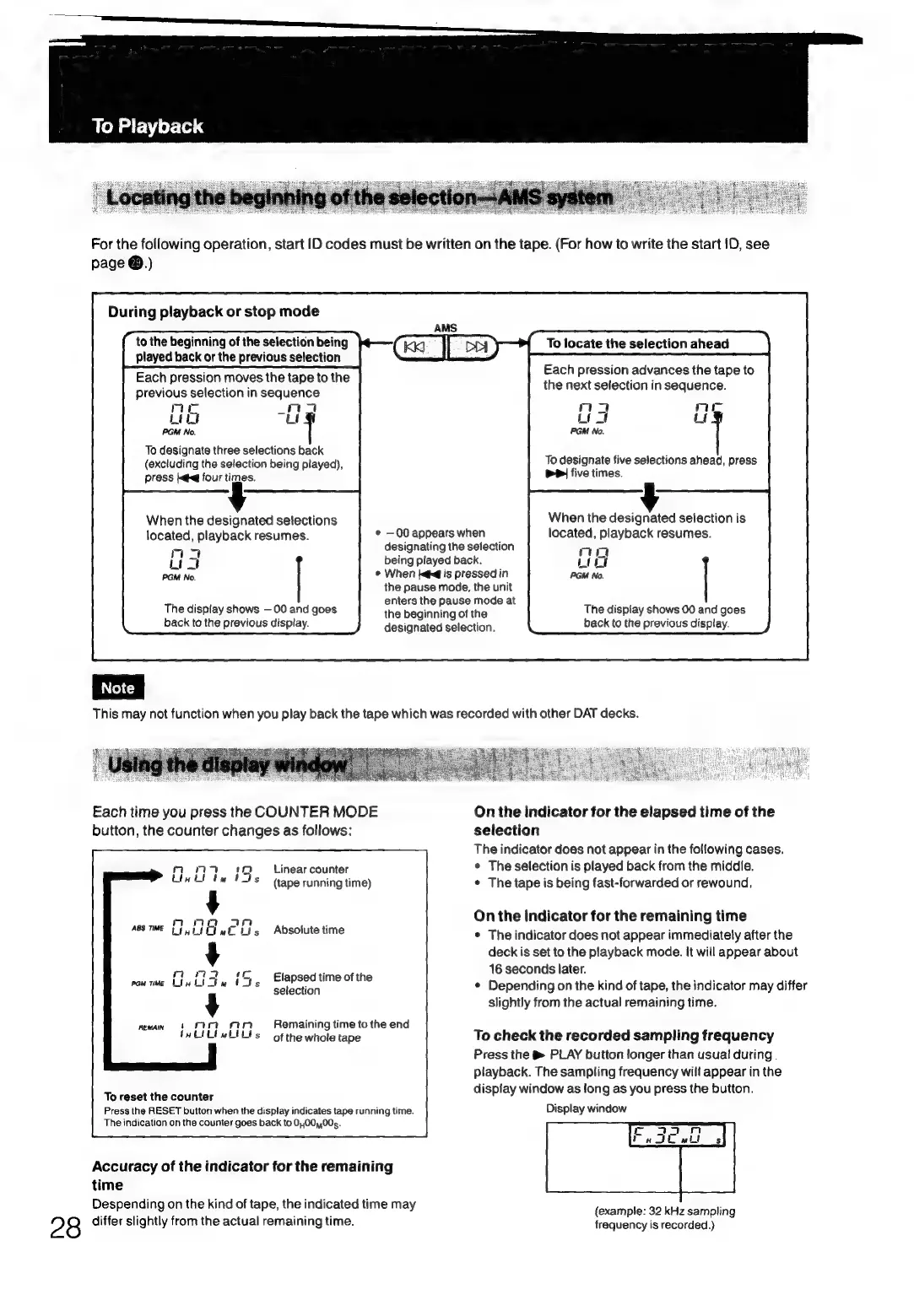
To
Playback
For the
following
operation,
start
ID
codes
must
be
written
on the
tape.
(For
how
to
write
the
start
1D,
see
page
@.)
During
playback
or
stop
mode
to
the
beginning
of
the
selection
being
To
locate
the
selection
ahead
played
back
or
the
previous
selection
Each
pression
moves
the
tape
to
the
mull
sisi
ene
ane
a
.
pang
previous
selection
in
sequence
ql
:
mae
ma
m4
nie
Len
uf
Liat
ut
PGM
No.
PGM
No.
To
designate
three
selections
back
:
,
2
(excluding
the
selection
being
played),
To
designate
five
selections
ahead,
press
press
iq
four
times.
PP
five
times.
When
the
designated
selections
When
the
designated
selection
is
located,
playback
resumes.
¢
—00
appears
when
located,
playback
resumes.
mas
designating
the
selection
wea
being
played
back.
PGM
No.
*
When
ke
is
pressed
in
the
pause
mode,
the
unit
:
nters
th
use
mode
at
The
display
shows
00
and
goes
ri
Sanne
of
the
The
display
shows
00
and
goes
back
to
the
previous
display.
designated
selection.
back
to
the
previous
display.
This
may
not
function
when
you
play
back
the
tape
which
was
recorded
with
other
DAT
decks.
Each
time
you
press
the
COUNTER
MODE
On
the
indicator
for
the
elapsed
time
of
the
button,
the
counter
changes
as
follows:
selection
The
indicator
does
not
appear
in
the
following
cases.
Linear
counter
*
The
selection
is
played
back
from
the
middie.
(tape
running
time)
©
The
tape
is
being
fast-forwarded
or
rewound,
On
the
indicator
for
the
remaining
time
*
The
indicator
does
not
appear
immediately
after
the
deck
is
set
to
the
playback
mode.
It
will
appear
about
Elapsed
time
of
the
ie
Seconds
later
F
.
selection
¢
Depending
on
the
kind
of
tape,
the
indicator
may
differ
slightly
from
the
actual
remaining
time.
Absolute
time
Remaining
time
to
the
end
;
of
the
whole
tape
To
check
the
recorded
sampling
frequency
Press
the
&
PLAY
button
longer
than
usual
during
.
playback.
The
sampling
frequency
will
appear
in
the
display
window
as
long
as
you
press
the
button.
To
reset
the
counter
: i
Press
the
RESET
button
when
the
display
indicates
tape
running
time.
Display
window
The
indication
on
the
counter
goes
back
to
0,,00,,00g.
Accuracy
of
the
indicator
for
the
remaining
time
Despending
on
the
kind
of
tape,
the
indicated
time
may
A
ae
:
(example:
32
kHz
sampling
28
differ
slightly
from
the
actual
remaining
time.
frequency
is
recorded.)

Related product manuals