EasyManua.ls Logo

Sony TCD-D3 - Advanced Operations (Nice to Know); Writing Start IDs Manually

Sony TCD-D3
35 pages
Print Icon
To Next Page IconTo Next Page
To Previous Page IconTo Previous Page
Loading...
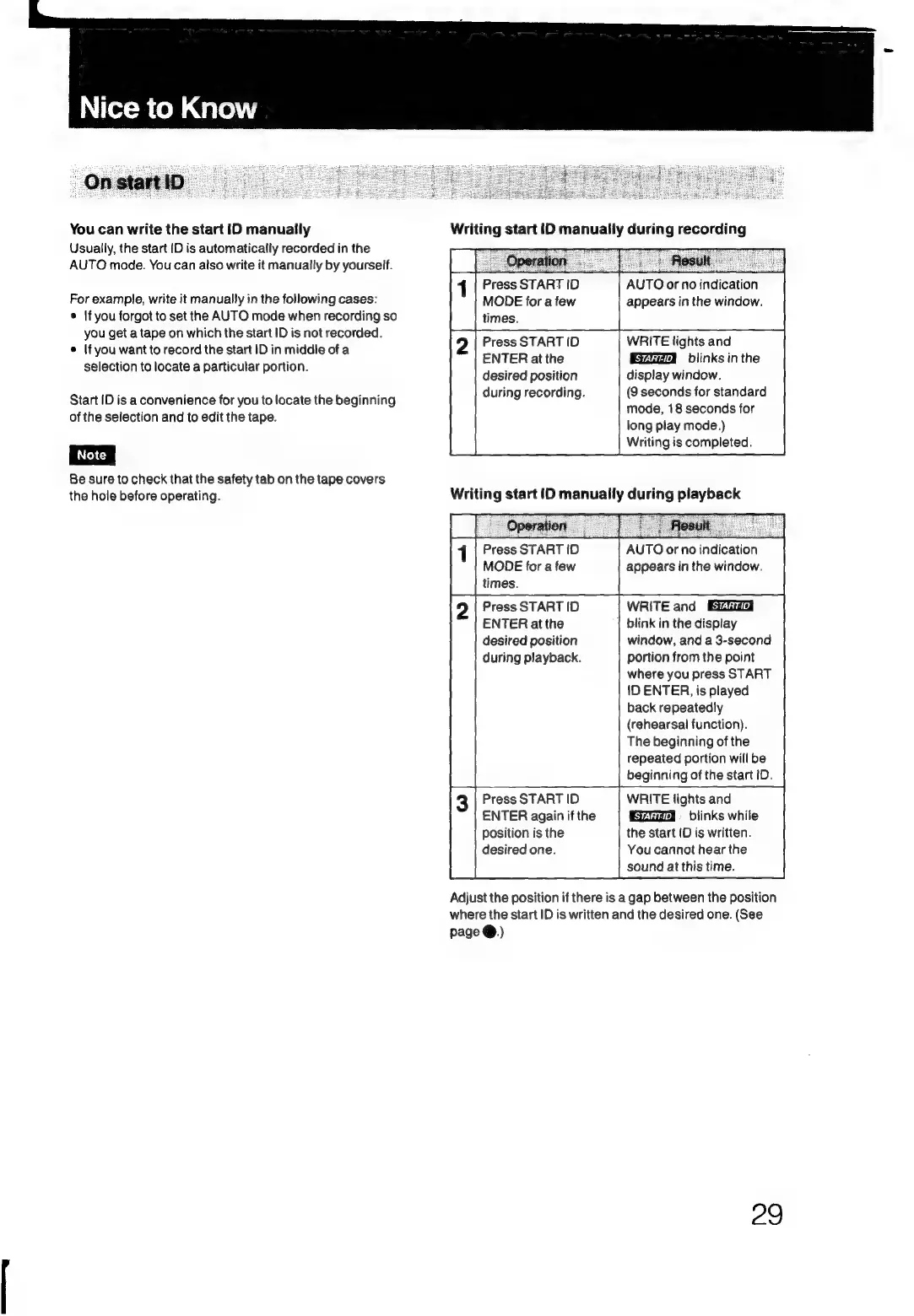
You
can
write
the
start
ID
manually
Usually,
the
start
ID
is
automatically
recorded
in
the
AUTO
mode.
You
can
also
write
it
manually
by
yourself.
For
example,
write
it
manually
in
the
following
cases:
©
\f
you
forgot
to
set
the
AUTO
mode
when
recording
so
you
get
a
tape
on
which
the
start
ID
is
not
recorded.
©
If
you
want
to
record
the
start
ID
in
middle
of
a
selection
to
locate
a
particular
portion.
Start
(D
is
a
convenience
for
you
to
locate
the
beginning
of
the
selection
and
to
edit
the
tape.
Be
sure
to
check
that
the
safety
tab
on
the
tape
covers
the
hole
before
operating.
Writing
start
ID
manually
during
recording
Press
START
ID
MODE
for
a
few
times.
Press
START
ID
ENTER
at
the
desired
position
during
recording.
AUTO
or
no
indication
appears
in
the
window.
WRITE
lights
and
blinks
in
the
display
window.
(9
seconds
for
standard
mode,
18
seconds
for
long
play
mode.)
Writing
is
completed.
Writing
start
ID
manuaily
during
playback
Press
START
ID
MODE
for
a
few
times.
Press
START
ID
ENTER
atthe
desired
position
during
playback.
Press
START
ID
ENTER
again
if
the
position
is
the
desired
one.
AUTO
or
no
indication
appears
in
the
window.
WRITE
and
blink
in
the
display
window,
and
a
3-second
portion
from
the
point
where
you
press
START
1D
ENTER,
is
played
back
repeatedly
(rehearsal
function).
The
beginning
of
the
repeated
portion
will
be
beginning
of
the
start
ID.
WRITE
lights
and
Ea
=
blinks
while
the
start
ID
is
written.
You
cannot
hear
the
sound
at
this
time.
Adjust
the
position
if
there
is
a
gap
between
the
position
where
the
start
ID
is
written
and
the
desired
one.
(See
page
@.)
29

Related product manuals