EasyManua.ls Logo

Sony TCD-D3 - Input;Output and Selector Switches

Sony TCD-D3
35 pages
Print Icon
To Next Page IconTo Next Page
To Previous Page IconTo Previous Page
Loading...
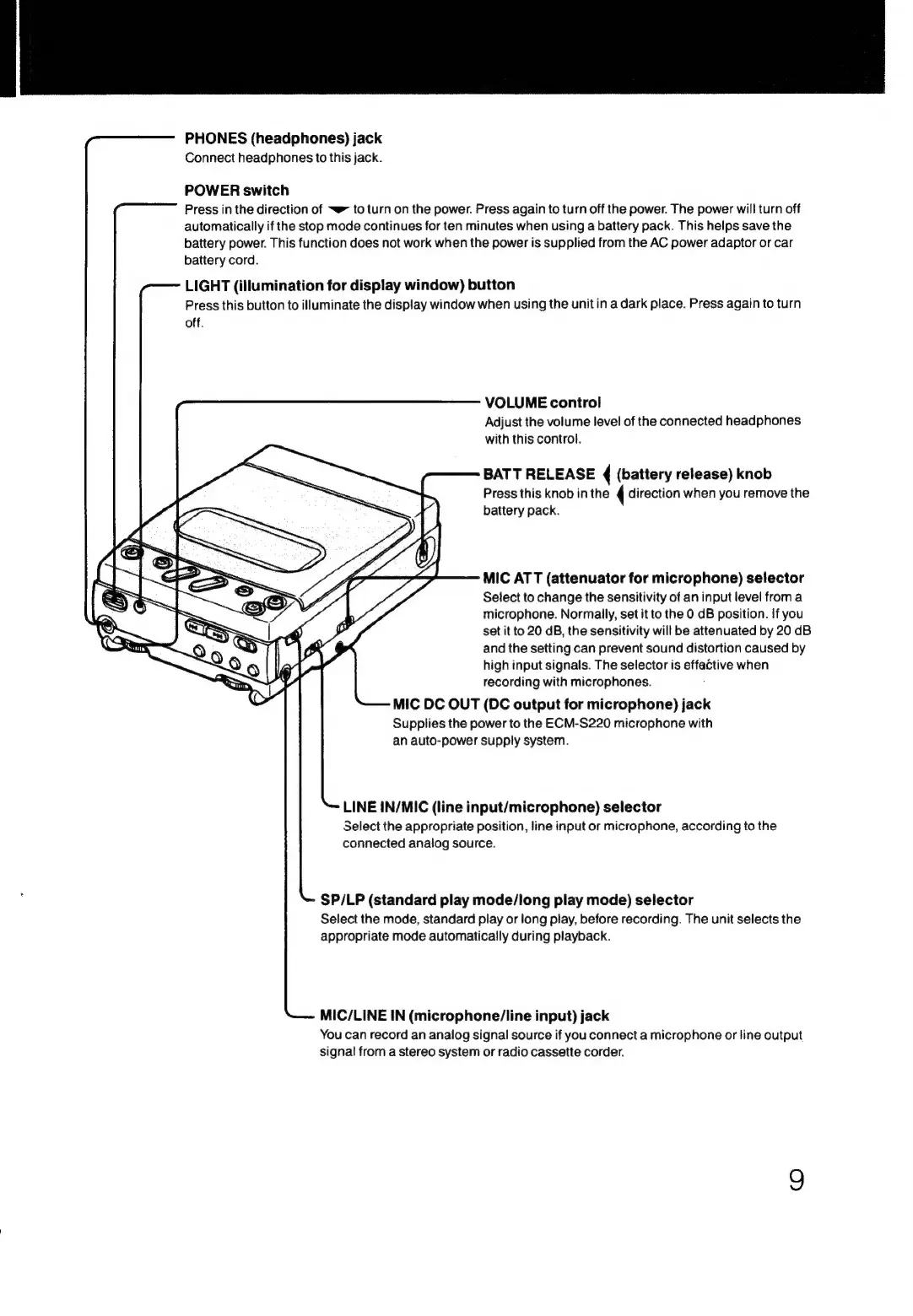
PHONES
(headphones)
jack
Connect
headphones
to
this
jack.
POWER
switch
Press
in
the
direction
of
~~ยป
to
turn
on
the
power.
Press
again
to
turn
off
the
power.
The
power
will
turn
off
automatically
if
the
stop
mode
continues
for
ten
minutes
when
using
a
battery
pack.
This
helps
save
the
battery
power.
This
function
does
not
work
when
the
power
is
supplied
from
the
AC
power
adaptor
or
car
battery
cord.
LIGHT
(illumination
for
display
window)
button
Press
this
button
to
illuminate
the
display
window
when
using
the
unitin
a
dark
place.
Press
again
to
turn
off.
VOLUME
control
Adjust
the
volume
level
of
the
connected
headphones
with
this
control.
BATT
RELEASE
(
(battery
release)
knob
Press
this
knob
in
the
4
direction
when
you
remove
the
battery
pack.
MIC
ATT
(attenuator
for
microphone)
selector
Select
to
change
the
sensitivity
of
an
input
level
froma
microphone.
Normally,
set
it
to
the
0
dB
position.
If
you
set
it
to
20
dB,
the
sensitivity
will
be
attenuated
by
20
dB
and
the
setting
can
prevent
sound
distortion
caused
by
high
input
signals.
The
selector
is
effactive
when
recording
with
microphones.
MIC
DC
OUT
(DC
output
for
microphone)
jack
Supplies
the
power
to
the
ECM-S220
microphone
with
an
auto-power
supply
system.
LINE
iN/MIC
(line
input/microphone)
selector
Select
the
appropriate
position,
line
input
or
microphone,
according
to
the
connected
analog
source.
SP/LP
(standard
play
mode/long
play
mode)
selector
Select
the
mode,
standard
play
or
long
play,
before
recording.
The
unit
selects
the
appropriate
mode
automatically
during
playback.
MIC/LINE
IN
(microphone/line
input)
jack
You
can
record
an
analog
signal
source
if
you
connect
a
microphone
or
line
output
signal
from
a
stereo
system
or
radio
cassette
corder.

Related product manuals