Connecting the AC Power Cord
17
6
Attach the arm cover.
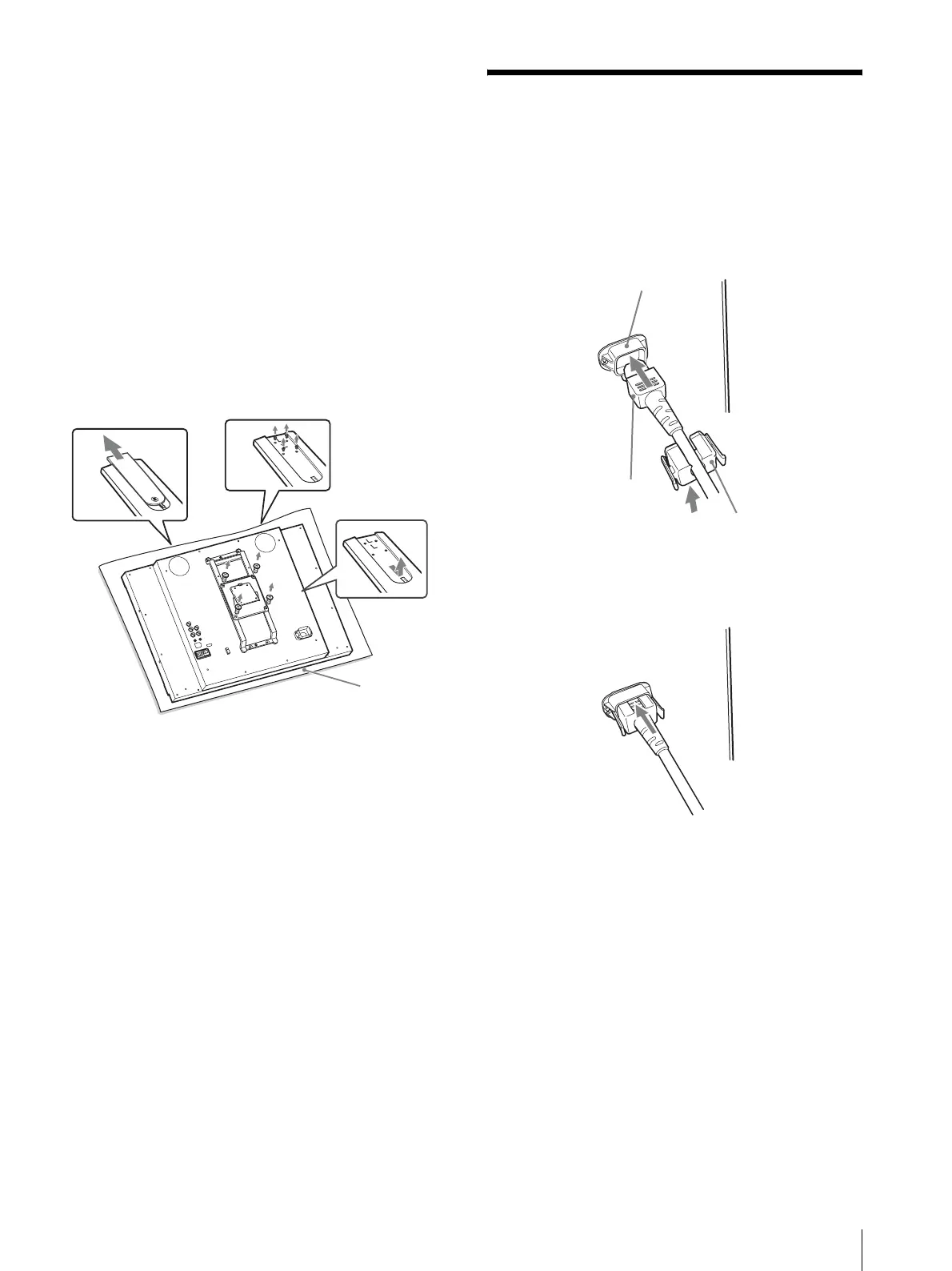
To remove the stand and stand
attachment bracket
1
Put the monitor on a soft cloth with the surface of
the monitor downward.
2
Slide and remove the arm cover of the stand.
3
Remove the four screws.
4
Remove the arm.
5
Remove the four screws to remove the stand
attachment bracket.
Connecting the AC
Power Cord
1
Plug the AC power cord into the AC IN socket on
the rear panel. Then, attach the AC plug holder
(supplied) to the AC power cord.
2
Slide the AC plug holder over the cord until it
locks.
To disconnect the AC power cord
Pull out the AC plug holder while pressing the lock
levers.
2
3
4
5
1
AC IN socket
AC power cord
AC plug holder
(supplied)





 To Next Page