EasyManua.ls Logo

Sony TRINITRON KV-16WT1 - Exchanging Programme Positions; OPTIONAL CONNECTIONS; 21-pin Connector Usage; Front Panel Connectors

Sony TRINITRON KV-16WT1
60 pages
Print Icon
To Next Page IconTo Next Page
To Previous Page IconTo Previous Page
Loading...
34
aN
a
I
a
PO
EET
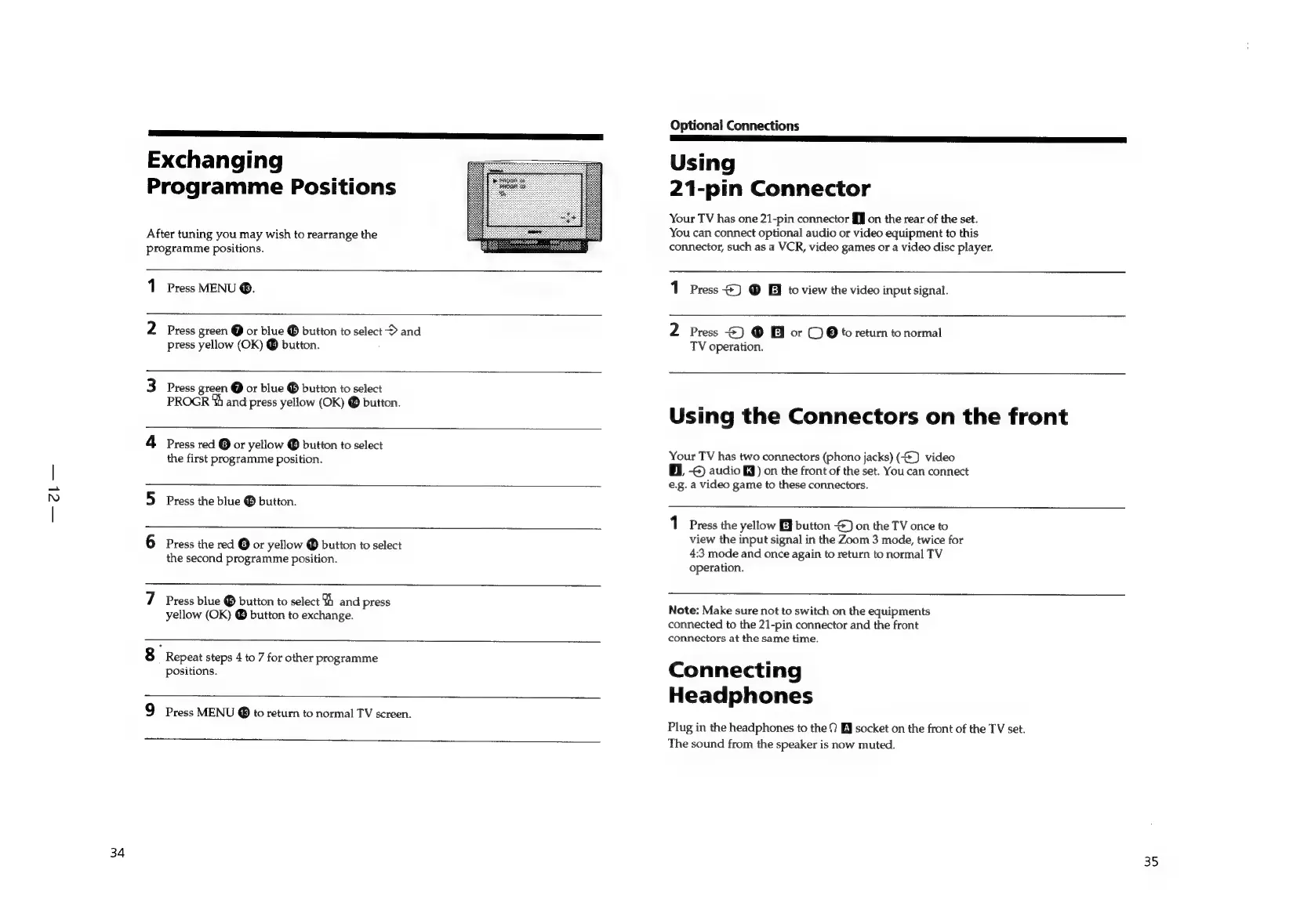
Exchanging
Programme
Positions
After
tuning
you
may
wish
to
rearrange
the
programme
positions.
Press
MENU
®.
2
Press
green
@
or
blue
®
button
to
select
>
and
8
press
yellow
(OK)
®
button.
3
Press
green
@
or
blue
®
button
to
select
PROGR
%
and
press
yellow
(OK)
@
button.
4
Press
red
©
or
yellow
®
button
to
select
the
first
programme
position.
5
Press
the
blue
button.
6
Press
the
red
@
or
yellow
@
button
to
select
the
second
programme
position.
7
Press
blue
®
button
to
select
1
and
press
yellow
(OK)
®
button
to
exchange.
8
Repeat
steps
4
to
7
for
other
programme
positions.
9
Press
MENU
to
return
to
normal
TV
screen.
Optional
Connections
i
il}
Using
21-pin
Connector
Your
TV
has
one
21-pin
connector
Ml
on
the
rear
of
the
set.
You
can
connect
optional
audio
or
video
equipment
to
this
connector,
such
as
a
VCR,
video
games
or
a
video
disc
player.
1
Press
&)
®
Ei
to
view
the
video
input
signal.
2
Press
4)
®@
&
or
©
9
to
return
to
normal
TV
operation.
Using
the
Connectors
on
the
front
Your
TV
has
two
connectors
(phono
jacks)
(-@)
video
EL
-€)
audio
MJ)
on
the
front
of
the
set.
You
can
connect
e.g.
a
video
game
to
these
connectors.
1
Press
the
yellow
button
-)
on
the
TV
once
to
view
the
input
signal
in
the
Zoom
3
mode,
twice
for
4:3
mode
and
once
again
to
return
to
normal
TV
operation.
Note:
Make
sure
not
to
switch
on
the
equipments
connected
to
the
21-pin
connector
and
the
front
connectors
at
the
same
time.
Connecting
Headphones
Plug
in
the
headphones
to
the
9
EJ
socket
on
the
front
of
the
TV
set.
The
sound
from
the
speaker
is
now
muted.
35

Related product manuals