EasyManua.ls Logo

Sony TRINITRON KV-16WT1 - Focus Adjustment; Screen, Drive, Colour & Brightness

Sony TRINITRON KV-16WT1
60 pages
Print Icon
To Next Page IconTo Next Page
To Previous Page IconTo Previous Page
Loading...
KV-16WT1
(3)
Screen-corner
Convergence.
3-4.
SCREEN
(G2),
DRIVE,
SUB
COLOUR
and
SUB
BRIGHTNESS.
Screen
(G2)
setting
|
Sy
aN
Input
a
0
IRE
(Black
Level)
signal
from
the
pattern
generator.
Enter
into
the
Service
Mode
"Test""Test"
and
38.
Adjust
G2
VR
until
the
Down
arrow
is
displayed.
Adjust
G2
VR
until
the
Down
arrow
just
disappears.
Press
the
TV
Button
on
the
Remote
Commander
to
store
the
data.
1.
N
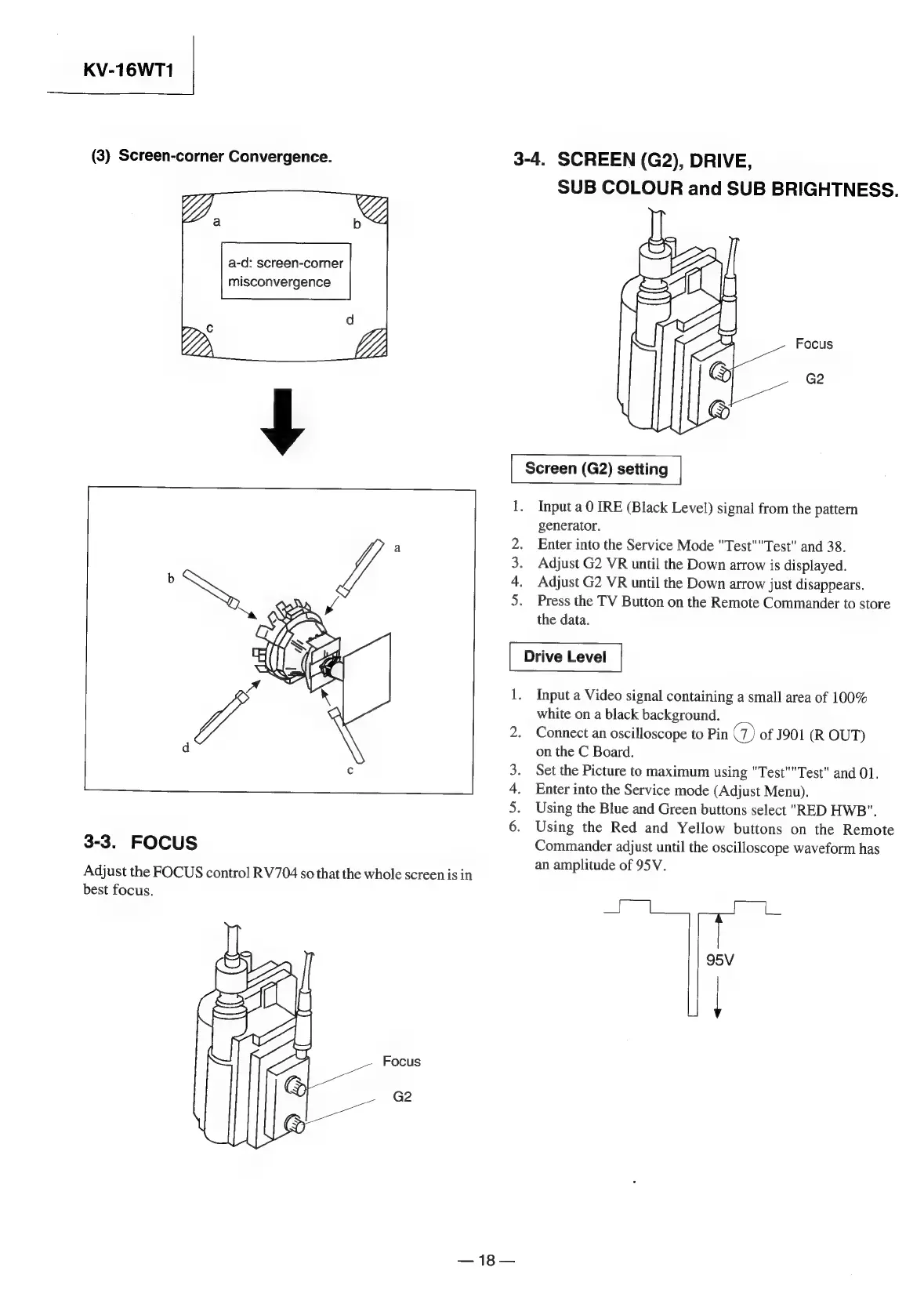
3-3.
FOCUS
Adjust
the
FOCUS
control
RV704
so
that
the
whole
screen
is
in
best
focus.
Focus
G2
—18—
Doe
OD
Input
a
Video
signal
containing
a
small
area
of
100%
white
on
a
black
background.
Connect
an
oscilloscope
to
Pin
@)
of
J901
(R
OUT)
on
the
C
Board.
Set
the
Picture
to
maximum
using
"Test""Test"
and
01.
Enter
into
the
Service
mode
(Adjust
Menu).
Using
the
Blue
and
Green
buttons
select
"RED
HWB".
Using
the
Red
and
Yellow
buttons
on
the
Remote
Commander
adjust
until
the
oscilloscope
waveform
has
an
amplitude
of
95V.
95V
rm

Related product manuals