EasyManua.ls Logo

Sony TRINITRON KV-2565MT - Page 4

Sony TRINITRON KV-2565MT
21 pages
Print Icon
To Next Page IconTo Next Page
To Previous Page IconTo Previous Page
Loading...
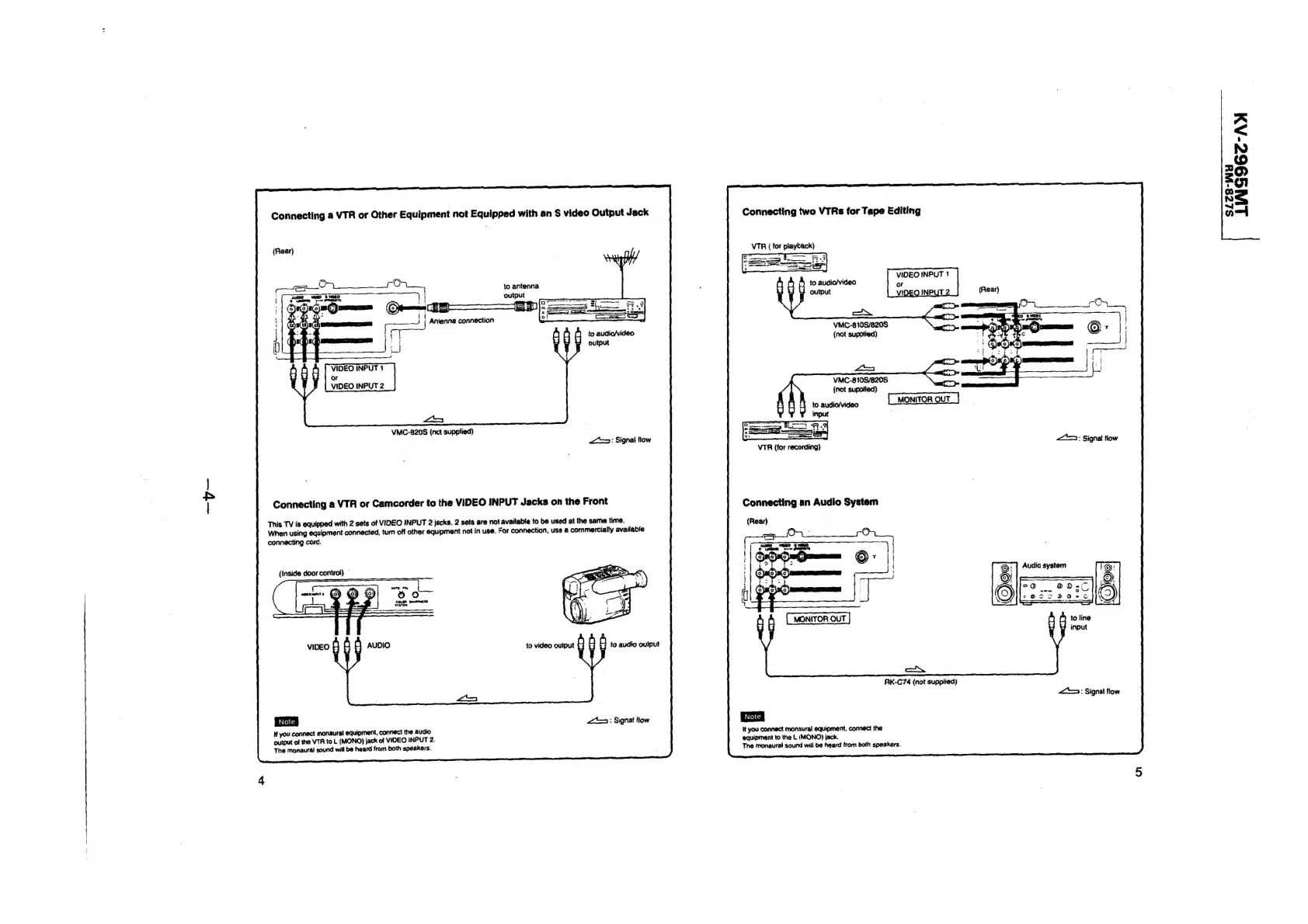
Connecting
a
VTR
or
Other
Equipment
not
Equipped
with
an
S
video
Output
Jack
to
antenna
output
Antenna
connection
i
3
r
|
a)
VIDEO
INPUT
1
or
VIDEO
INPUT
2
VMC-820S
(nct
supplied)
Connecting
a
VTR
or
Camcorder
to
the
VIDEO
INPUT
Jacks
on
the
Front
This
TV
is
equipped
with
2
sets
of
VIDEO
INPUT
2
jacks.
2
sets
are
not
available
to
be
usad
at
the
same
time.
When
using
equipment
connected,
turn
off
other
equipment
not
in
use.
For
connection,
usa
a
commercially
available
connecting
cord.
(Inside
door
control)
|
to
video
output
Hf
you
connect
monaural
equipment,
connect
the
audio
output
of
the
VTR
to
L
(MONO)
jack
of
VIOEO
INPUT
2.
The
monaural
sound
will
be
heard
from
both
speakers.
Connecting
two
VTRs
for
Tape
Editing
|
Sas
ren,
VIDEO
INPUT
1
to
audio/video
or
output
VIDEO
INPUT
2
VMC-610S/820S
(not
supplied)
win
VMC-810S/820S
{not
supplied)
to
audio/video
input
MONITOR
OUT
VTR
(for
recording)
Connecting
an
Audio
System
MONITOR
OUT
aN
AK-C74
(not
supplied)
It
you
connect
monaural
equipment.
connect
the
equipment
to
the
L
(MONO)
jack.
The
monaural
sound
will
be
heard
from
doth
speakers.
to
line
input
«=:
Signal
flow
LING96C-AX
a
=
oe
'
~~
~”

Related product manuals