EasyManua.ls Logo

Sony TRINITRON KV-2565MT - Presetting TV Channels; Automatic Channel Presetting; Manual Channel Presetting; Skipping Program Positions

Sony TRINITRON KV-2565MT
21 pages
Print Icon
To Next Page IconTo Next Page
To Previous Page IconTo Previous Page
Loading...
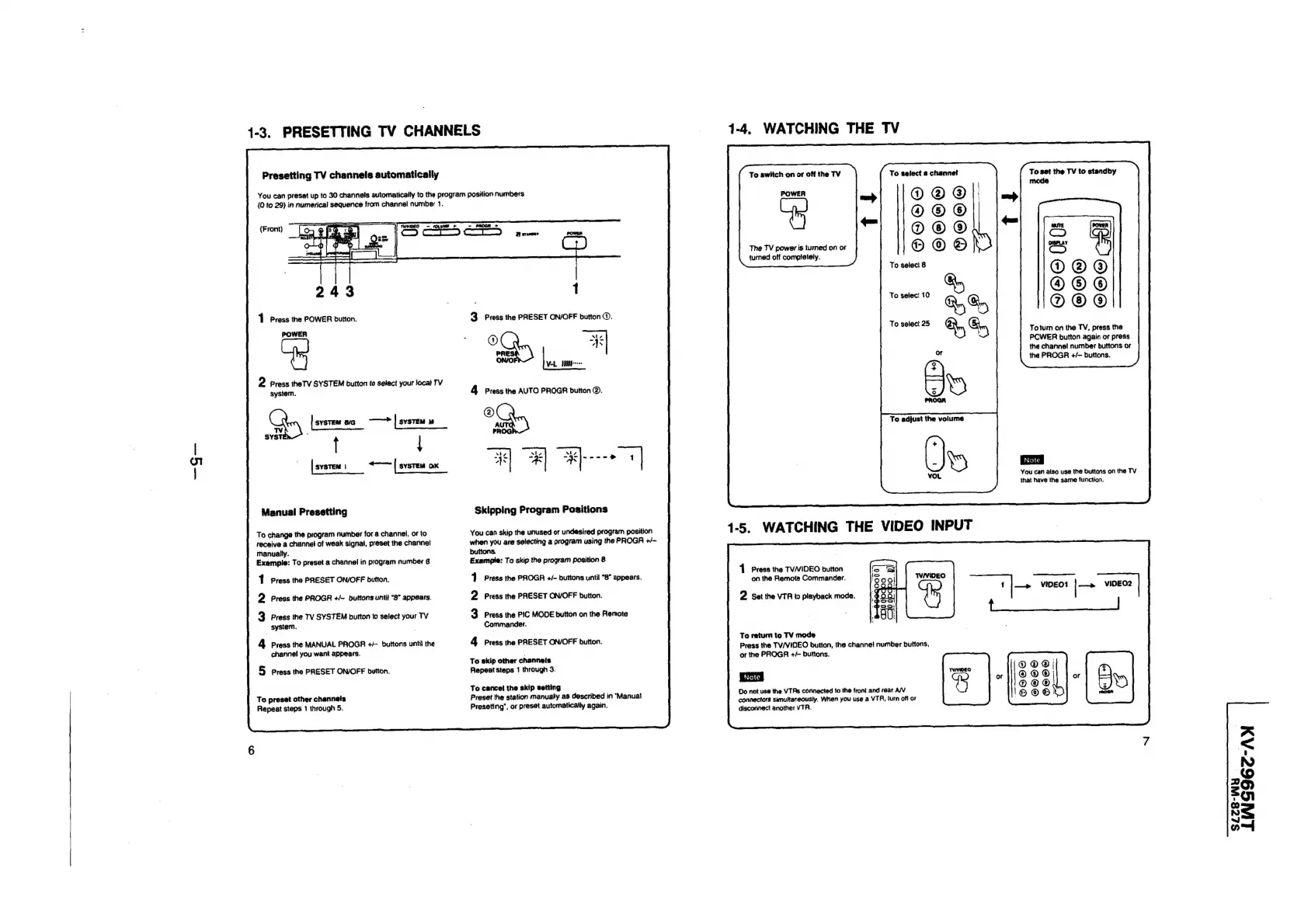
1-3.
PRESETTING
TV
CHANNELS
Presetting
TV
channels
automatically
You
can
preset
up
to
30
channels
automatically
to
the
program
position
numbers
(0
to
29)
in
numerica)
sequence
from
channel
number
1.
(Front)
1
Press
the
POWER
button.
POWER
2
Press
theTV
SYSTEM
button
to
select
your
local
TV
system.
Gp
tex
~ibie
|
svsren
1
«~~
|
sysTeM
DK
Manual
Presetting
To
change
the
program
number
for
a
channel,
or
to
receive
a
channel
of
weak
signal,
preset
the
channei
manually.
Example:
To
preset
a
channel
in
program
number
8
1
Press
the
PRESET
ON/OFF
button.
Press
the
PROGR
+/~
buttons
until
“8”
appears.
system.
Press
the
MANUAL
PROGR
++
buttons
unti}
the
channel
you
want
appears.
2
3
Press
the
TV
SYSTEM
button
lo
select
your
TV
4
5
Press
the
PRESET
ON/OFF
button.
To
preset
other
channels
Repeat
steps
1
through
5.
1
3
Press
the
PRESET
ON/OFF
button
©.
A
Press
the
AUTO
PROGR
button
@.
A
PROG
#4)
Hd
Skipping
Program
Positions
You
can
skip
the
unused
or
undesired
program
position
when
you
are
selecting
a
program
using
the
PROGA
+/-—
buttons.
Example:
To
skip
the
program
position
8
4
Press
the
PROGR
+/-
buttons
until
“8”
appears.
2
Press
the
PRESET
ON/OFF
button.
3.
Press
the
PIC
MODE
button
on
the
Renote
Commander.
4
Press
the
PRESET
ON/OFF
button.
To
skip
other
channeis
Repeat
steps
1
through
3.
To
cancel
the
skip
setting
Preset
the
station
manually
as
described
in
‘Manuat
Presetting’,
or
preset
automatically
again.
1-4.
WATCHING
THE
TV
To
switch
on
or
off
the
TV
POWER
The
TV
power
is
turned
on
or
turned
off
compietely.
To
select
10
To
select
25
1
Press
the
TVVIDEO
button
on
the
Remote
Commander.
2
set
the
VTA
to
playback
mode.
To
return
to
TV
mode
Press
the
TV/VIDEO
button,
the
channei
number
buttons,
or
the
PROGR
+/-
buttons.
|
Note
|
Do
not
use
the
VTRs
connected
to
the
front
and
rear
A/V
connectors
simultaneously,
When
you
use
a
VTA,
turn
off
or
disconnect
another
VTA.
To
select
a
channel
To
set
the
TV
to
standby
Toturn
on
the
TV,
prass
the
PCWER
button
again
or
press
the
channel
number
buttons
or
the
PROGR
+/-
buttons.
You
can
also
use
the
buttons
on
the
TV
that
have
the
same
function.
A
>
N
aS)
o
ol
S
nal
SLZ8-WY

Related product manuals