EasyManua.ls Logo

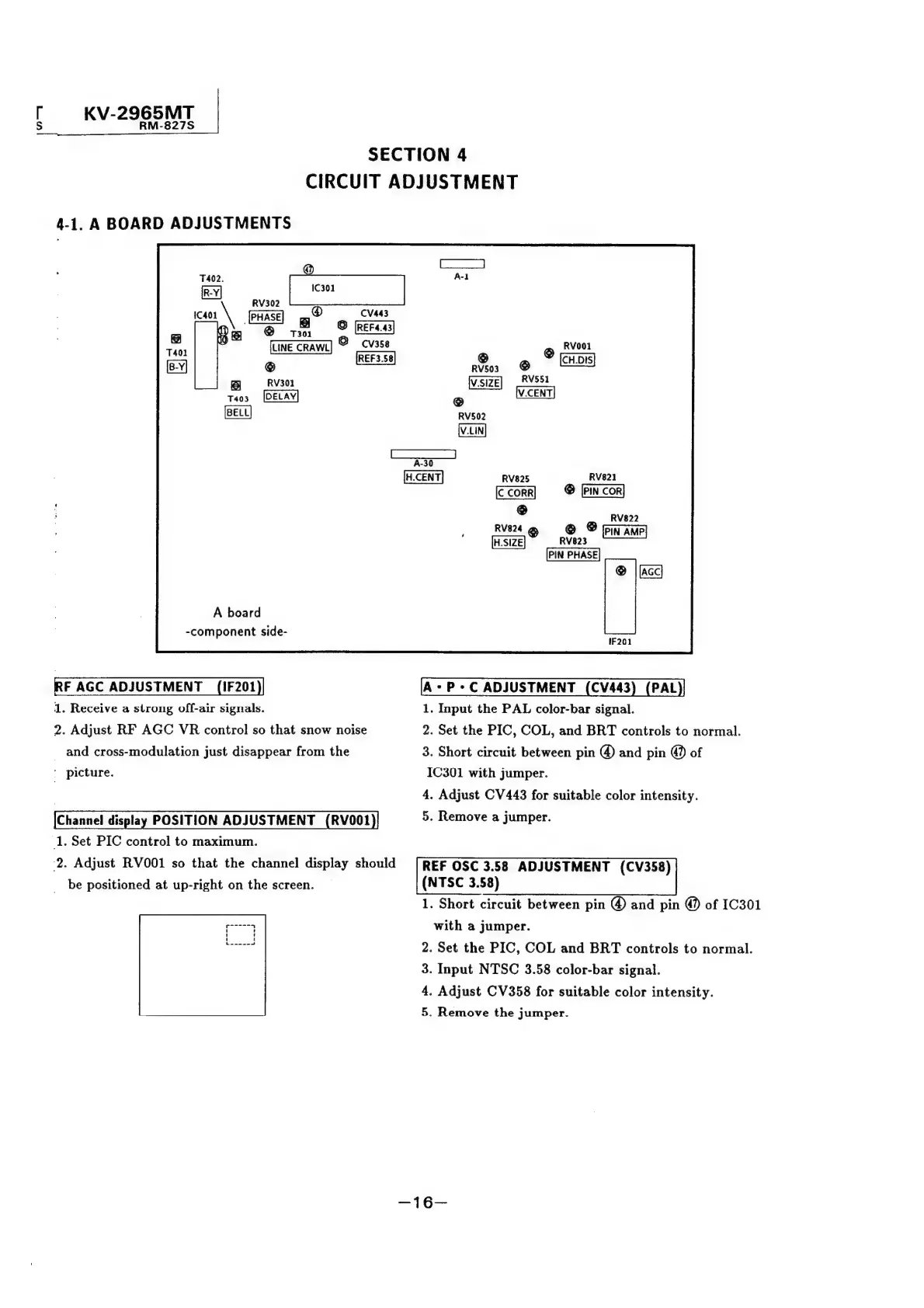
Sony TRINITRON KV-2565MT - Circuit Adjustments; A Board RF AGC Adjustment; A Board Channel Display Position Adjustment; A Board APC Adjustment (PAL)

Sony TRINITRON KV-2565MT
21 pages
Print Icon
To Next Page IconTo Next Page
To Previous Page IconTo Previous Page
Loading...
[
KV-2965MT
S
RM-827S
SECTION
4
CIRCUIT
ADJUSTMENT
4-1.
A
BOARD
ADJUSTMENTS
@
®
RV302
301
cans
\
PHASE]
gg”
6
LINE
CRAWL]
A
board
-component
side-
RF
AGC
ADJUSTMENT
(1F201)|
1.
Receive
a
strong
off-air
signals.
2.
Adjust
RF
AGC
VR
control
so
that
snow
noise
_
and
cross-modulation
just
disappear
from
the
'
picture.
Channel
display
POSITION
ADJUSTMENT
(RV001
1.
Set
PIC
control
to
maximum.
2.
Adjust
RVO001
so
that
the
channel
display
should
be
positioned
at
up-right
on
the
screen.
@
Rvoo
@
RV551
@
RV503
V.SIZE
@
RV502
RV821
©
[PIN
cor]
RV825
C
CORR
@
RV824
RV822
@
©
Pin
Ane}
RV823
PIN
PHASE
®
|
acc}
A-P-C
ADJUSTMENT
(CV443
1.
Input
the
PAL
color-bar
signal.
2.
Set
the
PIC,
COL,
and
BRT
controls
to
normal.
3.
Short
circuit
between
pin
@
and
pin
@
of
IC301
with
jumper.
4.
Adjust
CV
443
for
suitable
color
intensity.
5.
Remove
a
jumper.
REF
OSC
3.58
ADJUSTMENT
(CV358)
(NTSC
3.58)
1.
Short
circuit
between
pin
and
pin
@
of
1C301
with
a
jumper.
2.
Set
the
PIC,
COL
and
BRT
controls
to
normal.
3.
Input
NTSC
3.58
color-bar
signal.
4.
Adjust
CV358
for
suitable
color
intensity.
5.
Remove
the
jumper.
PAL

Related product manuals