EasyManua.ls Logo

Sony TRINITRON KV-2565MT - Focus Adjustment; Screen (G2) and White Balance Adjustments; Screen (G2) Adjustment; White Balance (Cut off) Adjustment

Sony TRINITRON KV-2565MT
21 pages
Print Icon
To Next Page IconTo Next Page
To Previous Page IconTo Previous Page
Loading...
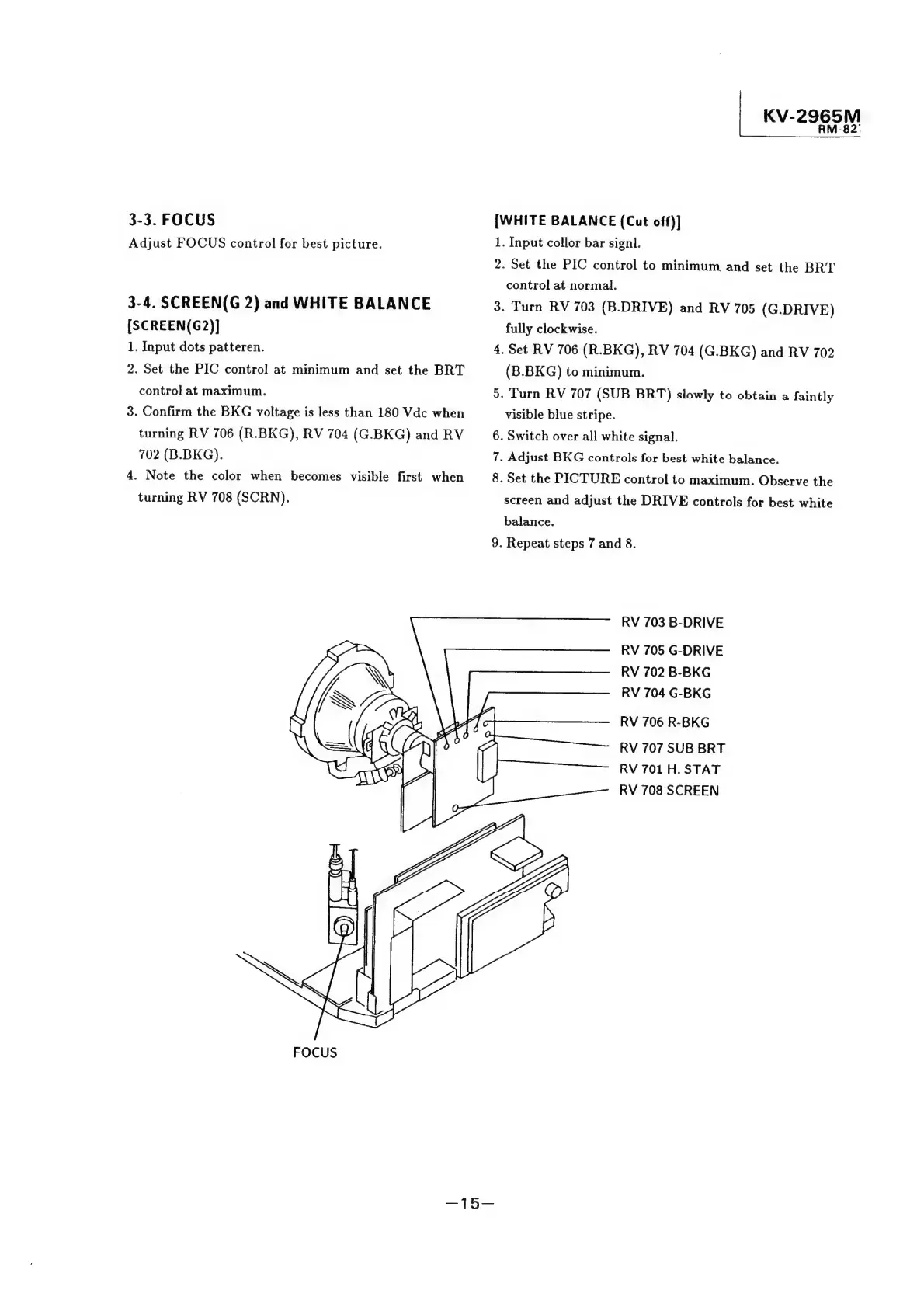
3-3.
FOCUS
Adjust
FOCUS
control
for
best
picture.
3-4.
SCREEN(G
2)
and
WHITE
BALANCE
[SCREEN(G2)]
1.
Input
dots
patteren.
2.
Set
the
PIC
control
at
minimum
and
set
the
BRT
control
at
maximum.
3.
Confirm
the
BKG
voltage
is
less
than
180
Vdc
when
turning
RV
706
(R.BKG),
RV
704
(G.BKG)
and
RV
702
(B.BKG).
4.
Note
the
color
when
becomes
visible
first
when
turning
RV
708
(SCRN).
CG
wey
(lp
\
©)
|:
SS
ge
KV-29
Ps)
Ss
{WHITE
BALANCE
(Cut
off)]
1.
Input
collor
bar
signl.
2.
Set
the
PIC
control
to
minimum
and
set
the
BRT
control
at
normal.
3.
Turn
RV
703
(B.DRIVE)
and
RV
705
(G.DRIVE)
fully
clockwise.
4.
Set
RV
706
(R.BKG),
RV
704
(G.BKG)
and
RV
702
(B.BKG)
to
minimum.
5.
Turn
RV
707
(SUB
BRT)
slowly
to
obtain
a
faintly
visible
blue
stripe.
6.
Switch
over
all
white
signal.
7.
Adjust
BKG
controls
for
best
white
balance.
8.
Set
the
PICTURE
control
to
maximum.
Observe
the
screen
and
adjust
the
DRIVE
controls
for
best
white
balance.
9.
Repeat
steps
7
and
8.
RV
703
B-DRIVE
RV
705
G-DRIVE
RV
702
B-BKG
RV
704
G-BKG
RV
706
R-BKG
RV
707
SUB
BRT
RV
701
H.
STAT
RV
708
SCREEN
o
01
-8
N
<
.
1

Related product manuals