EasyManua.ls Logo

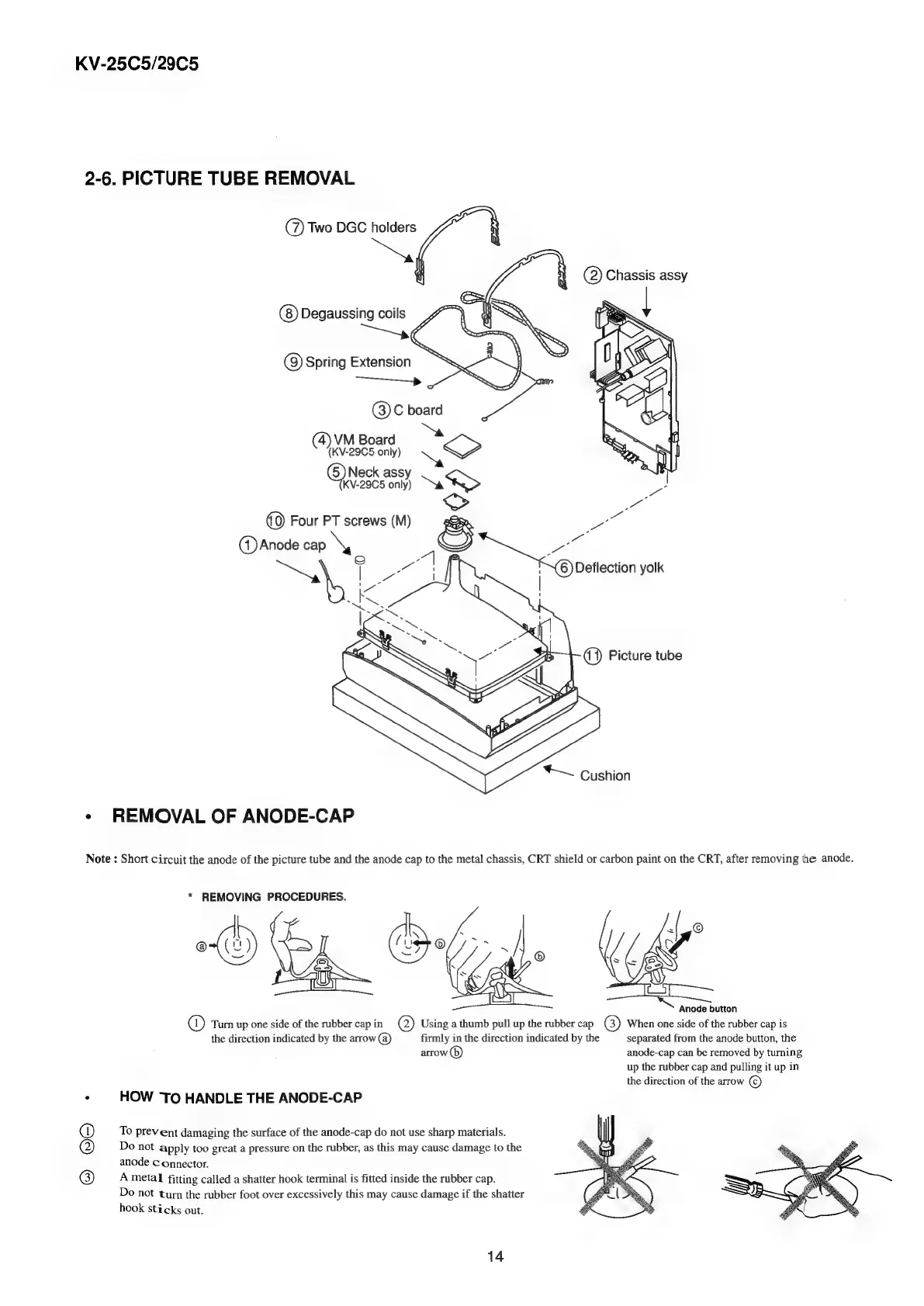
Sony TRINITRON KV-29C5D - Picture Tube and Anode Cap Handling; Picture Tube and Anode Cap Removal

Sony TRINITRON KV-29C5D
57 pages
Print Icon
To Next Page IconTo Next Page
To Previous Page IconTo Previous Page
Loading...
KV-25C5/29C5
2-6.
PICTURE
TUBE
REMOVAL
©)
Two
DGC
holders
oN
(2)
Chassis
assy
Degaussing
coils
Q)
Spring
Extension
©)
C
board
(4)
VM
Board
(KV-29C5
only)
LO
Neck
ass
KV-29C5
par
re
ps
(0)
Four
PT
screws
(M)
&
(1)
Anode
cap
Sy
ee
7
a
al
:
|
5,
K
a
=
aes
Cushion
¢
REMOVAL
OF
ANODE-CAP
Note
:
Short
circuit
the
anode
of
the
picture
tube
and
the
anode
cap
to
the
metal
chassis,
CRT
shield
or
carbon
paint
on
the
CRT,
after
removing
the
anode,
*
REMOVING
PROCEDURES.
Anode
button
@)
Turn
up
one
side
of
the
rubber
cap
in
Q)
Using
a
thumb
pull
up
the
rubber
cap
G)
When
one
side
of
the
rubber
cap
is
the
direction
indicated
by
the
arrow
(a)
firmly
in
the
direction
indicated
by
the
separated
from
the
anode
button,
the
arrow
(6)
anode-cap
can
be
removed
by
turning
up
the
rubber
cap
and
pulling
it
up
in
the
direction
of
the
arrow
©
.
HOW
TO
HANDLE
THE
ANODE-CAP
To
prevent
damaging
the
surface
of
the
anode-cap
do
not
use
sharp
materials.
Do
not
apply
too
great
a
pressure
on
the
rubber,
as
this
may
cause
damage
to
the
anode
connector.
A
metal
fitting
called
a
shatter
hook
terminal
is
fitted
inside
the
rubber
cap.
Do
not
turn
the
rubber
foot
over
excessively
this
may
cause
damage
if
the
shatter
hook
sticks
out.
©0
14

Related product manuals