EasyManua.ls Logo

Sony TRINITRON KV-29C5D - Using the Sleep Timer; Viewing Teletext

Sony TRINITRON KV-29C5D
57 pages
Print Icon
To Next Page IconTo Next Page
To Previous Page IconTo Previous Page
Loading...
Additional
TV
Features
Using
the
Sleep
Timer
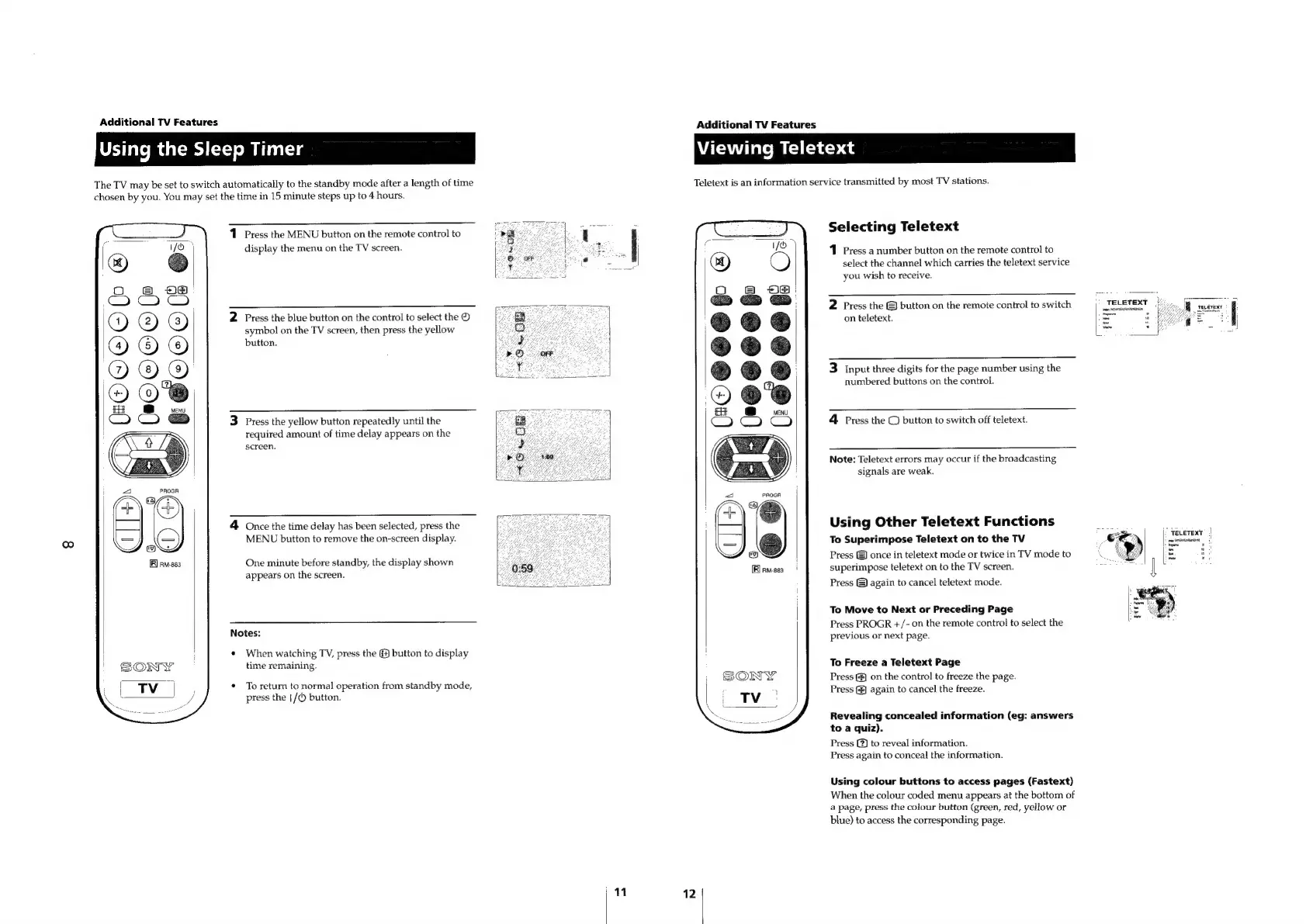
The
TV
may
be
set
to
switch
automatically
to
the
standby
mode
after
a
length
of
time
chosen
by
you.
You
may
set
the
time
in
15
minute
steps
up
to
4
hours.
1
Press
the
MENU
button
on
the
remote
control
to
display
the
menu
on
the
TV
screen.
2
Press
the
blue
button
on
the
control
to
select
the
®
symbol
on
the
TV
screen,
then
press
the
yellow
button.
3
Press
the
yellow
button
repeatedly
until
the
required
amount
of
time
delay
appears
on
the
screen.
4
Once
the
time
delay
has
been
selected,
press
the
MENU
button
to
remove
the
on-screen
display.
One
minute
before
standby,
the
display
shown
appears
on
the
screen.
Notes:
¢
When
watching
TV,
press
the
(4)
button
to
display
time
remaining.
*
To
return
to
normal
operation
from
standby
mode,
press
the
|/()
button.
"
Additional
TV
Features
Viewing
Teletext
Teletext
is
an
information
service
transmitted
by
most
TV
stations.
Selecting
Teletext
1
Press
a
number
button
on
the
remote
control
to
select
the
channel
which
carries
the
teletext
service
you
wish
to
receive.
2
Press
the
&
button
on
the
remote
control
to
switch
on
teletext.
3
Input
three
digits
for
the
page
number
using
the
numbered
buttons
on
the
control.
4
Press
the
©
button
to
switch
off
teletext.
Note:
Teletext
errors
may
occur
if
the
broadcasting
signals
are
weak.
Using
Other
Teletext
Functions
To
Superimpose
Teletext
on
to
the
TV
Press
&
once
in
teletext
mode
or
twice
in
TV
mode
to
superimpose
teletext
on
to
the
TV
screen.
[Rirmses
|
Press
&)
again
to
cancel
teletext
mode.
To
Move
to
Next
or
Preceding
Page
Press
PROGR
+/-
on
the
remote
control
to
select
the
previous
or
next
page.
To
Freeze
a
Teletext
Page
Press
&
on
the
control
to
freeze
the
page.
Press
(¥)
again
to
cancel
the
freeze.
Revealing
concealed
information
(eg:
answers
to
a
quiz).
Press
(2)
to
reveal
information.
Press
again
to
conceal
the
information.
Using
colour
buttons
to
access
pages
(Fastext)
When
the
colour
coded
menu
appears
at
the
bottom
of
a
page,
press
the
colour
button
(green,
red,
yellow
or
blue)
to
access
the
corresponding
page.
12
TELETEXT
Pevaime
s
fo
we

Related product manuals