EasyManua.ls Logo

Sony Trinitron KV-29F3A - Page 7

Sony Trinitron KV-29F3A
58 pages
Print Icon
To Next Page IconTo Next Page
To Previous Page IconTo Previous Page
Loading...
4
Overview
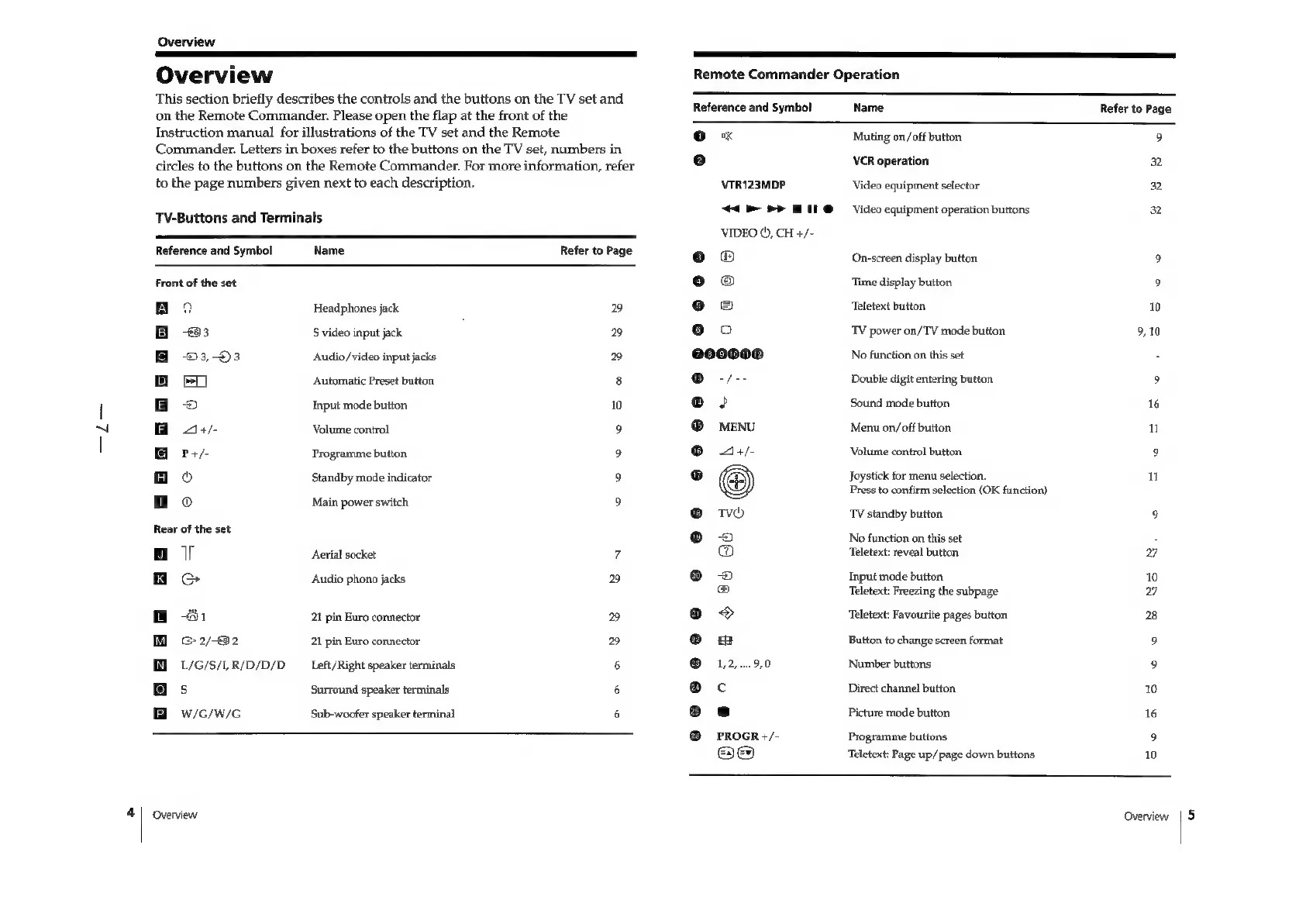
Overview
This
section
briefly
describes
the
controls
and
the
buttons
on
the
TV
set
and
on
the
Remote
Commander.
Please
open
the
flap
at
the
front
of
the
Instruction
manual
for
illustrations
of
the
TV
set
and
the
Remote
Commander.
Letters
in
boxes
refer
to
the
buttons
on
the
TV
set,
numbers
in
circles
to
the
buttons
on
the
Remote
Commander.
For
more
information,
refer
to
the
page
numbers
given
next
to
each
description.
TV-Buttons
and
Terminals
Reference
and
Symbol
Front
of
the
set
Rear
of
the
set
a
o
1
2/82
L/G/S/1,
R/D/D/D
s
W/G/W/G
Name
Headphones
jack
$
video
input
jack
Audio/video
input
jacks
Automatic
Preset
button
Input
mode
button
Volume
control
Programme
button
Standby
mode
indicator
Main
power
switch
Aerial
socket
Audio
phono
jacks
21
pin
Euro
connector
21
pin
Euro
connector
Left/Right
speaker
terminals
Surround
speaker
terminals
Sub-woofer
speaker
terminal
Overview
Refer
to
Page
29
29
10
ee
©
29
29
Remote
Commander
Operation
Reference
and
Symbol
Name
Refer
to
Page
Qo
x
Muting
on/off
button
9
e
VCR
operation
32
VTR123MDP
Video
equipment
selector
32
44.
PP
HI
@
Video
equipment
operation
buttons
32
VIDEO
©,
CH
+/-
eo
On-screen
display
button
9
o@
‘Time
display
button
9
oe
Teletext
button
10
@o
TV
power
on/TV
mode
button
9,10
@00000
No
function
on
this
set
3
®
-/--
Double
digit
entering
button
9
®
>
Sound
mode
button
16
®
MENU
Menu
on/off
button
n
@
4+/-
Volume
control
button
9
oO
Joystick
for
menu
selection.
Press
to
confirm
selection
(OK
function)
@
TV
standby
button.
9
©
No
function
on
this
set
2
Teletext:
reveal
button
7
®
Input
mode
button.
10
Teletext:
Freezing
the
subpage
7
@
Teletext:
Favourite
pages
button.
28
@
Button
to
change
screen
format
9
@
1,2...9,0
Number
buttons
9
@c
Direct
channel
button
10
®
es
Picture
mode
button
16
@
PROGR
+/-
Programme
buttons
9
ae
‘Teletext:
Page
up/page
down
buttons
10
Overview
5

Related product manuals