EasyManua.ls Logo

Sony Trinitron KV-29F3A - GETTING STARTED; Connecting the Speakers

Sony Trinitron KV-29F3A
58 pages
Print Icon
To Next Page IconTo Next Page
To Previous Page IconTo Previous Page
Loading...
6
Getting
Started
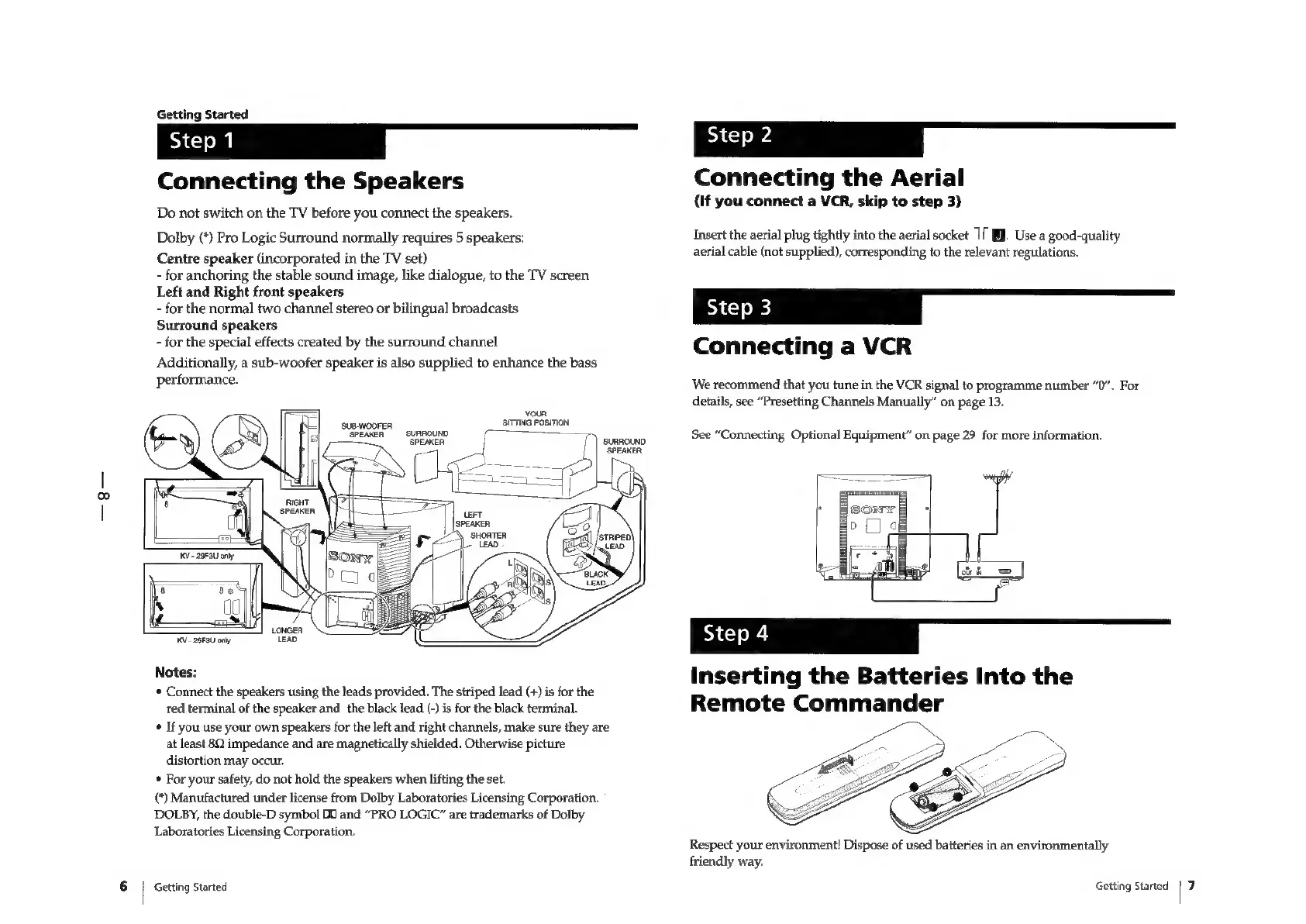
Connecting
the
Speakers
Do
not
switch
on
the
TV
before
you
connect
the
speakers.
Dolby
(*)
Pro
Logic
Surround
normally
requires
5
speakers:
Centre
speaker
(incorporated
in
the
TV
set)
-
for
anchoring
the
stable
sound
image,
like
dialogue,
to
the
TV
screen
Left
and
Right
front
speakers
-
for
the
normal
two
channel
stereo
or
bilingual
broadcasts
Surround
speakers
-
for
the
special
effects
created
by
the
surround
channel
Additionally,
a
sub-woofer
speaker
is
also
supplied
to
enhance
the
bass
performance.
your
SITTING
POSITION
SUB-NOOFER,
‘SPEAKER
SURROUND
‘SPEAKER
KV
25F3U
only
Notes:
*
Connect
the
speakers
using
the
leads
provided.
The
striped
lead
(+)
is
for
the
red
terminal
of
the
speaker
and
the
black
lead
(-)
is
for
the
black
terminal.
*
If
you
use
your
own
speakers
for
the
left
and
right
channels,
make
sure
they
are
at
least
80
impedance
and
are
magnetically
shielded.
Otherwise
picture
distortion
may
occur.
*
For
your
safety,
do
not
hold
the
speakers
when
lifting
the
set.
(*)
Manufactured
under
license
from
Dolby
Laboratories
Licensing
Corporation.
DOLBY,
the
double-D
symbol
D0
and
“PRO
LOGIC”
are
trademarks
of
Dolby
Laboratories
Licensing
Corporation.
Getting
Started
Li
=
tS
Connecting
the
Aerial
(If
you
connect
a
VCR,
skip
to
step
3)
Insert
the
aerial
plug
tightly
into
the
aerial
socket
1
BJ.
Use
a
good-quality
aerial
cable
(not
supplied),
corresponding
to
the
relevant
regulations.
kk
__=
&8§»§€=—h
Connecting
a
VCR
We
recommend
that
you
tune
in
the
VCR
signal
to
programme
number
“0”.
For
details,
see
“Presetting
Channels
Manually”
on
page
13.
See
“Connecting
Optional
Equipment”
on
page
29
for
more
information.
Inserting
the
Batteries
Into
the
Remote
Commander
Respect
your
environment!
Dispose
of
used
batteries
in
an
environmentally
friendly
way.
Getting
Started
|
7

Related product manuals