— 30 —
KV-32FS10/32FV15/32XBR250/34FV10/34FV15/34FV15C/34FX250C/34FV15K
34FV15T/36FS10/36FV15/36XBR250/38FX250/38FX250C/38FX250T/38FV15K
SERVICE VP AFC 0
1000 0000
|||||||||||||||------------
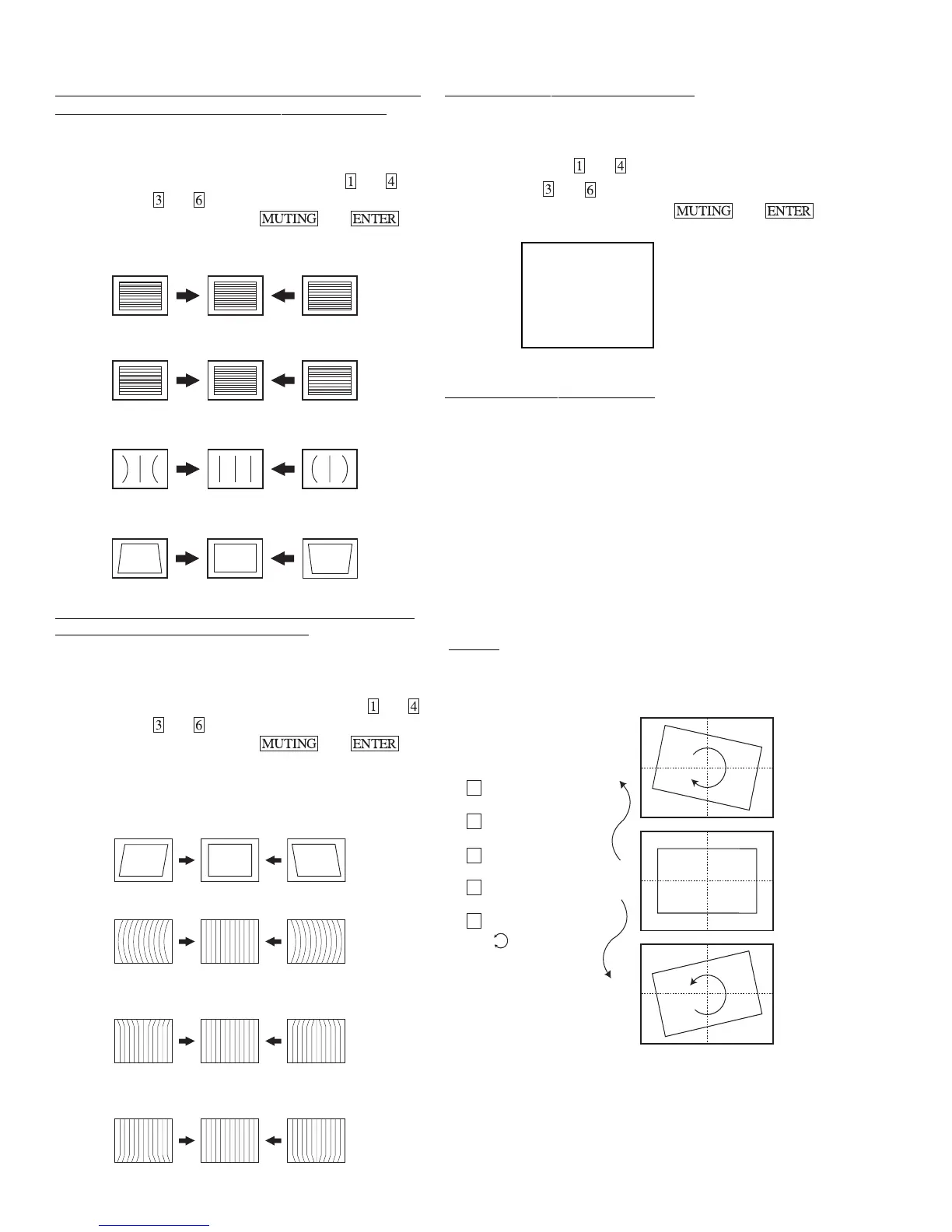
OSD POSITION ADJUSTMENT (DISP)
1. Input a color bar signal.
2. Set to Service adjustment Mode.
3. Select DISP with
and .
4. Adjust with
and for the bar center.
5. Write into the memory by pressing then .
ROTATION COIL ADJUSTMENT
1. Input a monoscope signal.
2. Push Menu button on the Remote (RM-Y171).
3. Select "Set Up" Mode.
4. Select "Tilt Correction". Confirm that number (0) color
changes to red.
5. Push > (+) on the Remote (RM-Y171). Confirm that number
increases up to +5 and picture rotates clockwise.
6. Push . (+) on the Remote (RM-Y171). Confirm that number
decreases up to -5 and picture rotates counterclockwise.
7. Push > (+) on the Remote (RM-Y171). Return to 0.
SET-UP
+5
0
-5
Channel Set-up
Favorite Channel
Video Label
Language: English
Tilt Correction : 0
Menu
X
V LINEARITY (VLIN), V CORRECTION (VSCO), PIN AMP
(PAMP) AND TRAPEZIUM (TRAP) ADJUSTMENTS
1. Input a cross-hatch signal.
2. Set to Service adjustment Mode.
3. Select VLIN, VSCO, PAMP, and TRAP with
and .
4. Adjust with
and for the best picture.
5. Write the memory by Pressing
then .
V LINEARITY(VLIN)
VS CORRECTION (VSCO)
PIN AMP (PAMP)
TRAPEZIUM (TRAP)
V ANGLE (VANG), V BOW (VBOW), UPPER PIN (UCPN)
AND LOW PIN (LCPN) ADJUSTMENTS
1. Input a cross hatch signal.
2. Set to Service Adjustment Mode.
3. Select VVANG, VBOW, UCPN, and LCPN with
and .
4. Adjust with
and for the best picture.
5. Write the memory by Pressing
then .
Please use VANG data from 3∼12. Adjust from 3 to12 only.
V ANGLE (VANG)
V BOW (VBOW)
UPPER PIN (UCPN)
LOW PIN (LCPN)








 To Next Page