Getting Started
10
-EN
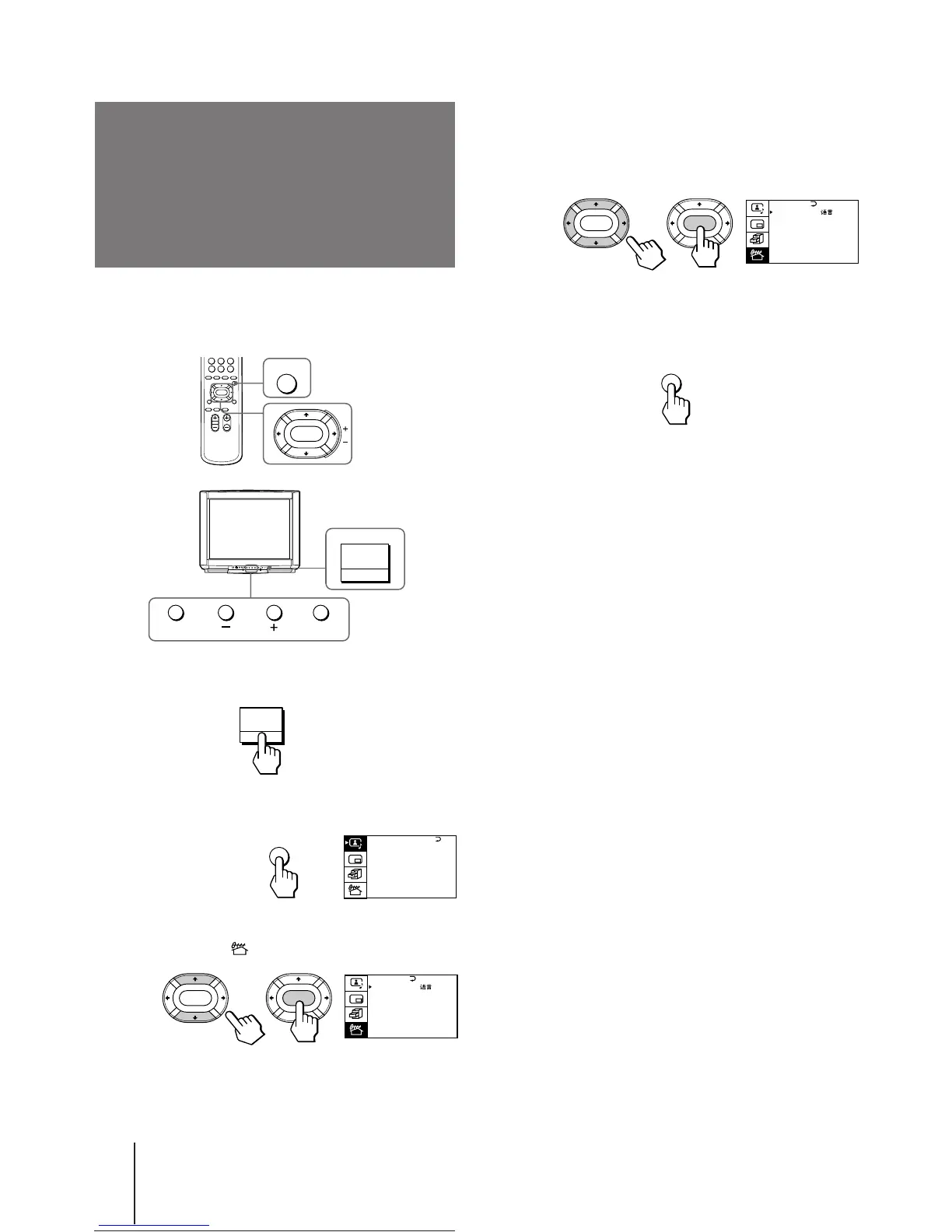
Changing the menu
language
4 Make sure the cursor (z) appears beside
LANGUAGE/###, and press ENTER.
5 Press V/b/v/B to select ###, and press ENTER.
All of the menus change to Chinese.
6 Press MENU to return to the normal screen.
If you prefer Chinese to English, you can change the
menu language. You can use buttons on both the
remote commander and the TV.
1 Press MAIN POWER to turn on the TV.
2 Press MENU.
3 Press V or v to move the cursor (z) to the
PRESET menu ( ), and press ENTER.
MENU
ENTER
MAIN POWER
A / V CONTROL
DYNAMIC
SOFT
STANDARD
PERSONAL
V I DEO ADJUST
AUD I O ADJUST
T I LT CORRECT: 0
MENU
PRESET
SKIP: PR02 OFF
TV SYS: B/G
COL SYS : AUTO
ENGL I SH
AUTO PROGRAM
MANUAL PROGRAM
LANGUAGE /
:
ENTER ENTER
MAIN POWER
ENTER MENU
PRESET
SKIP: PR02 OFF
TV SYS: B/G
COL SYS : AUTO
CH I NESE
AUTO PROGRAM
MANUAL PROGRAM
LANGUAGE /
:
ENTER ENTER






 To Next Page