Operations
-EN
23
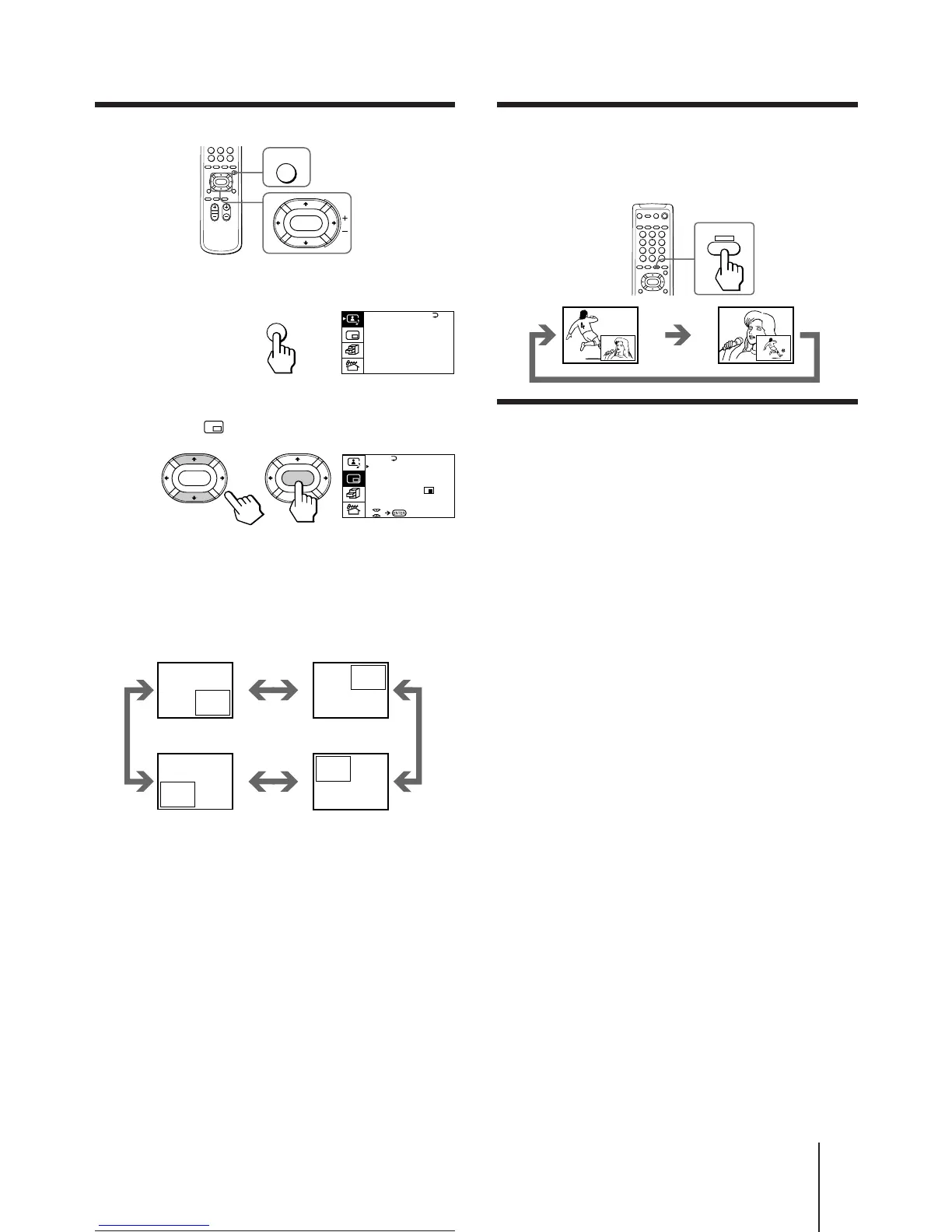
Swapping pictures between the main
and PIP screens
Press SWAP.
Freezing the PIP screen
Press FREEZE.
The PIP screen will freeze.
To restore the normal screen
Press FREEZE again.
Notes
• When you display a video input on the PIP screen at an
abnormal speed, the picture may be noisy depending on the
VCR.
• If you display different color systems on the main screen and
the PIP screen, the size of the PIP screen may be different and
the PIP picture may be noisy. This does not indicate a
malfunction of the TV.
SWAP
Changing the position of the PIP screen
1 Press MENU.
2 Press V or v to move the cursor (”) to the
PIP menu ( ), and press ENTER.
3 Press V or v to move the cursor (z) to
POSITION, and press ENTER.
4 Press V/b/v/B to select the position you
want, and press ENTER.
5 Press MENU to return to the normal screen.
PIP
PIP: OFF
PIP TEXT
STROBE
POS I T ION:
PROGR I NDEX
ENTER ENTER
MENU
ENTER
A / V CONTROL
DYNAMIC
SOFT
STANDARD
PERSONAL
V I DEO ADJUST
AUD I O ADJUST
T I LT CORRECT: 0
MENU






 To Next Page