EasyManua.ls Logo

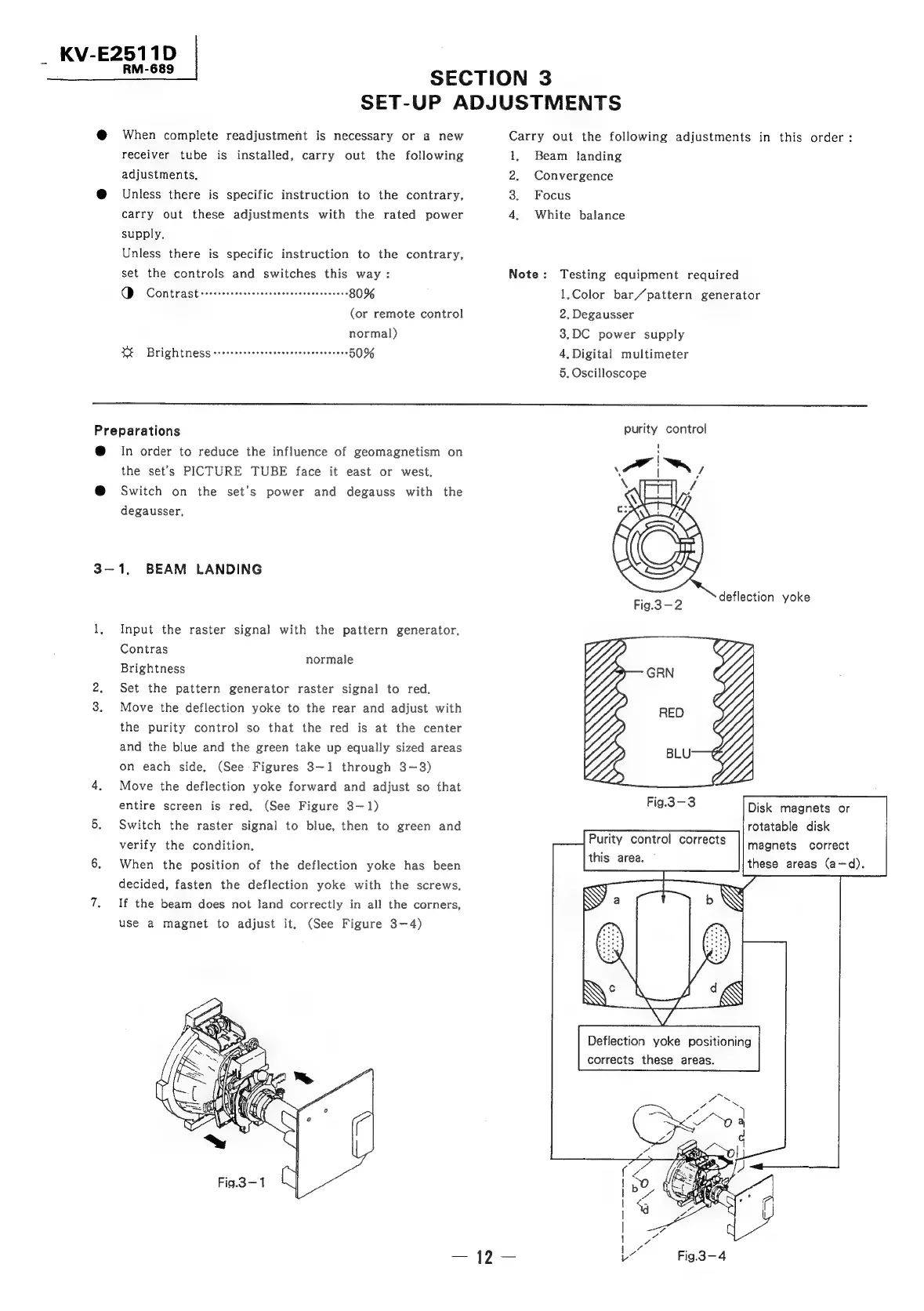
Sony TRINITRON KV-E2911D - Section 3 Set-Up Adjustments; Beam Landing

Sony TRINITRON KV-E2911D
56 pages
Print Icon
To Next Page IconTo Next Page
To Previous Page IconTo Previous Page
Loading...
_
KV-E2511D
|
RM-689
SECTION
3
SET-UP
ADJUSTMENTS
@
When
complete
readjustment
is
necessary
or
a
new
receiver
tube
is
installed,
carry
out
the
following
adjustments,
@
Unless
there
is
specific
instruction
to
the
contrary,
carry
out
these
adjustments
with
the
rated
power
supply,
Unless
there
is
specific
instruction
to
the
contrary,
set
the
controls
and
switches
this
way:
O
CONtrast
srrceestceeseresvevcvereesserseeees
80%
(or
remote
control
normal)
XE
Brightness
errcrsessersceeeeeeeeneeessccees
50%
Carry
out
the
following
adjustments
in
this
order:
1,
Beam
landing
2.
Convergence
3.
Focus
4,
White
balance
Note:
Testing
equipment
required
1,Color
bar/pattern
generator
2,
Degausser
3.DC
power
supply
4,
Digital
multimeter
5.
Oscilloscope
Preparations
@
In
order
to
reduce
the
influence
of
geomagnetism
on
the
set’s
PICTURE
TUBE
face
it
east
or
west.
@
Switch
on
the
set’s
power
and
degauss
with
the
degausser,
3-1,
BEAM
LANDING
1,
Input
the
raster
signal
with
the
pattern
generator.
Contras
Brightness
2.
Set
the
pattern
generator
raster
signal
to
red.
3.
Move
the
deflection
yoke
to
the
rear
and
adjust
with
the
purity
control
so
that
the
red
is
at
the
center
normale
and
the
blue
and
the
green
take
up
equally
sized
areas
on
each
side.
(See
Figures
3-1
through
3-3)
4.
Move
the
deflection
yoke
forward
and
adjust
so
that
entire
screen
is
red.
(See
Figure
3—1)
5.
Switch
the
raster
signal
to
blue,
then
to
green
and
verify
the
condition.
6.
When
the
position
of
the
deflection
yoke
has
been
decided,
fasten
the
deflection
yoke
with
the
screws.
7.
If
the
beam
does
not
land
correctly
in
all
the
corners,
use
a
magnet
to
adjust
it.
(See
Figure
3-4)
purity
control
Fig.3-3
Disk
magnets
or
rotatable
disk
magnets
correct
these
areas
(a—d).
Deflection
yoke
positioning
corrects
these
areas.
fo
7
*
cod
ree
a
R
ron
o~o|
38
J
\
ea
2
Ibe,
aC
ae
Bx.
e
=
wv
Ge
|
Z
1
wee
Le
Fig.3-4

Related product manuals