EasyManua.ls Logo

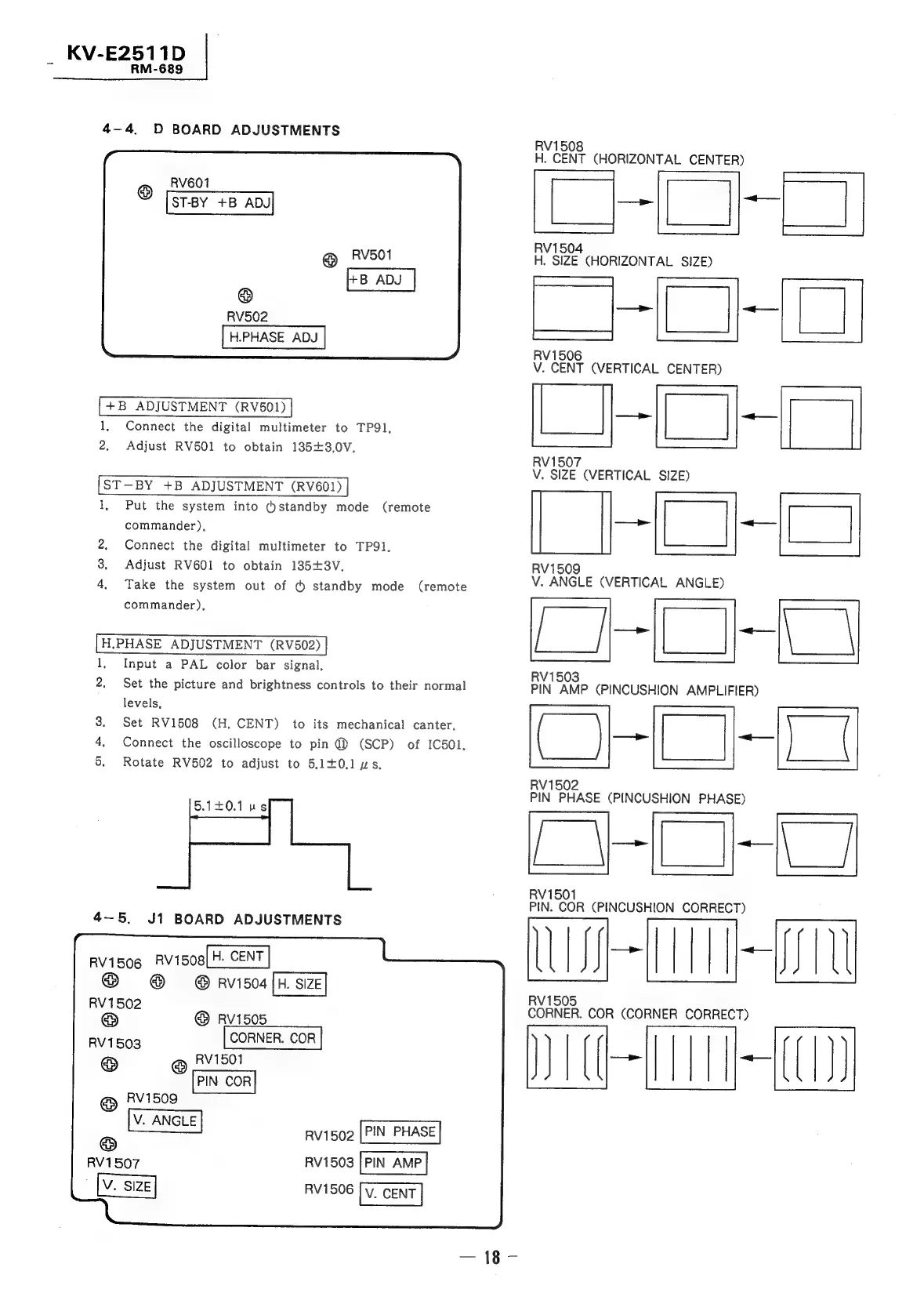
Sony TRINITRON KV-E2911D - D Board Adjustments

Sony TRINITRON KV-E2911D
56 pages
Print Icon
To Next Page IconTo Next Page
To Previous Page IconTo Previous Page
Loading...
KV-E2511D
|
=
RM-689
4-4
D
BOARD
ADJUSTMENTS
RV601
@
ST-BY
+B
ADJ
@
RV501
.
RV502
H.PHASE
ADJ
+B
ADJUSTMENT
(RV501)
1,
Connect
the
digital
multimeter
to
TP91,
2,
Adjust
RV501
to
obtain
135+3,0V.
[ST-BY
+B
ADJUSTMENT
(RV601)
|
1,
Put
the
system
into
(standby
mode
(remote
commander).
Connect
the
digital
multimeter
to
TP91.
Adjust
RV601
to
obtain
185+3V,
Take
the
system
out
of
@
standby
mode
(remote
commander),
H.PHASE
ADJUSTMENT
(RV502)
Input
a
PAL
color
bar
signal,
Set
the
picture
and
brightness
controls
to
their
normal
Pr
SO
noe
levels,
Set
RV1508
(H.
CENT)
to
its
mechanical
canter,
Connect
the
oscilloscope
to
pin
@
(SCP)
of
IC501,
Rotate
RV502
to
adjust
to
5.1+0.1
ws.
See
5.14£0.1
us
4—5.
J1
BOARD
ADJUSTMENTS
RV1506
Rv1508[H.
CENT
|
®
©
@
RV1504
[H.
SIZE]
RV1502
@
RV1505
RV1503
CORNER.
COR
@
RV1501
PIN
COR
®
RV1509
ss
avis0e
[PN
PAS
RV1507
RV1503
RV1506
RV1508
H.
CENT
(HORIZONTAL
CENTER)
:
;
RV1504
H.
SIZE
(HORIZONTAL
SIZE)
RV1506
V.
CENT
(VERTICAL
CENTER)
a
aa
ig
u
RV1507
V.
SIZE
(VERTICAL
SIZE)
H
509
V.
ANGLE
(VERTICAL
ANGLE)
RV1503
PIN
AMP
(PINCUSHION
AMPLIFIER)
oe
ng
LO
V1502
PIN
PHASE
(PINCUSHION
PHASE)
-
n
dq
RV1501
PIN.
COR
(PINCUSHION
CORRECT)
LUI
RV1505
CORNER.
COR
(CORNER
CORRECT)
JL)
—<—_———
-—s

Related product manuals