EasyManua.ls Logo

Sony TRINITRON KV-E2911D - Page 19

Sony TRINITRON KV-E2911D
56 pages
Print Icon
To Next Page IconTo Next Page
To Previous Page IconTo Previous Page
Loading...
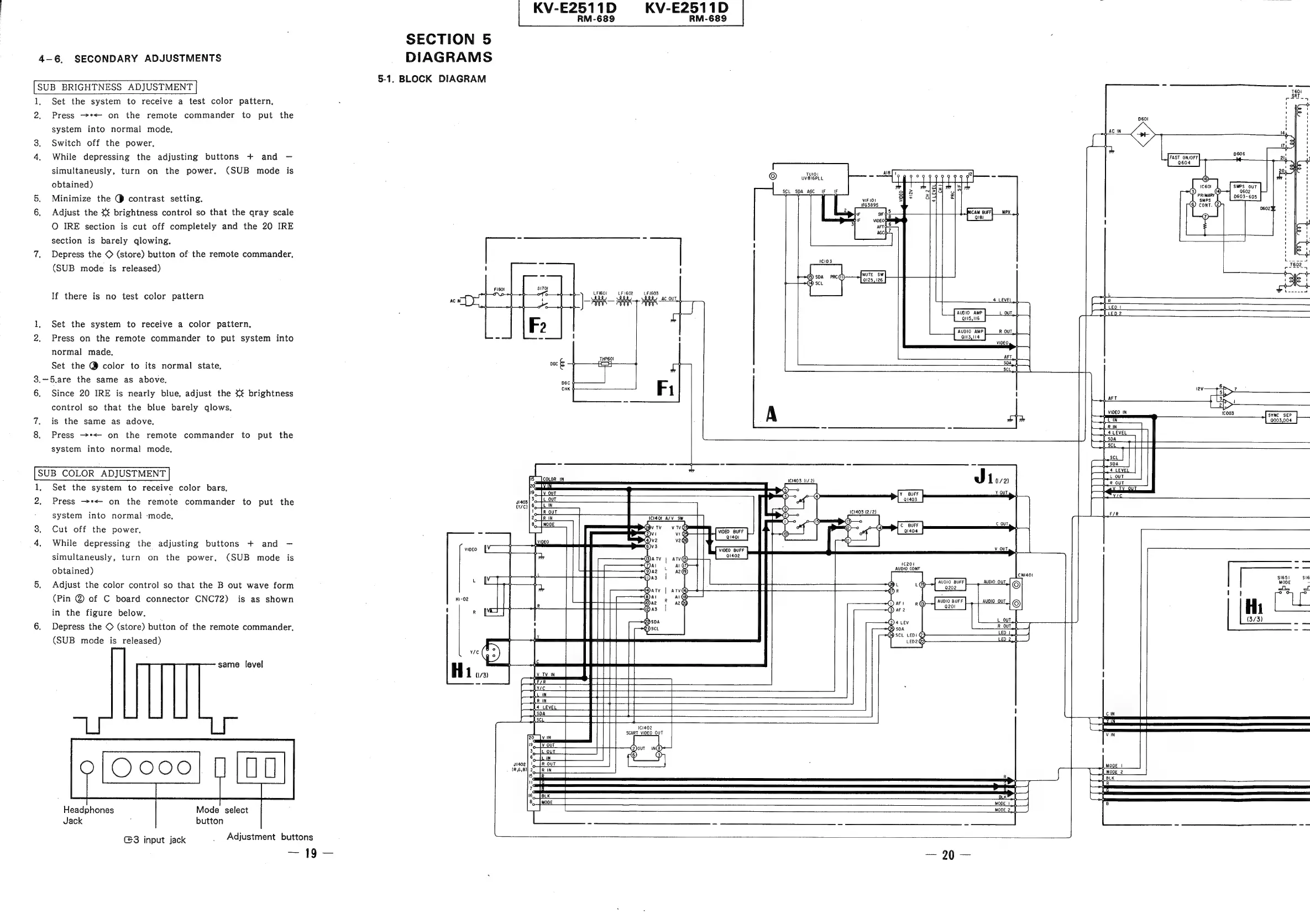
4-6.
SECONDARY
ADJUSTMENTS
SUB
BRIGHTNESS
ADJUSTMENT
1.
Set
the
system
to
receive
a
test
color
pattern,
2,
Press
~*<-
on
the
remote
commander
to
put
the
system
into
normal
mode,
3.
Switch
off
the
power.
4.
While
depressing
the
adjusting
buttons
+
and
simultaneusly,
turn
on
the
power.
(SUB
mode
is
obtained)
5.
Minimize
the
@
contrast
setting.
_
Adjust
the
brightness
control
so
that
the
qray
scale
O
IRE
section
is
cut
off
completely
and
the
20
IRE
section
is
barely
qlowing.
7.
Depress
the
©
(store)
button
of
the
remote
commander,
(SUB
mode
is
released)
If
there
is
no
test
color
pattern
1,
Set
the
system
to
receive
a
color
pattern,
2.
Press
on
the
remote
commander
to
put
system
into
normal
made.
Set
the
@
color
to
its
normal
state.
3,—5.are
the
same
as
above,
6.
Since
20
IRE
is
nearly
blue,
adjust
the
<<
brightness
control
so
that
the
blue
barely qlows,
=
is
the
same
as
adove,
8.
Press
>*<
on
the
remote
commander
to
put
the
system
into
normal
mode.
SUB
COLOR
ADJUSTMENT
1
Set
the
system
to
receive
color
bars.
2.
Press
-*<
on
the
remote
commander
to
put
the
system
into
normal
‘mode,
3.
Cut
off
the
power.
4.
While
depressing
the
adjusting
buttons
+
and
simultaneusly,
turn
on
the
power.
(SUB
mode
is
obtained)
5,
Adjust
the
color
control
so
that
the
B
out
wave
form
(Pin
@
of
C
board
connector
CNC72)
is
as
shown
in
the
figure
below.
6.
Depress
the
©
(store)
button
of
the
remote
commander,
(SUB
mode
is
released)
same
level
Mode
select
button
Headphones
Jack
G3
input
jack
Adjustment
buttons
SECTION
5
DIAGRAMS
5-1.
BLOCK
DIAGRAM
VIDEO
H
1
ve
Ge
plies
KV-E2511D
RM-689
LFI601
—-LFI602_——LF1603
yA,
DGC
CHK
a
aS
goo
omg
aie
&
z=
Ett
=
KV-E2511D
©
Tylol
ae
aI
uVveI6PLL
SCL SDA
AGC
iF
Ua
of
=
ae
f
VIF
101
sq*
o
IFG389S
2
As
et
(
4
LEVEL
AUDIO
AMP
QU5,16
AUDIO
AMP
QUZ
4
>
bed
at
VIDEO
_IN
if
ie
18
lio
|e
J
Live
Q1403
11403
(1/2)
Ral
I~
>
ee
a
eee
seo
|
G08

Related product manuals