16
Adjustments and Settings on the Menu
Operation
Adjustments and
Settings on the Menu
The menu allows you to adjust the color of prints and
configure printer settings to suit your printing needs.
Configured settings are stored even when the printer is
turned off, and up to two user-defined color adjustment
configurations can be saved.
Menu Structure
When the LCD display is in the ready state, pressing the
MENU button displays the menu.
With the menu displayed, each setting can be selected and
configured with the directional buttons (<, ,, M, m).
Press the MENU button while the menu is displayed to
return the LCD display to the ready state.
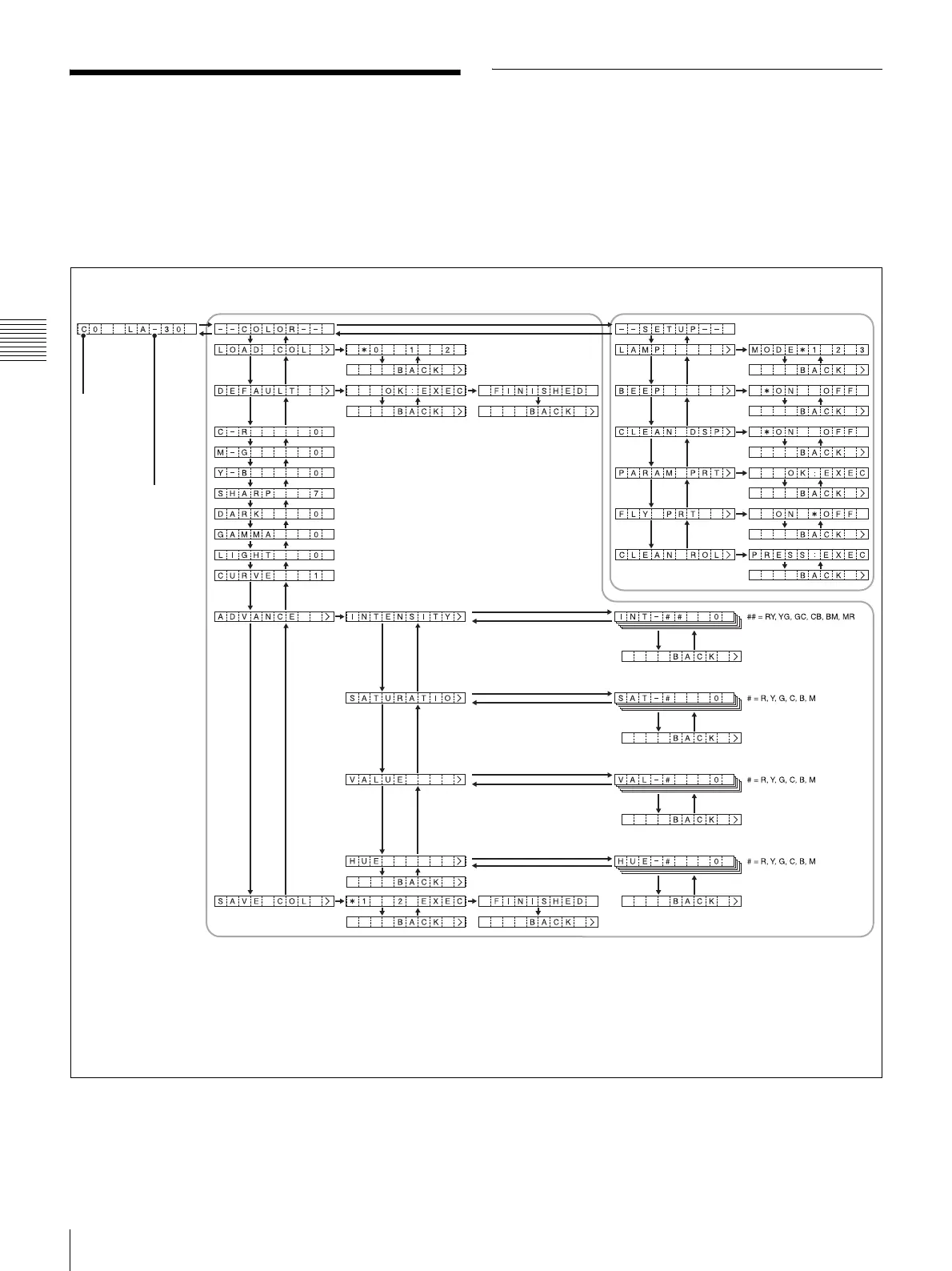
The menu is structured as follows.
Selected
configuration
number
Media size and
remaining pages
LA: 24LA
SA: 24SA
L: 21L
S: 21S
Setup menuColor adjustment menuReady state
Button operations for menus
• Press < or , to switch between menus, and press M or m to switch between setting items in menus. If you press M (or m) at the first (or
last) item in a menu, you will jump to the last (or first) item of that menu.
• If [>] appears at the right of a menu item, pressing , displays the sub-item for that menu. If [BACK>] is displayed, however, pressing ,
returns you to the previous item level for that menu.
• When setting values are displayed, pressing < or , changes the values.



 To Next Page