9
Location and Function of Parts and Controls
Introduction
K Tray light
Illuminates the output tray. (You can configure the
setting for this.) (page 18)
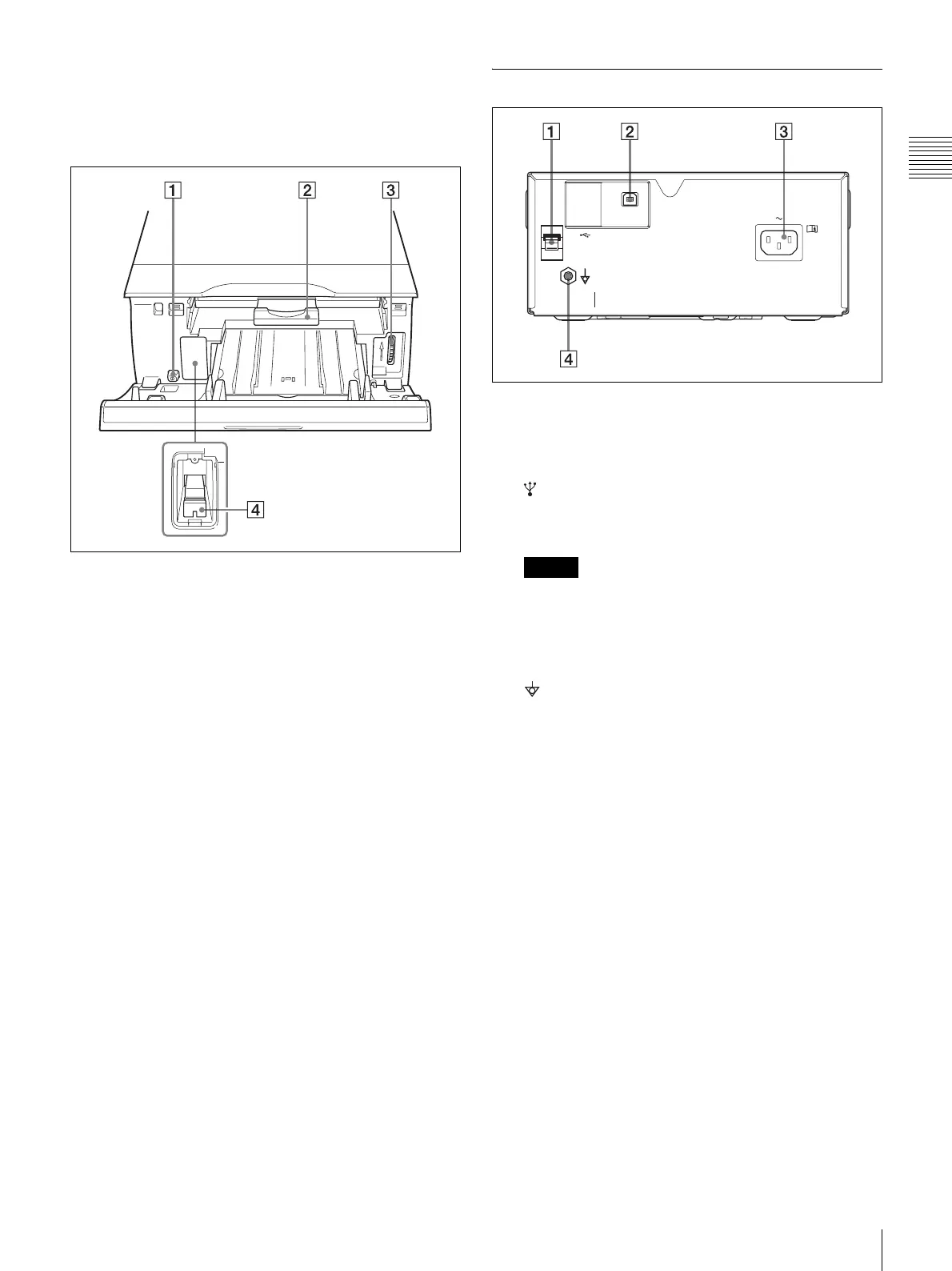
Inside the Ribbon Door Panel
A ! POWER switch
Use this switch to turn the printer on or off. This
switch functions even while the ribbon door panel is
open.
B Ribbon tray (page 12)
Load the ink ribbon in this tray.
C Dial (page 28)
Use this dial to clear paper manually when an internal
paper jam occurs.
D Media switch lever
Switch the position of this lever according to the type
of ink ribbon being used.
Rear
A USB cable stopper (page 10)
Secures the USB cable to prevent it from being
disconnected.
B USB connector
Connects to a computer equipped with a Hi-Speed
USB (USB 2.0 compliant) interface.
Note
Use the supplied USB cable when connecting.
C - AC IN connector (page 10)
Connects to the power cord.
D Equipotential ground terminal connector
Connects to a ground (equipotential) plug to bring the
various parts of the system to the same potential.



 To Next Page