18
nN
Getting Started
Right
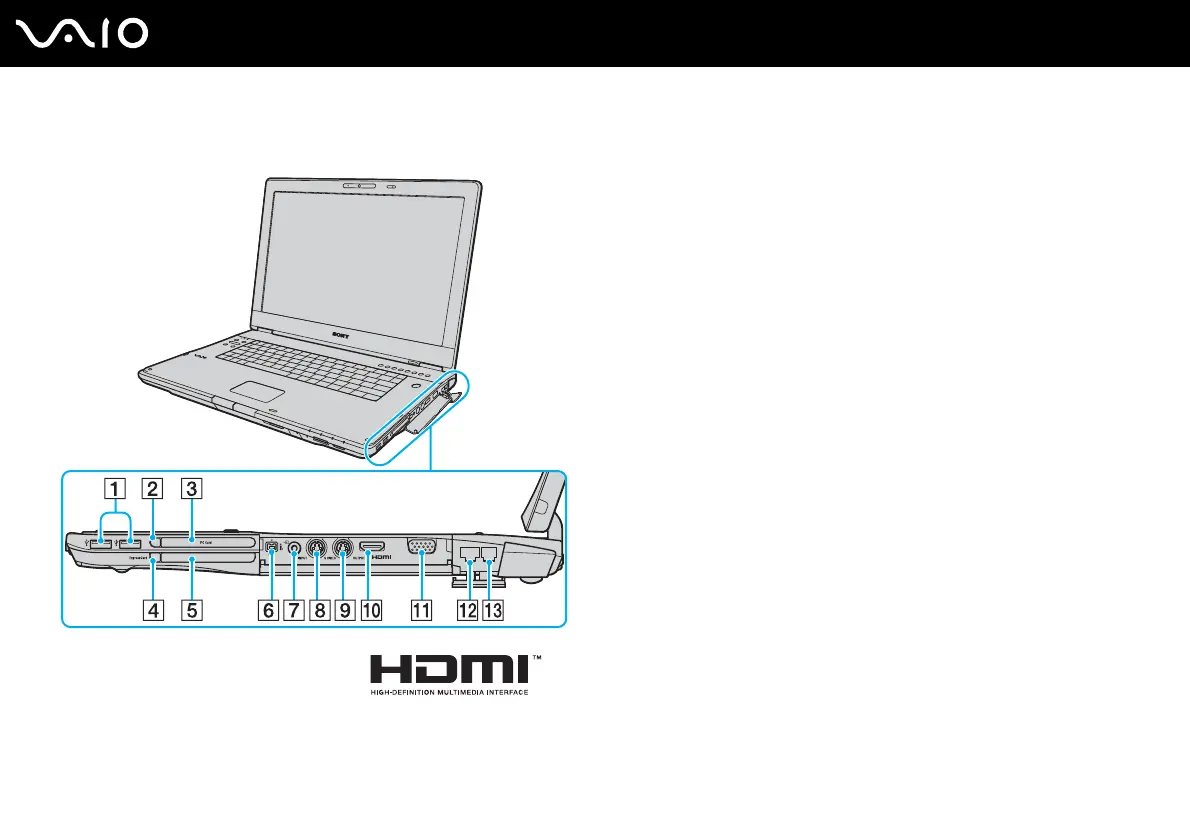
A Hi-Speed USB (USB 2.0) ports
*1
(page 97)
B PC Card release button (page 55)
C PC Card slot (page 53)
D ExpressCard
module release button (page 59)
E Universal ExpressCard
slot (page 57)
F i.LINK (IEEE 1394) S400 port (page 101)
G AV In jack
*2 *3
Connect an external device such as a VCR.
H S VIDEO INPUT port
*2 *3 *4
Connect an external device such as a VCR.
I S VIDEO OUTPUT port
*4
(page 90)
J HDMI port (page 90)
K Monitor (VGA) port (page 88)
L Network (Ethernet) port (page 103)
M Modem port (page 69)
*1
Support high-/full-/low- speeds.
*2
On selected models only.
*3
Parallel use of the AV In jack and the S VIDEO INPUT port will direct video
signals to the S VIDEO INPUT port.
*4
Referred to as the S VIDEO IN port and the S VIDEO OUT port hereinafter.



 To Next Page