57
GB
Others
When “Wide Mode” in the INPUT SETTING menu is set to “Full 2”
a (N) = {(PS × 31.076) × 1.03} – 31.7
a (M) = {(PS × 37.252) × 0.97} – 31.7
b = x – {PS × 4.465 + (a + 31.7) × 0.1405 – 4.5}
c = x
– {PS × 4.465 + (a + 31.7) × 0.1405 – 4.5 + 90.5}
• The projected image size is the one when “Wide Mode” in the INPUT SETTING menu is set to
“Full 2”. When “Wide Mode” in the INPUT SETTING menu is set to the mode other than “Full
2”, black bands may appear at the top and bottom or right and left of the screen.
• When “Wide Mode” in the INPUT SETTING menu is set to “4:3”, the projected image size
(diagonal) will be approximately 88% of “Full 2” size.
• When “Wide Mode” in the INPUT SETTING menu is set to “16:9”, the projected image size
(diagonal) will be approximately 97% of “Full 2” size.
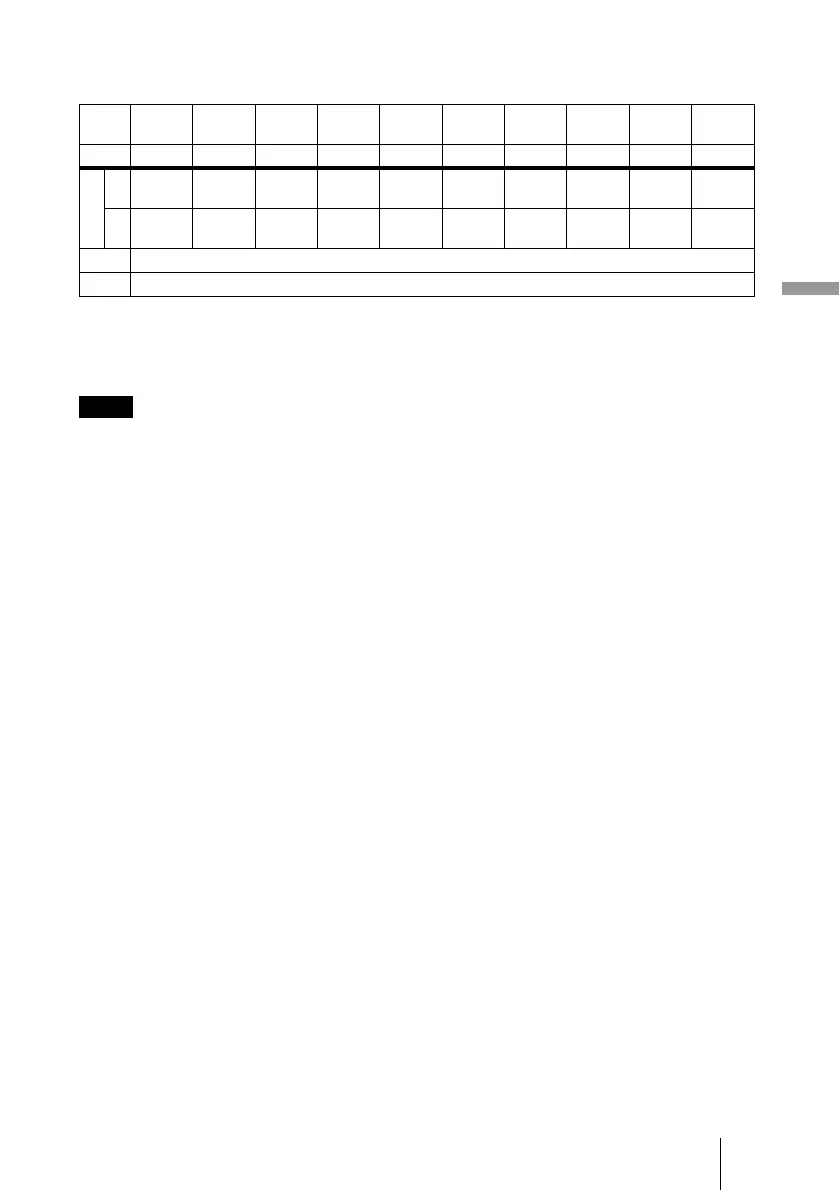
The alphabetical letters in the charts and calculation methods indicate the following.
PS: projected image size measured diagonally
a: distance between the screen and the center of the lens
b: distance between the floor and the center of the lens
c: distance between the floor and the adjusters of the projector
x: free
N: minimum
M: maximum
Unit: mm (inches)
PS
(inches)
40 60 80 100 120 150 180 200 250 300
(mm) 1016 1524 2032 2540 3048 3810 4572 5080 6350 7620
aN1250
(49
1
/
4
)
1890
(74
1
/
2
)
2530
(
99
5
/
8
)
3170
(124
7
/
8
)
3810
(150
1
/
8
)
4770
(187
7
/
8
)
5730
(225
5
/
8
)
6370
(
250
7
/
8
)
7970
(313
7
/
8
)
9570
(376
7
/
8
)
M 1410
(55
5
/
8
)
2140
(84
3
/
8
)
2860
(112
5
/
8
)
3580
(141)
4300
(169
3
/
8
)
5390
(212
1
/
4
)
6470
(254
7
/
8
)
7200
(283
1
/
2
)
9000
(
354
3
/
8
)
10810
(425
3
/
4
)
b Based on the calculation formula given below.
c Based on the calculation formula given below.
Notes



 To Next Page