24
The Screen Menu
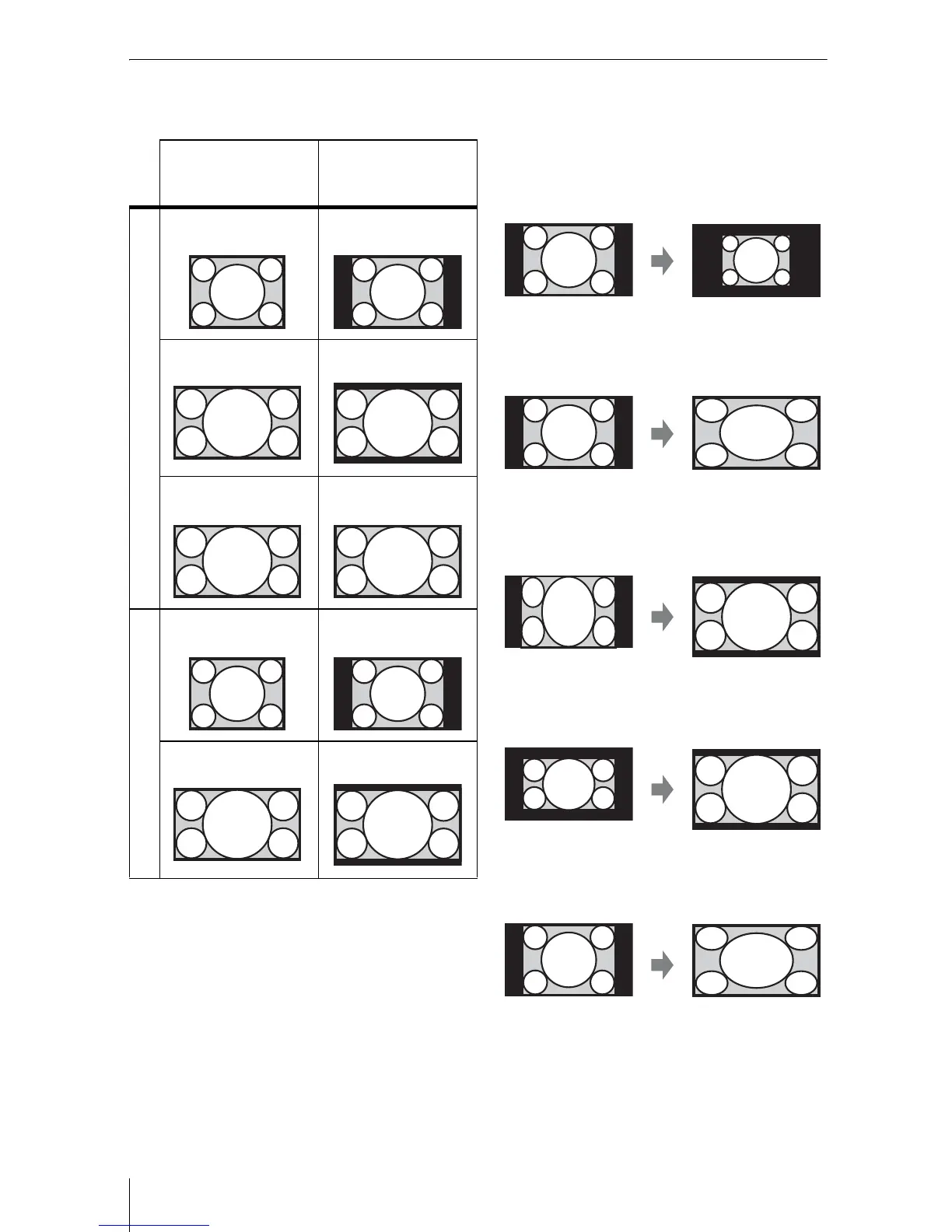
Aspect
VPL-FH36/FH35/FH31/FH30
*1: If you select “Normal,” the image is
projected in the same resolution as the
input signal without changing the aspect
ratio of the original image.
*2: If you select “Full2,” the image is projected
to fit the projected image size, regardless
of the aspect ratio of the image.
*3: Depending on the input signal, the
projected image may be projected as
illustrated below. In this a case, select
“16:9.”
*4: Depending on the input signal, the image
may be projected as illustrated below. In
this a case, select “Zoom.”
*5: If you select “Full,” the image is projected
to fit the projected image size, regardless
of the aspect ratio of the image.
Input signal Recommended
setting value and
projected image
Computer signal
(4:3) (Full1)
*1 *2
(16:9) (Full1)
*1 *2
(16:10) (Full1)
*1
Video signal
(4:3) (4:3)
*3 *5
(16:9) (16:9)
*4 *5





 To Next Page