13 (GB)
.........................................................................................................................................................................................................
1) Macintosh is a registered trademark of Apple Computer, Inc.
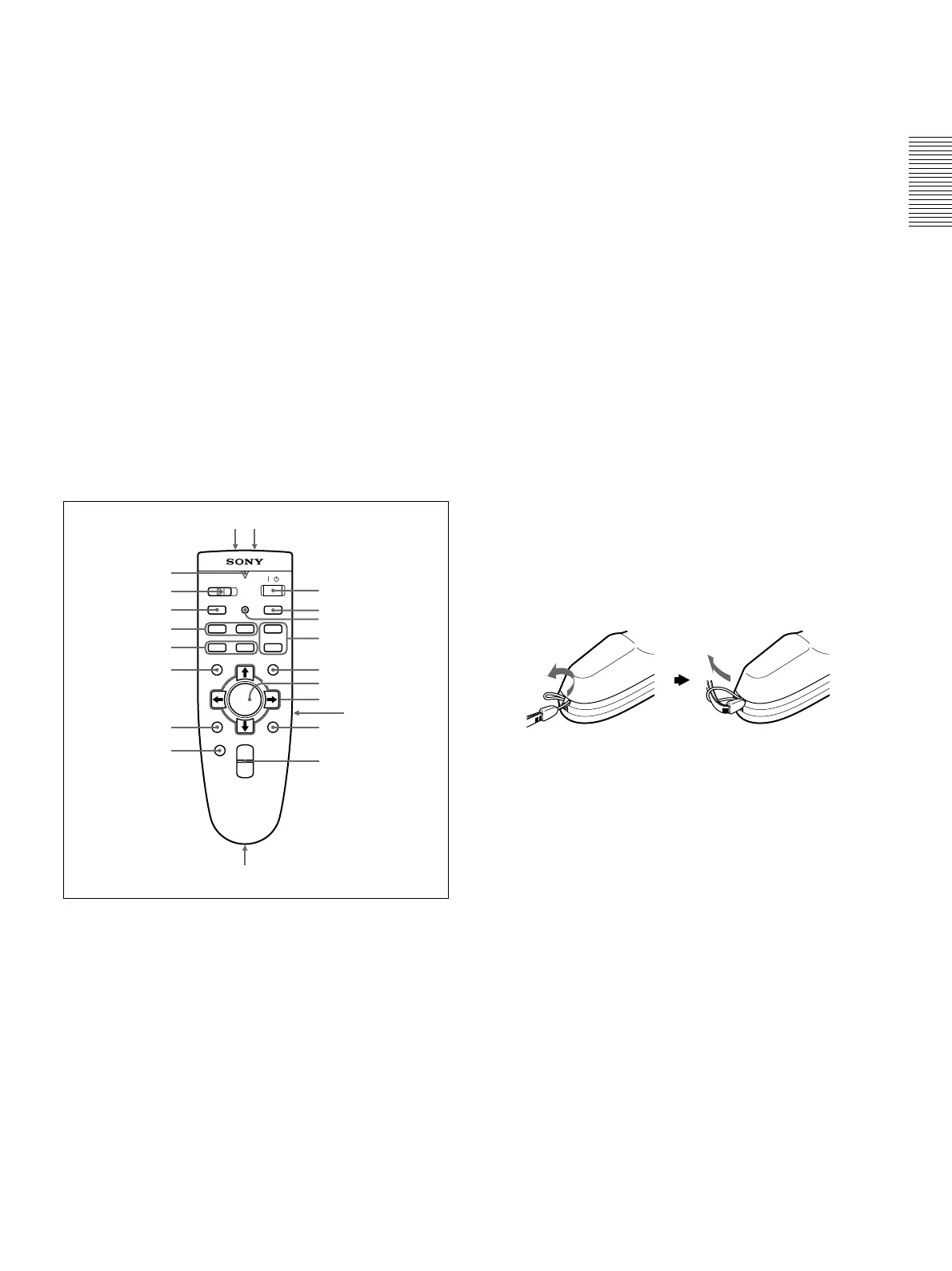
Remote Commander
The keys which have the same names as on the
control panel function identically.
You can control a connected computer using the
Remote Commander.
For details, see “Connecting with a Computer” on page
15 (GB).
Notes on laser beam
•Do not look into the laser transmitter.
•Do not aim the laser at people.
1
I
/
1
key
2 INPUT key
3 APA (Auto Pixel Alignment) key
4 VOLUME +/– keys
5 LASER key
Emits laser beam from the laser transmitter when you
press this key.
Location and Function of Controls
COMMAND
MUTING
VOLUME
HELP
/
INPUTAPA
FUNCTION
MENU
LASER
ENTER
RESET
D ZOOM
+
–
+
–
R CLICK
PIC
AUDIO
ONOFF
12
6
7
9
qd
qa,qs
qf
qg
qh
qj
qk
ql
w;
wa ws
0
8
5
4
2
1
3
6 OUTPUT connectors
MONITOR (HD D-sub 15-pin, female): Connects
to the video input connector on the monitor.
Outputs signals from the selected channel in the
INPUT A (RGB or 5BNC) or INPUT B (RGB)
connector. This connector does not output any
signals from the DIGITAL RGB connector.
AUDIO (phono type): Connects to external active
speakers.
The volume of the speakers can be controlled by the
VOLUME +/– keys on the Remote Commander or
the VOL +/– keys on the control panel.
6 Joy stick
Functions as a mouse of a computer connected to the
unit.
7 Arrow keys (M/m/</,)
8 L CLICK key
Functions as a left button on a mouse. When
connected to a Macintosh
1)
computer, the L CLICK
key functions as a mouse button.
9 R CLICK key
Functions as a right button on a mouse. When
connected to a Macintosh computer, the R CLICK key
functions as a mouse button.
0 D ZOOM +/– key
Enlarges the image at a desired location on the screen.
+: Pressing the + key once displays the icon. This
icon indicates the point you want to enlarge. Use
an arrow key (M/m/</,) to move the icon to
the point to be enlarged. Press the + key
repeatedly until the image is enlarged to your
requirements.
–: Pressing the – key reduces an image that has been
enlarged with the D ZOOM + key.
qa Strap holder
Attaches the supplied strap.
qs CONTROL S OUT jack (stereo minijack)
Connects to the CONTROL S IN jack on the projector
with the connecting cable (not supplied) when using
the Remote Commander as a wired one. In this case,
you do not need to install the batteries since the power
is supplied via the CONTROL S IN jack on the
projector.
qd RESET key
qf ENTER key
qg MENU key
qh FUNCTION 1/2 keys
When you connect the projector with a computer, you
can open a file on the screen by just pressing the
FUNCTION key. This will enhance your presentation.
To use this function, allocate a file to the FUNCTION
key by using the application software. For details on
how to allocate a file to the FUNCTION key, refer to
the help file of the application software.



 To Next Page